Kya aap har baar Telegram channel par manually messages post karke thak gaye hain? Ya phir aap chahte hain ki website updates, AI alerts, leads aur notifications automatically Telegram par aa jayein? Agar haan, to n8n Se Telegram Automation Kaise Kare ye guide aapke liye hai. Aajkal creators, bloggers, freelancers aur businesses Telegram automation ka use karke bahut saara manual work save kar rahe hain. Is article me hum practical examples, bot setup, workflows aur real-world use cases ke saath step-by-step process samjhenge taaki aap bina coding ke powerful Telegram automations bana sakein.
Telegram aaj sirf messaging app nahi raha.
Ye automation ecosystem ka important part ban chuka hai.
Maine khud observe kiya hai ki bahut se creators Telegram ko sirf communication tool samajhte hain.
Lekin reality me Telegram ek powerful automation hub ban sakta hai.
Isi liye n8n Se Telegram Automation Kaise Kare samajhna creators aur businesses dono ke liye valuable skill hai.
Agar aap n8n ecosystem me naye hain to Telegram automation start karne se pehle platform ki basic understanding hona zaruri hai. Workflow aur automation concepts ko clearly samajhne ke liye n8n AI Software Kya Hai? Complete Guide 2026 article zarur padhein.
Table of Contents
- Quick Answer
- Why Trust This Guide?
- n8n Aur Telegram Automation Kya Hai?
- n8n Se Telegram Automation Kaise Kare?
- Telegram Bot Kya Hota Hai?
- Telegram Bot Kaise Banaye?
- Telegram Ko n8n Se Connect Kaise Kare?
- First Telegram Workflow Setup
- Telegram Automation Use Cases
- Step-by-Step Guide
- Common Mistakes
- My Take
- FAQs
- Conclusion
- Final CTA
Quick Answer
n8n Se Telegram Automation Kaise Kare?
Simple answer:
- Telegram Bot Create Karo
- Bot Token Generate Karo
- n8n Me Telegram Node Add Karo
- Token Connect Karo
- Trigger Setup Karo
- Message Automation Configure Karo
- Workflow Activate Karo
Bas.
Ab Telegram messages automatically send aur receive kiye ja sakte hain.
Why Trust This Guide?
Ye guide based hai:
- Practical workflow testing
- Telegram bot setup experience
- Real-world automation use cases
- Industry automation trends
- n8n workflow implementation
Mere experience me beginners ko Telegram automation difficult lagti hai kyunki unhe bot setup aur workflow structure clear nahi hota.
Is article me hum dono cheezein simple language me samjhenge.
Telegram automation ko practically samajhne ka best tarika real workflows dekhna hota hai. Different industries me use hone wale examples ke liye 10 Best n8n Workflow Examples (2026) guide bhi explore karein.
Agar aap Telegram bots aur official bot features ko detail me samajhna chahte hain to Telegram ka official documentation sabse reliable source hai. Bot creation, commands aur integrations ke baare me aur jaanne ke liye Telegram Bot Documentation explore karein.
n8n Aur Telegram Automation Kya Hai?
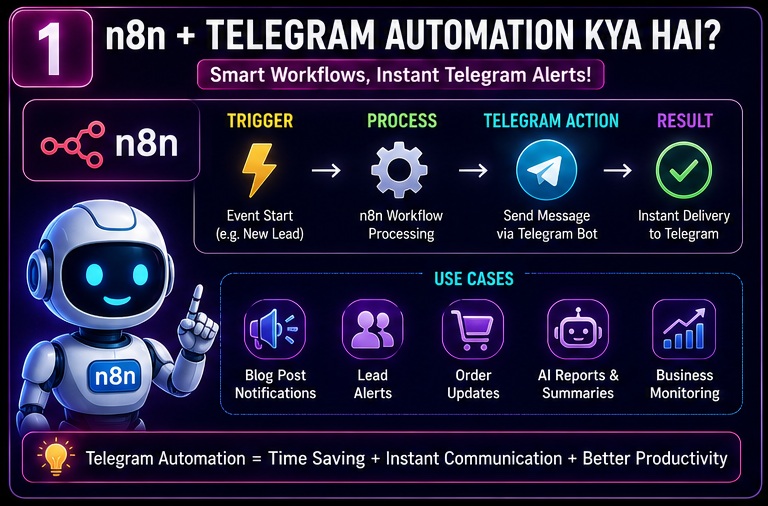
Sabse pehle basic concept clear karte hain.
Telegram automation ka matlab hai:
Telegram ke andar repetitive tasks ko automatically perform karwana.
Example:
- Auto notifications
- Auto alerts
- Auto content posting
- Auto customer updates
- AI-generated messages
Ye sab workflows ke through automate kiya ja sakta hai.
Real Example
New Blog Post Publish
↓
n8n Trigger
↓
Telegram Channel Message
↓
Audience Notification
Manual posting ki zarurat nahi.
n8n Se Telegram Automation Kaise Kare?
Ab main process samajhte hain.
Workflow generally is structure ko follow karta hai:
Trigger
↓
Data Collection
↓
Processing
↓
Telegram Message
↓
Delivery
Ye Telegram automation ka foundation hai.
Agar aap automation ke overall benefits samajhna chahte hain to productivity, time saving aur workflow optimization ke practical advantages ko detail me jaanne ke liye n8n AI Software Ke Fayde article bhi dekh sakte hain.
Telegram Bot Kya Hota Hai?
Telegram automation ka heart hai:
Telegram Bot
Bot ek automated account hota hai.
Ye manually operate nahi hota.
Instructions ke according kaam karta hai.
Bot Kya Kar Sakta Hai?
- Messages Send Kar Sakta Hai
- Notifications Deliver Kar Sakta Hai
- Commands Receive Kar Sakta Hai
- AI Responses Generate Kar Sakta Hai
- Workflow Trigger Kar Sakta Hai
Real Life Example
Customer Form Submit Kare
↓
Bot Alert Receive Kare
↓
Telegram Group Me Message Send Ho
Ye Telegram bot ka practical use hai.
Telegram Bot Kaise Banaye?
Ye beginners ke liye sabse important step hai.
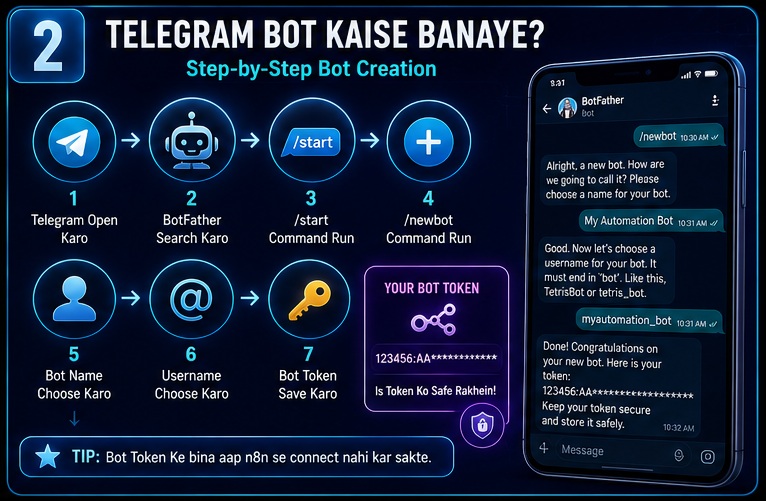
Step 1
Telegram Open Karo
Step 2
BotFather Search Karo
Telegram ka official bot management bot.
Step 3
/start Command Run Karo
Step 4
/newbot Command Run Karo
Step 5
Bot Name Choose Karo
Example:
My Automation Bot
Step 6
Username Choose Karo
Example:
myautomation_bot
Step 7
Bot Token Save Karo
Ye token bahut important hai.
Isse hi n8n bot se connect hoga.
Telegram Ko n8n Se Connect Kaise Kare?
Ab actual integration start hoti hai.
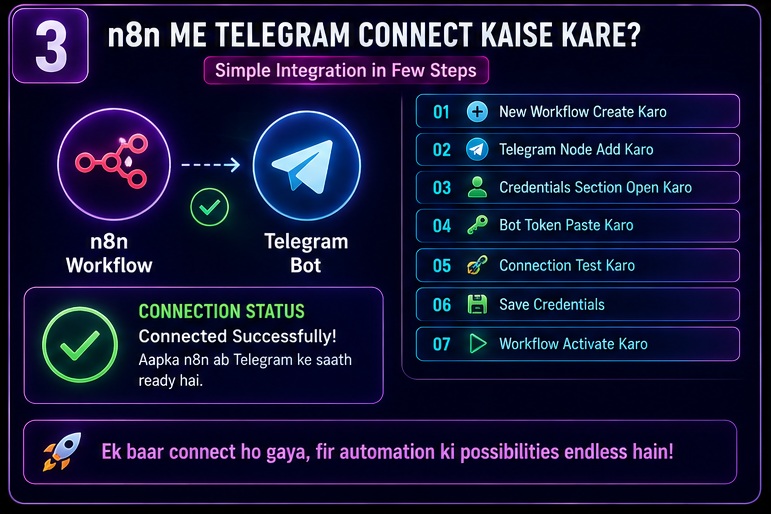
Step 1
n8n Dashboard Open Karo
Step 2
New Workflow Create Karo
Step 3
Telegram Node Add Karo
Step 4
Credentials Section Open Karo
Step 5
Bot Token Paste Karo
Step 6
Connection Test Karo
Step 7
Save Credentials
Connection ready.
First Telegram Workflow Setup
Ab pehla workflow banate hain.
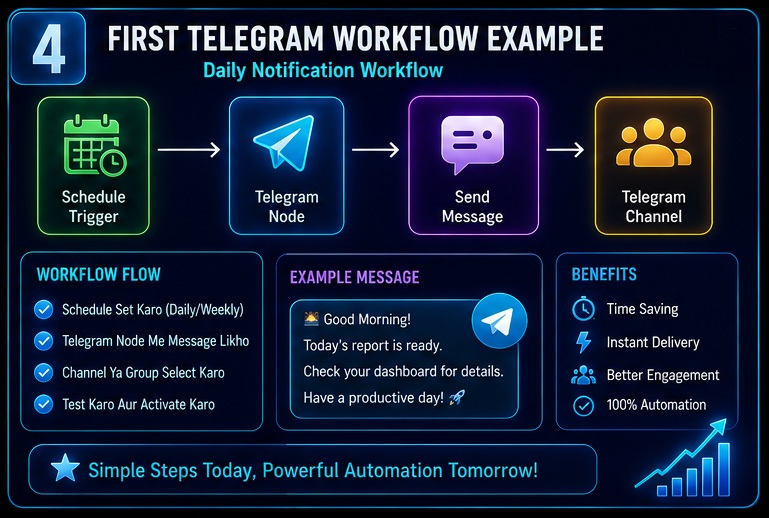
Goal
Daily Telegram Notification
Workflow
Schedule Trigger
↓
Telegram Node
↓
Send Message
↓
Telegram Channel
Example Message
Good Morning!
Today’s report is ready.
Result
Har din automated notification receive hogi.
Telegram Automation Ke Benefits
1. Time Saving
Manual work reduce hota hai.
2. Faster Communication
Instant alerts.
3. Better Engagement
Audience continuously updated rehti hai.
4. Scalability
Large audience ko handle karna easy hota hai.
5. Business Automation
Leads aur updates automatically manage ho sakte hain.
Popular Telegram Automation Use Cases
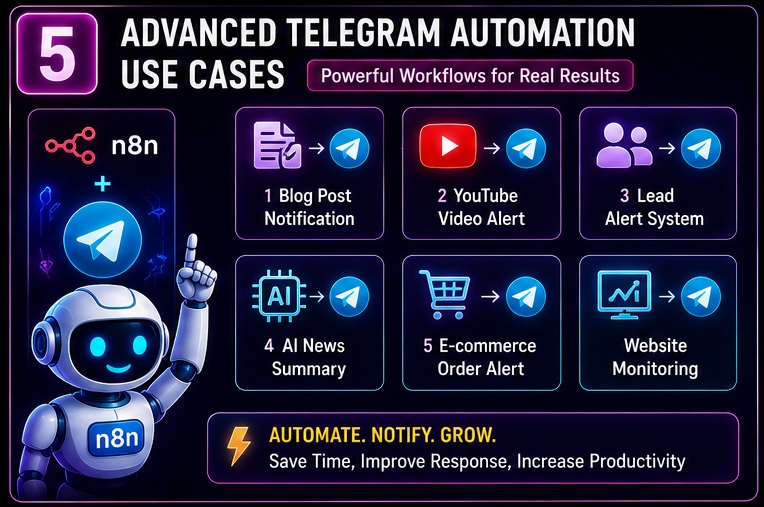
Blogging Notifications
New article publish hote hi Telegram alert.
YouTube Notifications
New video upload
↓
Telegram message
Lead Alerts
New lead
↓
Sales team Telegram alert
AI Research Updates
New research summary
↓
Telegram delivery
Website Monitoring
Website issue detect
↓
Instant Telegram alert
Advanced Telegram Automation Workflows
Ab jab basic setup complete ho gaya hai to next step hai advanced workflows ko samajhna.
Mere experience me yahin se Telegram automation ka actual power start hota hai.
Bahut se beginners sirf notifications tak limited rehte hain.
Lekin reality me n8n Se Telegram Automation Kaise Kare ka answer sirf message sending tak nahi hai.
Aap Telegram ko complete automation dashboard bana sakte hain.
Telegram Channel Automation
Sabse popular use case.
Bloggers ke liye Telegram automation sabse powerful traffic channels me se ek ban sakta hai. Content publishing aur distribution workflows ko detail me samajhne ke liye n8n Se Blogging Automation Kaise Kare guide zarur padhein.
Problem
Har baar article publish karne ke baad manually Telegram channel par post karna.
Solution
n8n Automation
Workflow
New Blog Post Published
↓
RSS Feed Trigger
↓
Article Details Fetch
↓
Telegram Message Generate
↓
Telegram Channel Post
Result
Har article automatically Telegram channel par publish ho jayega.
Telegram Group Automation
Telegram groups bhi automate kiye ja sakte hain.
Example
New Member Join Kare
↓
Welcome Message
↓
Rules Send
↓
Useful Links Share
Benefits
- Better onboarding
- Community management
- Time saving
AI + Telegram Automation
Ye 2026 ka fastest growing use case hai.
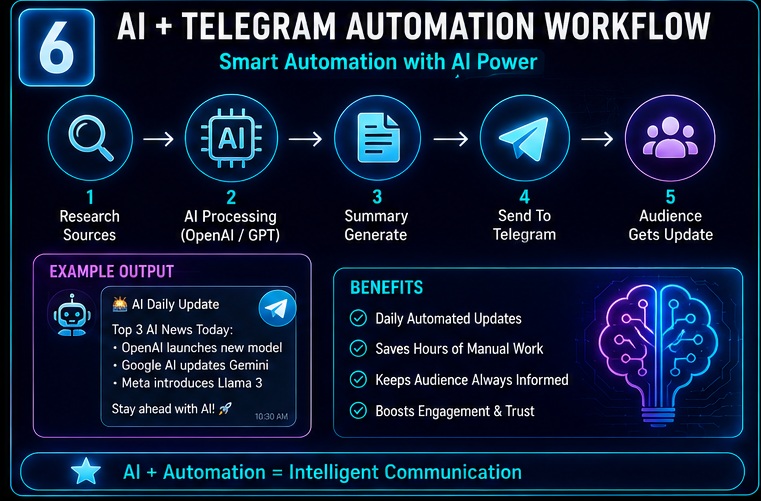
Workflow Example
AI News Research
↓
OpenAI Processing
↓
Summary Generate
↓
Telegram Channel Delivery
Result
Audience ko daily AI updates automatically mil sakti hain.
Telegram aur AI ka combination intelligent workflows create kar sakta hai. Advanced AI-powered systems aur autonomous workflows ke baare me detail me jaanne ke liye n8n AI Agents Complete Guide zarur padhein.
Telegram Lead Notification System
Business owners ke liye kaafi useful.
Workflow
Website Form Submission
↓
Lead Capture
↓
CRM Entry
↓
Telegram Alert
Example Message
New Lead Received
Name: Rahul
Phone: XXXXXXXX
Interested Service: SEO
Benefits
- Faster response
- Better conversions
- Real-time notifications
Telegram E-commerce Alerts
Online stores ke liye useful automation.
Workflow
New Order
↓
Order Processing
↓
Telegram Alert
Example
New Order Received
Order ID #1001
Amount ₹2499
Customer Confirmed
Benefits
- Instant updates
- Faster operations
- Team coordination
Telegram Customer Support Automation
Aajkal bahut log support systems ko Telegram se connect kar rahe hain.
Workflow
Support Ticket Created
↓
Priority Check
↓
Telegram Alert
↓
Team Assignment
Benefits
- Faster support
- Better response times
- Centralized communication
Telegram Workflow With Google Sheets
Google Sheets integration beginners ke liye kaafi useful hoti hai.
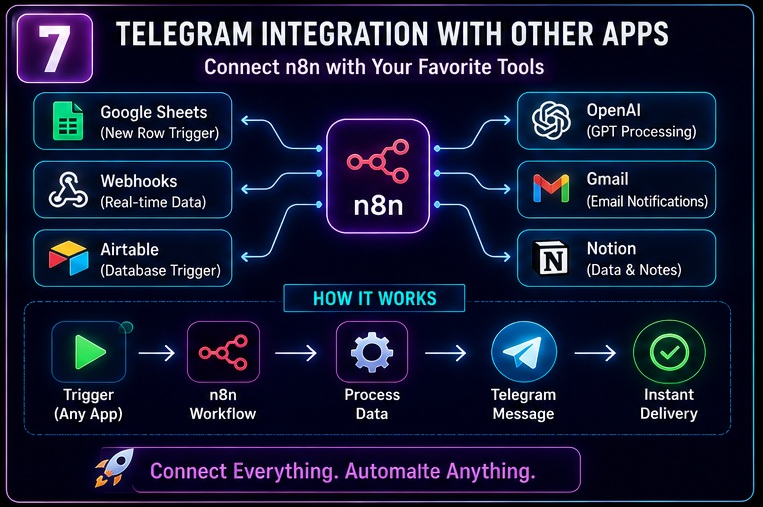
Example
New Row Added
↓
n8n Trigger
↓
Telegram Message
↓
Team Notification
Practical Uses
- Sales tracking
- Content planning
- Lead monitoring
Telegram + AI Content Workflow
Content creators ke liye powerful use case.
Workflow
Keyword Research
↓
AI Content Ideas
↓
Telegram Delivery
Result
Har din fresh content ideas Telegram par receive ho sakte hain.
Telegram Channel Growth Automation
Creators ke liye important use case.
Workflow
New Content Published
↓
Telegram Post
↓
Social Notification
↓
Performance Tracking
Benefits
- Consistent posting
- Audience retention
- Better engagement
Multi-Step Telegram Workflow Example
Ab ek advanced example dekhte hain.
Goal
Daily Business Report Telegram Par Receive Karna
Workflow
Google Sheets Data
↓
Data Processing
↓
AI Summary
↓
Report Generation
↓
Telegram Delivery
Example Output
Today’s Leads: 15
Revenue: ₹22,000
Top Source: Organic Search
Result
Daily reporting automated ho jati hai.
Telegram Command Automation
Bots commands bhi receive kar sakte hain.
Example
User Sends:
/report
↓
n8n Workflow
↓
Database Check
↓
Report Generate
↓
Telegram Reply
Benefit
Interactive automation create kar sakte hain.
Telegram Automation Security Tips
Automation setup karte waqt security ko ignore nahi karna chahiye.
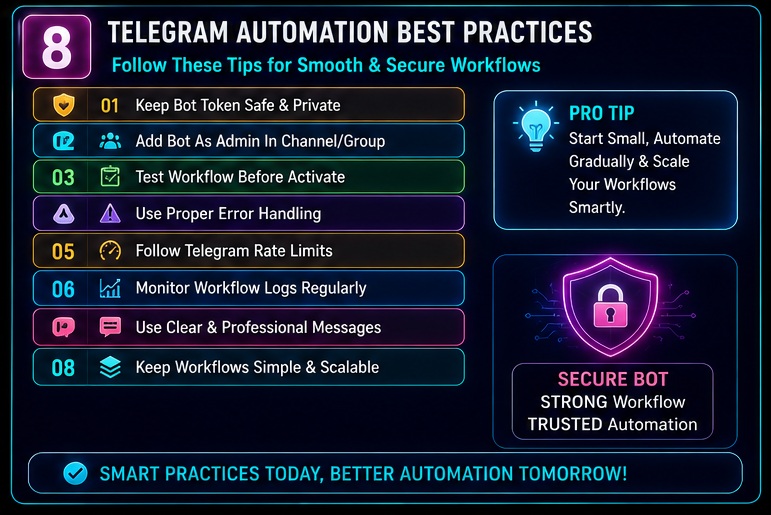
Rule 1
Bot Token Share Mat Karo
Rule 2
Private Channels Use Karo
Rule 3
Access Permissions Check Karo
Rule 4
Regular Token Rotation Consider Karo
Rule 5
Workflow Logs Monitor Karo
Workflow automation aur business process optimization ke broader concepts ko samajhne ke liye industry-level resources bhi helpful hote hain. Automation best practices aur workflow strategy ke liye IBM Automation Guide ek useful educational resource hai.
Telegram Automation For Bloggers
Bloggers ke liye Telegram automation bahut useful ho sakti hai.
Workflow
New Article
↓
Telegram Channel
↓
Audience Notification
↓
Traffic Increase
Practical Benefit
Publishing ke turant baad audience engagement start ho sakta hai.
YouTube creators Telegram notifications ke saath complete content workflow bhi automate kar sakte hain. Research se publishing tak ka process samajhne ke liye n8n Se YouTube Automation Kaise Kare article explore karein.
Telegram Automation For YouTubers
YouTube creators bhi Telegram automation ka use kar sakte hain.
Workflow
New Video Upload
↓
Video Details Fetch
↓
Telegram Channel Alert
Result
Subscribers ko instant update milta hai.
Telegram Automation For Agencies
Agencies multiple client updates automate kar sakti hain.
Workflow
Client Report Ready
↓
Telegram Delivery
↓
Team Notification
Benefits
- Better reporting
- Faster communication
- Less manual work
Common Beginner Confusions
Bahut se users same questions puchte hain.
Confusion #1
Telegram Bot Aur Telegram Account Same Hain
Reality
Dono alag hote hain.
Confusion #2
Telegram Automation Ke Liye Coding Zaruri Hai
Reality
Basic workflows no-code hote hain.
Confusion #3
Telegram Automation Sirf Notifications Ke Liye Hai
Reality
Lead management, reporting, AI workflows aur support systems bhi automate kiye ja sakte hain.
Confusion #4
Advanced Workflow Pehle Banana Chahiye
Reality
Simple workflows se start karna better hai.
Step-by-Step Guide: Complete Telegram Automation Workflow
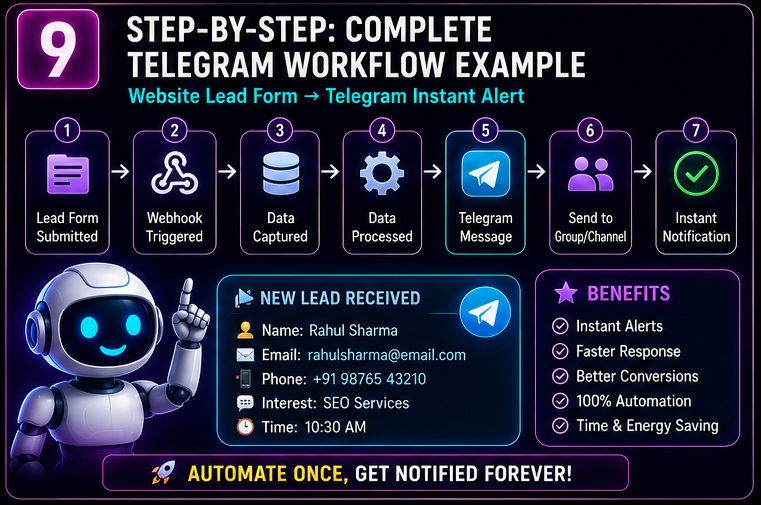
Ab practical implementation dekhte hain.
Mere hisab se beginners ke liye sabse useful learning method hai:
“Khud ek workflow banana”
Isliye yahan hum complete workflow setup karenge.
Goal
Website Lead Form
↓
Telegram Alert
↓
Instant Notification
Step 1: Trigger Setup
Webhook ya Form Trigger add karo.
Ye workflow ka starting point hoga.
Step 2: Data Receive Karo
Name
Phone
Message
Receive karo.
Step 3: Telegram Node Add Karo
Telegram Send Message node use karo.
Step 4: Message Format Karo
Example:
New Lead Received
Name: {{Name}}
Email: {{Email}}
Phone: {{Phone}}
Step 5: Channel Ya Group Select Karo
Bot ko channel/group me admin add karo.
Step 6: Workflow Test Karo
Dummy lead submit karo.
Step 7: Activate Workflow
Workflow ON karo.
Automation ready.
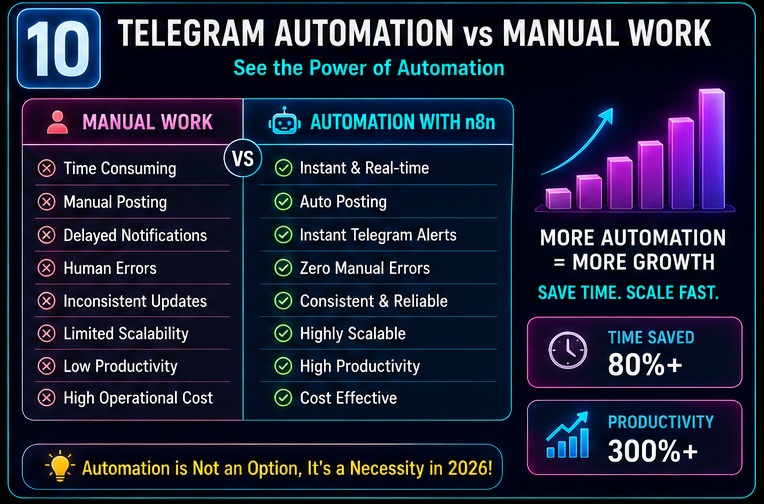
Telegram Automation vs Manual Work
| Feature | Manual Method | Telegram Automation |
|---|---|---|
| Message Posting | Manual | Automatic |
| Lead Alerts | Delayed | Instant |
| Reporting | Manual | Automated |
| Notifications | Time Consuming | Real-Time |
| Audience Updates | Inconsistent | Consistent |
| Team Communication | Manual | Automated |
| Scalability | Limited | High |
| Productivity | Average | Much Better |
Practical Example #1
Blogger Notification System
New Article Publish
↓
n8n Detect
↓
Telegram Channel Post
↓
Audience Alert
Result
Traffic faster receive ho sakta hai.
Practical Example #2
YouTube Creator Workflow
New Video Upload
↓
Video Details Fetch
↓
Telegram Message
↓
Subscriber Alert
Result
Video visibility improve ho sakti hai.
Practical Example #3
Business Lead System
Website Lead
↓
CRM Entry
↓
Telegram Alert
↓
Sales Team Notification
Result
Lead response time improve hota hai.
Practical Example #4
AI Research Assistant
Research Sources
↓
AI Summary
↓
Telegram Delivery
Result
Daily research updates automatically mil sakti hain.
10 Common Telegram Automation Mistakes
Ab un mistakes ki baat karte hain jo beginners frequently karte hain.
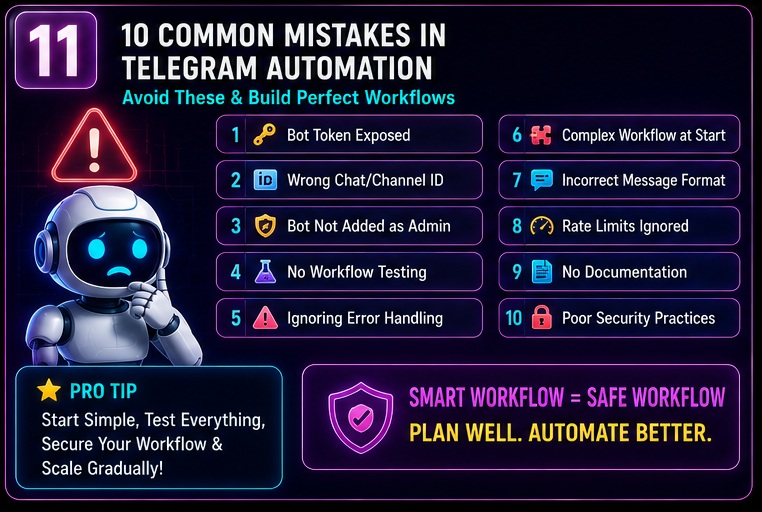
Mistake #1
Bot Token Public Share Karna
Mistake #2
Workflow Test Na Karna
Mistake #3
Wrong Chat ID Use Karna
Mistake #4
Bot Ko Admin Access Na Dena
Mistake #5
Complex Workflow Se Start Karna
Mistake #6
Error Handling Ignore Karna
Mistake #7
Message Formatting Check Na Karna
Mistake #8
Rate Limits Ignore Karna
Mistake #9
Documentation Na Banana
Mistake #10
Telegram Automation Ko Sirf Notification Tool Samajhna
Reality thodi alag hai.
Telegram complete automation dashboard ban sakta hai.
Telegram Automation Ideas
Agar aap aur experiments karna chahte hain to ye ideas try kar sakte hain.
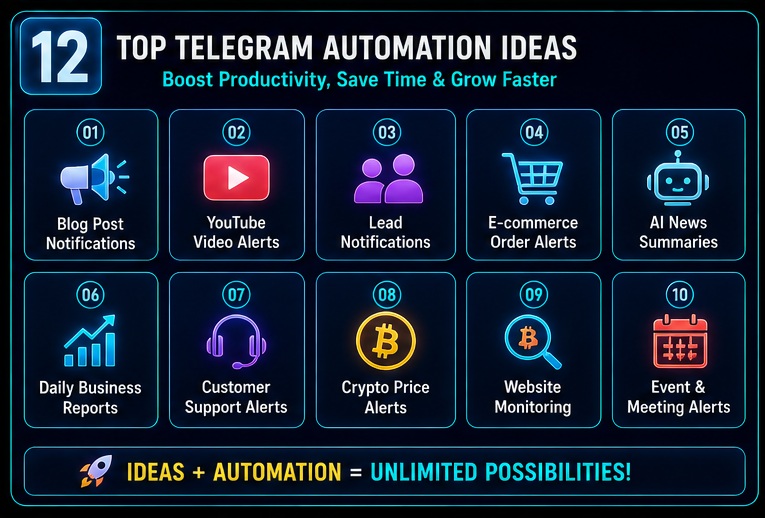
Idea 1
AI News Bot
Idea 2
Crypto Price Alert Bot
Idea 3
Stock Market Alert Bot
Idea 4
Blog Notification Channel
Idea 5
Lead Tracking Bot
Idea 6
Customer Support Bot
Idea 7
Daily Business Report Bot
Idea 8
Content Idea Generator Bot
Idea 9
Affiliate Sales Notification Bot
Idea 10
Website Monitoring Bot
Agar aap aur advanced workflows explore karna chahte hain to creators, freelancers aur businesses ke liye practical use cases dekhne ke liye Best n8n AI Automation Ideas guide bhi kaafi useful rahegi.
My Take
Agar mujhe personally evaluate karna ho to Telegram automation beginners ke liye sabse easy automation projects me se ek hai.
Maine khud observe kiya hai ki jab users Telegram workflows banana seekh lete hain to unke liye baaki automations bhi easy ho jati hain.
Automation skills future me earning opportunities bhi create kar sakti hain. Freelancing, automation consulting aur workflow services ke through income generate karne ke methods ke liye n8n Se Paise Kaise Kamaye article bhi zarur padhein.
Mere Experience Me
Best starting projects:
- Lead Notifications
- Blog Alerts
- YouTube Updates
- AI Summaries
Ye workflows simple bhi hain aur practical bhi.
Beginners Ke Liye Advice
Pehla goal perfect workflow banana nahi hona chahiye.
Pehla goal workflow logic samajhna hona chahiye.
Ek baar logic samajh aa gaya to automation build karna kaafi easy ho jata hai.
Related Opportunities / Next Steps
Agar aapne seekh liya hai ki n8n Se Telegram Automation Kaise Kare, to next learning topics ye hone chahiye:
- n8n Workflow Examples
- n8n AI Agents Complete Guide
- Best n8n AI Automation Ideas
- n8n Se Blogging Automation Kaise Kare
- n8n Se YouTube Automation Kaise Kare
- n8n Workflow Kaise Kaam Karta Hai
- n8n Se Paise Kaise Kamaye
- n8n vs Zapier
Ye topics milkar aapki automation expertise ko next level par le ja sakte hain.
Telegram workflows samajhne ke baad next logical step workflow architecture ko deeply samajhna hota hai. Triggers, nodes aur workflow logic ko beginner-friendly language me samajhne ke liye n8n Workflow Kaise Kaam Karta Hai? 90% Beginners Yahin Confuse Ho Jaate Hain (2026 Guide) article zarur dekhein.
FAQs
1. n8n Se Telegram Automation Kaise Kare?
Telegram Bot create karke uska token n8n me connect karein, workflow setup karein aur Telegram node ke through messages automate karein.
2. Kya Telegram Automation Ke Liye Coding Zaruri Hai?
Nahi.
Basic Telegram workflows no-code approach se ban sakte hain.
3. Telegram Bot Free Me Ban Sakta Hai?
Haan.
Telegram BotFather ke through free bot create kiya ja sakta hai.
4. Telegram Automation Kis-Kis Kaam Me Use Ho Sakti Hai?
Lead generation, notifications, reporting, AI summaries, content distribution aur support systems me.
5. Kya Telegram Channels Automate Kiye Ja Sakte Hain?
Bilkul.
Posts aur notifications automatically publish ki ja sakti hain.
6. Kya Telegram Automation Businesses Ke Liye Useful Hai?
Haan.
Lead alerts, reporting aur team communication automate ki ja sakti hai.
7. Kya Telegram Automation AI Ke Saath Integrate Ho Sakti Hai?
Haan.
AI-generated summaries aur intelligent notifications create ki ja sakti hain.
8. Beginners Ko Kaunsa Telegram Workflow Sabse Pehle Banana Chahiye?
Lead notification ya daily alert workflow.
Ye sabse simple aur practical options hain.
Conclusion
Agar poore article ko summarize karein to n8n Se Telegram Automation Kaise Kare samajhna utna difficult nahi hai jitna beginners ko lagta hai.
Humne dekha:
- Telegram Bot Setup
- n8n Integration
- Telegram Nodes
- Channel Automation
- Group Automation
- AI Workflows
- Lead Notifications
- Reporting Systems
- Common Mistakes
Sabse important lesson ye hai:
Telegram ko sirf messaging app mat samjhiye.
Automation ecosystem ka powerful part samjhiye.
Jab aap workflows ko process ki tarah dekhna start kar dete hain tab Telegram automation bahut easy ho jati hai.
Final CTA
Ab sirf n8n Se Telegram Automation Kaise Kare padhkar mat ruk jaiye.
Apna pehla Telegram bot banaiye.
Usse n8n ke saath connect kariye.
Ek simple workflow create kariye.
Aur phir gradually advanced automations ki taraf badhiye.
- Real Estate AI Photo Prompts: Create Stunning Property Images That Sell Faster (2026 Guide)
- Car Dealer AI Photo Prompts: Create Professional Vehicle Photos That Sell Faster (2026 Guide)
- Jewelry Photography AI Prompts: Luxury Product Images Without Expensive Equipment 2026 guide
- E-Commerce Product Photo AI Prompts: Amazon & Flipkart Style Images in Minutes (2026 Guide)
- Facebook Profile AI Photo Prompts: Upgrade Your Social Presence Instantly