Kya aap blogging me research, keyword analysis, content planning aur publishing ke repetitive kaam se pareshan ho chuke hain? Aajkal successful bloggers sirf content nahi likhte, balki smart automation systems bhi build karte hain. Isi wajah se log search kar rahe hain n8n Se Blogging Automation Kaise Kare aur kaise AI aur automation ki help se blogging workflow ko faster banaya ja sakta hai. Is guide me aap practical workflows, real-world examples aur step-by-step systems seekhenge jo blogging me time, effort aur productivity ko dramatically improve kar sakte hain.
Maine khud observe kiya hai ki bahut se bloggers content writing par focus karte hain lekin workflow optimization ko ignore kar dete hain.
Result?
- Slow growth
- Inconsistent publishing
- Time wastage
- Burnout
Isi liye n8n Se Blogging Automation Kaise Kare aaj blogging industry ka ek important topic ban chuka hai.
Agar aap blogging automation ko properly samajhna chahte hain to sabse pehle n8n ki foundation clear honi chahiye. Bahut se beginners direct workflows par focus karte hain lekin platform ki actual capabilities ko nahi samajhte. Isliye aage badhne se pehle n8n AI Software Kya Hai? Complete Guide 2026 zarur padhein.
Table of Contents
- Quick Answer
- Why Trust This Guide?
- Blogging Automation Kya Hai?
- n8n Blogging Ke Liye Kyu Useful Hai?
- Blogging Workflow Ka Breakdown
- Required Tools
- n8n Se Blogging Automation Kaise Kare?
- Workflow #1 Keyword Research Automation
- Workflow #2 Content Idea Automation
- Workflow #3 AI Content Research Workflow
- Workflow #4 Content Calendar Automation
- Step-by-Step Guide
- Practical Examples
- Common Mistakes
- My Take
- FAQs
- Conclusion
- Final CTA
Quick Answer
n8n Se Blogging Automation Kaise Kare?
Short answer:
Aap n8n ki help se blogging ke kai repetitive tasks automate kar sakte hain.
Examples:
- Keyword research
- Content ideas collection
- Research automation
- Content planning
- Publishing workflows
- Social sharing
- Reporting
Lekin ek important baat samajhna zaruri hai.
n8n Se Blogging Automation Kaise Kare ka matlab blogging ko fully automatic banana nahi hai.
Automation ka goal hai:
- Productivity improve karna
- Repetitive work reduce karna
- Workflow streamline karna
Creative strategy aur final content quality abhi bhi human responsibility hai.
Why Trust This Guide?
Internet par automation ke baare me bahut articles available hain.
Lekin unme se kai articles:
- Practical nahi hote
- Real-world testing par based nahi hote
- Unrealistic claims karte hain
Ye guide prepare karte waqt focus kiya gaya hai:
- Practical research
- Tool testing
- Industry trends
- Real-world blogging workflows
- Automation best practices
Mere experience me blogging automation tabhi valuable hoti hai jab wo actual workflow bottlenecks ko solve kare.
Isi practical perspective ko follow karte hue ye guide create ki gayi hai.
Blogging automation aur workflow building ko deeply samajhne ke liye official documentation sabse reliable learning source hoti hai. Yahan aap workflow creation, integrations, triggers aur advanced automation concepts ko detail me explore kar sakte hain. Agar aap professional level par automation seekhna chahte hain to Official n8n Documentation zarur explore karein.
Blogging Automation Kya Hai?
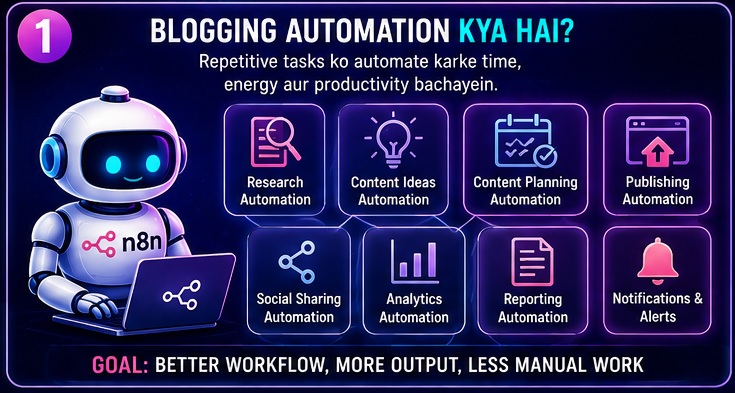
Sabse pehle basic concept clear karte hain.
Blogging automation ka matlab:
Blog automatically likhna nahi.
Blogging automation ka matlab hai:
Repetitive tasks ko automate karna.
Examples
Research Automation
Information collect karna.
Keyword Management
Keywords organize karna.
Content Planning
Calendar maintain karna.
Publishing Support
Notifications aur workflows.
Promotion
Content distribution.
Ye sab n8n Se Blogging Automation Kaise Kare process ka important part hain.
Kya Blogging Automation Safe Hai?
Ye beginners ka common question hai.
Answer:
Haan.
Agar automation ko responsibly use kiya jaye.
Good Automation
- Workflow management
- Research support
- Organization
- Reporting
Bad Automation
- Low-quality mass content
- Spam publishing
- Duplicate content generation
Automation productivity ke liye honi chahiye.
Quality compromise karne ke liye nahi.
n8n Blogging Ke Liye Kyu Useful Hai?
n8n ek flexible workflow automation platform hai.
Ye multiple tools ko connect kar sakta hai.
Example:
RSS Feed
↓
Google Sheets
↓
AI Tool
↓
Notion
↓
Ye poora process automatically execute ho sakta hai.
Isi wajah se bloggers increasingly n8n adopt kar rahe hain.
Major Benefits
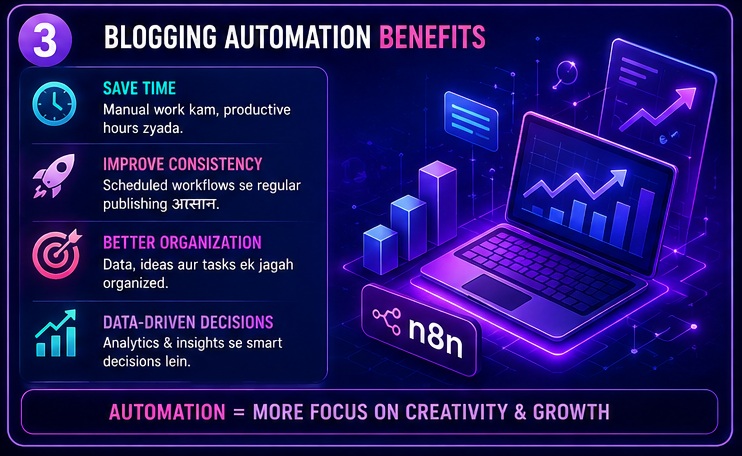
Time Saving
Repetitive tasks reduce hote hain.
Better Consistency
Workflows organized hote hain.
Scalability
Blog growth ke saath systems bhi scale hote hain.
Flexibility
Custom workflows create kiye ja sakte hain.
Agar aap practical automation implementations dekhna chahte hain to real-world workflow examples samajhna bahut useful ho sakta hai. Different industries me automation kaise use ho raha hai aur kaunse workflows sabse effective hain, ye jaanne ke liye 10 Best n8n Workflow Examples (2026) article bhi explore karein.
Blogging Workflow Ka Breakdown
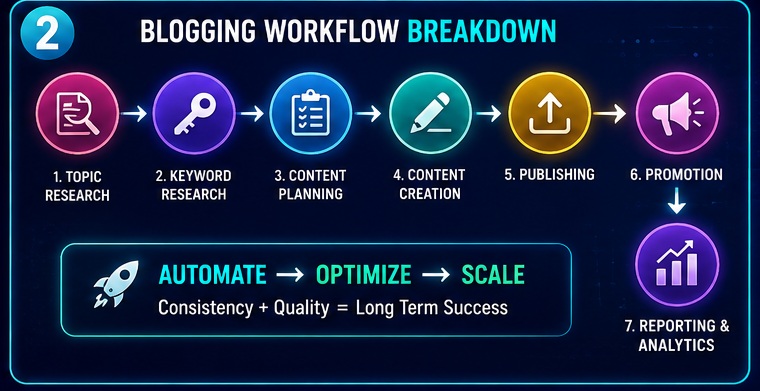
Successful blogging me generally ye stages hoti hain:
Stage 1: Topic Research
Topic identify karna.
Stage 2: Keyword Research
Search intent samajhna.
Stage 3: Content Planning
Publishing schedule create karna.
Stage 4: Content Creation
Draft preparation.
Stage 5: Publishing
Article publish karna.
Stage 6: Promotion
Traffic generate karna.
Stage 7: Reporting
Performance measure karna.
Ye sab stages n8n Se Blogging Automation Kaise Kare strategy ke through optimize ki ja sakti hain.
Required Tools
Agar aap blogging automation implement karna chahte hain to ye tools useful ho sakte hain.
Tool 1: n8n
Main workflow automation platform.
Tool 2: WordPress
Publishing system.
Tool 3: Google Sheets
Data management.
Tool 4: Notion
Content organization.
Tool 5: Email
Notifications.
Tool 6: AI Tools
Research assistance.
n8n Se Blogging Automation Kaise Kare?
Ab hum practical workflows dekhte hain.
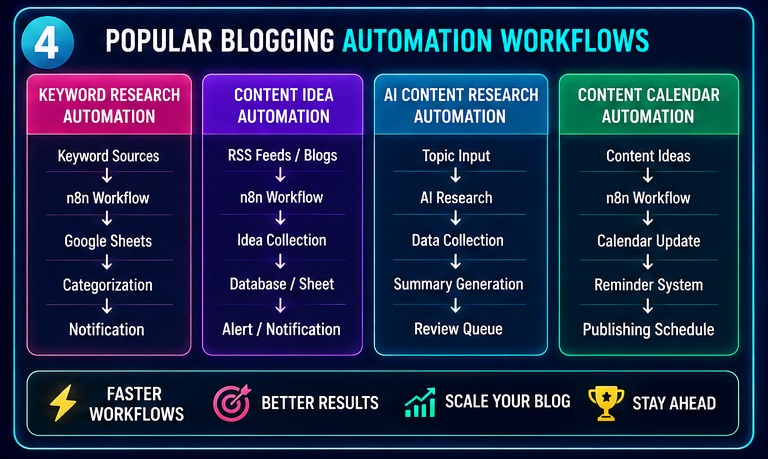
Workflow #1: Keyword Research Automation
Keyword research blogging foundation hoti hai.
Lekin manually karna repetitive ho sakta hai.
Example Workflow
Keyword Sources
↓
Collection
↓
Google Sheet
↓
Categorization
↓
Notification
Benefits
Better Organization
Keywords centralized rehte hain.
Faster Research
Manual effort reduce hota hai.
Better Planning
Content opportunities easily identify hoti hain.
Isi tarah n8n Se Blogging Automation Kaise Kare keyword management ko efficient bana sakta hai.
Automation ka sabse bada advantage productivity aur efficiency improvement hota hai. Agar aap detail me samajhna chahte hain ki bloggers aur businesses n8n ko itna pasand kyu kar rahe hain to n8n AI Software Ke Fayde guide bhi zarur padhein.
Workflow #2: Content Idea Automation
Content ideas regularly collect karna bloggers ke liye challenge hota hai.
Workflow Example
Industry Blogs
↓
RSS Feeds
↓
n8n
↓
Database
↓
Alert
Result
Fresh content ideas automatically collect ho sakte hain.
Why Useful?
Aajkal bahut bloggers content ideation me hi kaafi time spend kar dete hain.
Automation is process ko simplify kar sakti hai.
Workflow #3: AI Content Research Workflow
Research blogging ka important part hai.
Goal
Information gathering faster karna.
Workflow
Topic
↓
Research Sources
↓
Collection
↓
Summary
↓
Review Queue
Important Note
AI summaries ko final source mat maaniye.
Fact-checking zaruri hai.
Benefits
- Faster preparation
- Better organization
- Reduced manual research
Research aur content creation automation aaj blogging industry ko rapidly transform kar rahe hain. Agar aap aur advanced AI-based workflow ideas dekhna chahte hain to Best n8n AI Automation Ideas article me kai practical use cases explore kar sakte hain.
Workflow #4: Content Calendar Automation
Consistency blogging growth ka important factor hai.
Problem
Bahut bloggers random publishing karte hain.
Solution
Content Calendar Automation
Workflow
Content Idea
↓
Calendar
↓
Reminder
↓
Publishing Task
Result
Structured workflow.
Better consistency.
Better planning.
Real-World Example
Maan lijiye aap AI niche blog run karte hain.
Workflow:
AI News
↓
RSS Feed
↓
Google Sheet
↓
Summary
↓
Telegram Alert
Ab aapko manually dozens websites monitor karne ki zarurat nahi hogi.
Ye practical example dikhata hai ki n8n Se Blogging Automation Kaise Kare blogging workflow ko kitna efficient bana sakta hai.
Beginners Ke Liye Best Starting Point
Agar aap beginner hain to direct advanced AI workflows mat banaiye.
Start with:
- Keyword tracking
- Content idea collection
- Content calendar
- Notifications
Simple workflows pehle build kariye.
Fir gradually advanced systems par move kariye.
Workflow #5: Publishing Automation
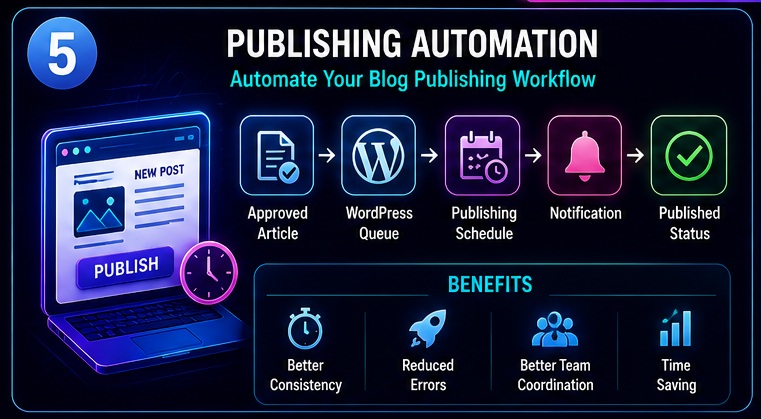
Content likhne ke baad publishing process bhi time consume kar sakti hai.
Especially jab aap multiple authors ya multiple websites manage karte hain.
Problem
Manual publishing me:
- Scheduling issues
- Missed deadlines
- Content tracking problems
dekhne ko mil sakte hain.
Solution
n8n publishing workflows ko automate kar sakta hai.
Example Workflow
Approved Article
↓
WordPress Queue
↓
Publishing Schedule
↓
Notification
↓
Published Status
Benefits
Better Consistency
Publishing schedule maintain rehta hai.
Reduced Errors
Manual mistakes kam hoti hain.
Better Team Coordination
Workflow transparent ho jata hai.
Isi tarah n8n Se Blogging Automation Kaise Kare publishing management ko streamline kar sakta hai.
Agar aap WordPress-based blogging workflow automate kar rahe hain to publishing system ki official capabilities aur best practices ko samajhna bhi useful hota hai. WordPress ecosystem aur publishing workflows ke baare me aur detail me jaanne ke liye WordPress Developer Resources ek valuable learning resource ho sakta hai.
Workflow #6: Social Sharing Automation
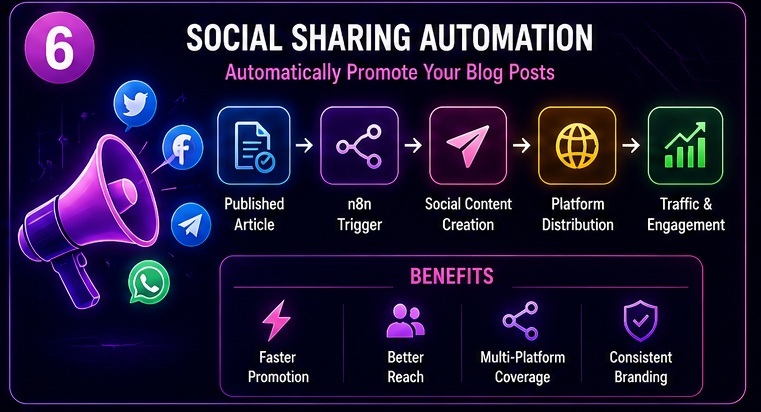
Blog publish karna first step hai.
Traffic lana equally important hai.
Problem
Bahut bloggers article publish karte hain lekin promotion consistent nahi karte.
Workflow Example
Published Article
↓
n8n Trigger
↓
Social Content
↓
Platform Notifications
↓
Distribution
Benefits
Faster Promotion
Content jaldi distribute hota hai.
Better Reach
Multiple channels cover kiye ja sakte hain.
Consistency
Promotion miss nahi hoti.
Workflow #7: Analytics Reporting Automation
Successful bloggers numbers track karte hain.
Important Metrics
- Traffic
- Clicks
- Impressions
- Rankings
- Conversions
Problem
Manually reports banana repetitive task ho sakta hai.
Workflow
Analytics Data
↓
n8n
↓
Spreadsheet
↓
Summary
↓
Email Report
Result
Performance monitoring easier ho jati hai.
Workflow #8: Competitor Monitoring Automation
Ye advanced workflow hai.
Goal
Industry updates aur competitor content track karna.
Example
RSS Feeds
↓
Monitoring
↓
Database
↓
Alerts
Benefits
Trend Discovery
New opportunities identify hoti hain.
Content Inspiration
Fresh ideas milte hain.
Faster Decisions
Market awareness improve hoti hai.
Advanced Blogging Automation System
Ab ek complete blogging automation ecosystem samajhte hain.
Full Blogging Engine
Research
↓
Keywords
↓
Content Ideas
↓
AI Research
↓
Content Calendar
↓
Publishing
↓
Promotion
↓
Analytics
Ye modern blogging workflow architecture hai.
Kya Ye Fully Automated Hai?
Nahi.
Aur hona bhi nahi chahiye.
Creative strategy aur editorial review human hi handle kare.
Automation support system ki tarah kaam kare.
Agar aap intelligent workflows aur next-generation automation systems ko samajhna chahte hain to AI agents ka concept bhi explore karna chahiye. Is topic ko detail me samajhne ke liye n8n AI Agents Complete Guide article zarur dekhein.
Step-by-Step Guide: n8n Se Blogging Automation Kaise Kare?
Ab implementation process dekhte hain.
Step 1: Blogging Goals Define Karein
Pehle clear karein:
Automation kis problem ko solve karegi?
Examples:
- Keyword research
- Publishing
- Reporting
Step 2: Existing Workflow Analyze Karein
Identify karein:
Kahan sabse zyada time waste ho raha hai?
Step 3: Automation Opportunities Identify Karein
Examples:
- Repetitive tasks
- Data collection
- Notifications
Step 4: Workflow Design Karein
Input
↓
Processing
↓
Output
Structure define karein.
Step 5: Integrations Connect Karein
Tools connect karein:
- WordPress
- Sheets
- Notion
Step 6: Testing Karein
Har workflow ko test karna zaruri hai.
Step 7: Scale Karein
Simple systems se start karke gradually expand karein.
Practical Blogging Automation Example
Maan lijiye aap AI niche website run karte hain.
Workflow
AI News Sources
↓
RSS Feed
↓
Keyword Database
↓
Research Summary
↓
Content Calendar
↓
Publishing Reminder
↓
Promotion
Result
- Better organization
- Faster content planning
- Consistent publishing
Blogger Types Aur Automation Opportunities
Different bloggers ke liye different workflows useful hote hain.
Solo Blogger
Best workflows:
- Keyword tracking
- Content calendar
- Reporting
Niche Blogger
Best workflows:
- Research monitoring
- Competitor tracking
- Content planning
Agency Owner
Best workflows:
- Client reporting
- Publishing workflows
- Team coordination
Affiliate Blogger
Best workflows:
- Product tracking
- Content opportunities
- Reporting
Manual vs Automated Blogging Workflow
| Task | Manual Workflow | Automated Workflow |
|---|---|---|
| Keyword Research | Slow | Faster |
| Content Ideas | Manual Collection | Automated Collection |
| Research | Time Consuming | Organized |
| Planning | Random | Structured |
| Publishing | Manual | Scheduled |
| Promotion | Inconsistent | Automated |
| Reporting | Repetitive | Streamlined |
Real-World Blogging Scenarios
Scenario 1
New Blogger
Problem:
Content planning.
Solution:
Content calendar workflow.
Scenario 2
Affiliate Website
Problem:
Tracking opportunities.
Solution:
Monitoring workflow.
Scenario 3
Content Team
Problem:
Workflow coordination.
Solution:
Publishing automation.
Automation Se Kya Expect Nahi Karna Chahiye?
Ye important section hai.
Unrealistic Expectation #1
100% automated blog.
Reality:
Human oversight zaruri hai.
Unrealistic Expectation #2
Instant traffic growth.
Automation workflow improve karti hai.
Traffic guarantee nahi karti.
Unrealistic Expectation #3
Zero-effort blogging.
Content quality fir bhi important rahegi.
Common Blogging Automation Challenges
Challenge 1
Poor workflow design.
Challenge 2
Too many automations.
Challenge 3
No testing.
Challenge 4
Ignoring content quality.
Challenge 5
Wrong priorities.
Har automation platform ke benefits ke saath kuch limitations aur challenges bhi hote hain. Realistic expectations set karne aur common drawbacks ko samajhne ke liye n8n AI Software Ke Nuksaan guide bhi padh sakte hain.
Future Of Blogging Automation
2026 aur uske baad:
- AI integration increase hogi
- Smarter workflows develop honge
- Better content systems banenge
Aajkal bahut bloggers automation ko competitive advantage ki tarah use kar rahe hain.
Isi liye n8n Se Blogging Automation Kaise Kare future-ready skill ban sakti hai.
My Take
Agar mujhe practical perspective se answer dena ho ki n8n Se Blogging Automation Kaise Kare aur kya ye worth it hai, to mera answer hoga:
Haan, lekin sahi approach ke saath.
Maine khud observe kiya hai ki bahut bloggers automation ko shortcut samajh lete hain.
Wo sochte hain:
- AI content likh dega
- Workflow sab kuch handle kar lega
- Traffic automatically aa jayega
Reality thodi alag hai.
Automation blogging ko easy nahi banati.
Automation blogging ko efficient banati hai.
Ye difference samajhna bahut important hai.
Mere Experience Me
Jo bloggers automation ka use karte hain:
- Better planning karte hain
- Consistent publishing maintain karte hain
- Research faster karte hain
- Time save karte hain
Aur long-term me usually better systems build kar pate hain.
Beginners Ke Liye Advice
Agar aap beginner hain to:
- Direct advanced AI systems mat banaiye
- Simple workflows se start kariye
- Keyword management automate kariye
- Content calendar automate kariye
Fir gradually advanced automations par move kariye.
Sabse Important Lesson
Automation content quality ka replacement nahi hai.
Google ko aaj bhi:
- Helpful content
- User intent satisfaction
- Expertise
- Trust
important lagta hai.
Isi liye n8n Se Blogging Automation Kaise Kare seekhte waqt quality ko kabhi sacrifice mat kariye.
Related Opportunities / Next Steps
Agar aap blogging automation me interested hain to ye related topics bhi explore kar sakte hain:
- n8n AI Software Kya Hai
- n8n Workflow Examples
- n8n AI Software Ke Fayde
- n8n AI Software Ke Nuksaan
- n8n AI Agents Complete Guide
- n8n Se Paise Kaise Kamaye
- n8n Se YouTube Automation Kaise Kare
- n8n vs Zapier
Ye saare articles milkar complete automation ecosystem understanding build karte hain.
Automation skills sirf blogging tak limited nahi hain. Freelancers, creators aur agencies workflow automation services dekar income bhi generate kar rahe hain. Agar aap monetization opportunities explore karna chahte hain to n8n Se Paise Kaise Kamaye guide bhi zarur padhein.
Frequently Asked Questions (FAQs)
1. Kya n8n Se Blogging Automation Kaise Kare Beginners Ke Liye Difficult Hai?
Nahi.
Beginners simple workflows se start kar sakte hain:
- Content calendar
- Keyword tracking
- Notifications
Aur gradually advanced workflows seekh sakte hain.
2. Kya Blogging Fully Automated Ho Sakti Hai?
Technically kai tasks automate kiye ja sakte hain.
Lekin:
- Strategy
- Content quality
- Editing
- User understanding
Human involvement demand karte hain.
3. Kya n8n Se Blogging Automation Kaise Kare Bina Coding Ke Seekha Ja Sakta Hai?
Basic level par haan.
Advanced workflows me thodi technical understanding helpful ho sakti hai.
4. Kaunsa Workflow Sabse Pehle Banana Chahiye?
Beginners ke liye:
Keyword Tracking Workflow
ya
Content Calendar Workflow
best starting point hote hain.
5. Kya Automation SEO Improve Kar Sakti Hai?
Indirectly haan.
Automation:
- Better planning
- Consistency
- Research quality
improve kar sakti hai.
Lekin rankings guarantee nahi karti.
6. Kya AI Aur n8n Ko Saath Me Use Kiya Ja Sakta Hai?
Bilkul.
Aajkal bahut bloggers:
- AI research
- AI summaries
- Content planning
ke liye dono ko combine kar rahe hain.
7. Kya Small Blogs Ko Automation Ki Zarurat Hai?
Haan.
Small blogs bhi:
- Time save kar sakte hain
- Better organization maintain kar sakte hain
automation ki help se.
8. Future Me Blogging Automation Ka Importance Badega?
Current trends ko dekha jaye to:
AI aur automation blogging workflows ka increasingly important part ban sakte hain.
Conclusion
Agar poore guide ko summarize karein to n8n Se Blogging Automation Kaise Kare ka answer sirf ek workflow tak limited nahi hai.
Aap automate kar sakte hain:
- Keyword research
- Content ideation
- Research collection
- Content planning
- Publishing management
- Promotion workflows
- Analytics reporting
Lekin sabse important baat ye hai ki automation ko support system ki tarah use karein.
Content quality, expertise aur user value ko hamesha priority dein.
Mere hisab se bloggers jo aaj automation workflows seekhna start karenge unke paas future me strong competitive advantage ho sakta hai.
Final CTA
Ab sirf ye mat sochiye ki n8n Se Blogging Automation Kaise Kare.
Action lijiye.
Apna pehla automation workflow banaiye.
Keyword tracking system setup kariye.
Content calendar automate kariye.
Aur gradually apne blogging workflow ko optimize kariye.
Saath hi hamari related guides bhi explore karein.
- Real Estate AI Photo Prompts: Create Stunning Property Images That Sell Faster (2026 Guide)
- Car Dealer AI Photo Prompts: Create Professional Vehicle Photos That Sell Faster (2026 Guide)
- Jewelry Photography AI Prompts: Luxury Product Images Without Expensive Equipment 2026 guide
- E-Commerce Product Photo AI Prompts: Amazon & Flipkart Style Images in Minutes (2026 Guide)
- Facebook Profile AI Photo Prompts: Upgrade Your Social Presence Instantly
Pingback: n8n Se YouTube Automation Kaise Kare (Ultimate Step-by-Step Guide 2026)