Aajkal har jagah automation aur AI ki baat ho rahi hai. YouTube videos, blogs aur social media par log n8n ko ek powerful automation tool bata rahe hain jo business, freelancers aur creators ka kaafi time bacha sakta hai. Lekin kya sach me sab kuch itna perfect hai? Ya phir kuch aise n8n AI Software Ke Nuksaan bhi hain jo beginners ko pehle se pata hone chahiye?
Reality ye hai ki har tool ke advantages ke saath limitations bhi hoti hain. Agar aap bina research kiye n8n use karna shuru kar dete hain, to future me aapko time, money aur productivity dono ka nuksaan ho sakta hai.
Is complete guide me hum n8n AI Software Ke Nuksaan ko practical examples ke saath detail me samjhenge taaki aap informed decision le saken aur pata kar saken ki ye tool aapke liye suitable hai ya nahi.
Agar aap n8n ke disadvantages samajhne aaye hain to sabse pehle ye samajhna zaruri hai ki ye tool actual me kaam kaise karta hai. Bahut se users bina basic knowledge ke automation start kar dete hain aur baad me confusion face karte hain. Isliye pehle hamari detailed guide n8n AI Software Kya Hai zarur padhein jisse aapko poora foundation clear ho jayega.
Table of Contents
- Quick Answer
- Why Trust This Guide?
- n8n Kya Hai?
- n8n AI Software Ke Nuksaan Overview
- Steep Learning Curve
- Technical Knowledge Ki Zarurat
- Self Hosting Challenges
- Maintenance Problems
- Security Risks
- Hidden Costs
- Workflow Complexity Issues
- Scalability Challenges
- Third Party Dependency
- Practical Examples
- Comparison Table
- Common Mistakes
- My Take
- FAQs
- Conclusion
Quick Answer
Kya n8n me disadvantages hain?
Haan.
Sabse bade n8n AI Software Ke Nuksaan ye hain:
- Beginners ke liye learning curve difficult hai
- Technical setup confusing ho sakta hai
- Self-hosting me maintenance required hoti hai
- Complex workflows manage karna mushkil ho sakta hai
- Security aur backup ki responsibility user ki hoti hai
- Scaling ke saath cost badh sakti hai
- API failures automation ko break kar sakte hain
Agar aap non-technical user hain to shuruaat me challenges face kar sakte hain.
Why Trust This Guide?
Ye article sirf theory par based nahi hai.
Is guide ko tayar karne ke liye:
- Practical research ki gayi hai
- n8n ecosystem ka analysis kiya gaya hai
- Industry automation trends ko evaluate kiya gaya hai
- Real-world user experiences ko study kiya gaya hai
- Different workflow scenarios ko compare kiya gaya hai
Maine khud observe kiya hai ki bahut se beginners n8n ko sirf YouTube videos dekhkar start kar dete hain aur baad me unexpected problems face karte hain. Isi liye is article ka focus sirf marketing claims nahi balki ground reality batana hai.
Agar aap n8n ke features, integrations aur technical documentation ko directly source se verify karna chahte hain, to official resources dekhna sabse better approach hai. Isse aap latest updates, workflow examples aur platform capabilities ko accurately samajh sakte hain. Detailed information ke liye Official n8n Documentation refer kar sakte hain.
n8n Kya Hai?
n8n ek workflow automation platform hai jo different apps aur services ko connect karta hai.
Simple words me:
Agar aap chahte hain ki:
- Form submit hone par email bheja jaye
- Blog publish hote hi social media post create ho
- AI content automatically generate ho
- CRM data update ho
To n8n ye kaam automate kar sakta hai.
Lekin automation powerful hone ke saath complicated bhi ho sakta hai.
Yahin se n8n AI Software Ke Nuksaan samajhna important ho jata hai.
n8n AI Software Ke Nuksaan Overview
Aayiye pehle ek quick overview dekhte hain.
| Issue | Impact Level |
|---|---|
| Learning Curve | High |
| Technical Setup | High |
| Security Management | Medium-High |
| Maintenance | Medium |
| Hidden Costs | Medium |
| API Dependency | High |
| Scaling Issues | Medium |
| Debugging Complexity | High |
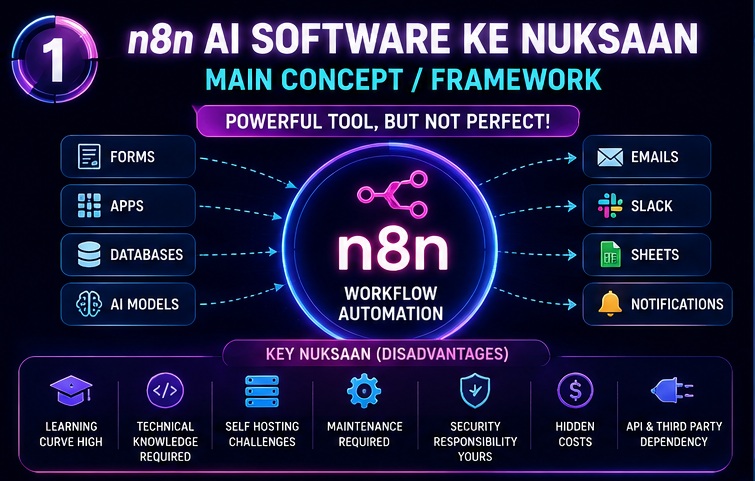
Ab in sabko detail me samajhte hain.
Steep Learning Curve Sabse Bada Challenge
Beginners Ko Sabse Zyada Problem Yahin Aati Hai
Bahut log sochte hain ki drag-and-drop automation ka matlab easy software.
Reality thodi alag hai.
n8n interface visually simple lagta hai lekin actual implementation me kaafi concepts samajhne padte hain.
Jaise:
- APIs
- Webhooks
- JSON
- Authentication
- Triggers
- Nodes
- Data Mapping
Agar aap pehli baar automation tools use kar rahe hain to ye terms confusing lag sakti hain.
Ye n8n AI Software Ke Nuksaan me sabse common problem mani jati hai.
Example
Maan lijiye aap ek contact form ko Google Sheets se connect karna chahte hain.
Sunne me easy lagta hai.
Lekin aapko samajhna padega:
- Trigger kaise kaam karta hai
- Data fields mapping kaise hoti hai
- API limits kya hain
- Error handling kaise hogi
Yahan beginners aksar atak jate hain.
Technical Knowledge Ki Zarurat
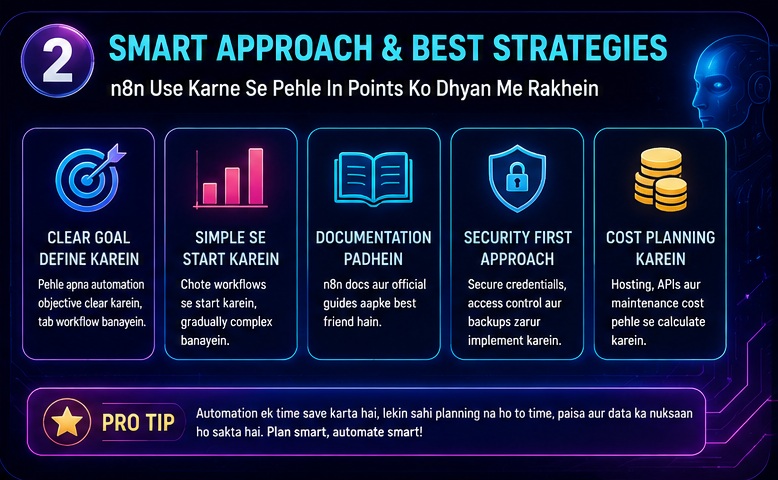
Non-Tech Users Ke Liye Challenge
Agar aap:
- Student hain
- Blogger hain
- Small business owner hain
To shuruaat me technical concepts problem create kar sakte hain.
Bahut se automation tools no-code hone ka claim karte hain.
Lekin n8n me practical level par:
- Basic technical understanding helpful hoti hai
- Logic building zaruri hoti hai
- Workflow debugging aani chahiye
Ye bhi important n8n AI Software Ke Nuksaan me se ek hai.
JavaScript Knowledge Kab Useful Ho Jata Hai?
Advanced workflows me aapko:
- Code node
- Expressions
- Data transformation
jaise features use karne pad sakte hain.
Yahan JavaScript ka basic knowledge kaafi help karta hai.
Agar coding se bilkul relation nahi hai to learning process slow ho sakta hai.
Self Hosting Challenges
Self Hosted Version Har Kisi Ke Liye Nahi
n8n ka biggest selling point hai self-hosting.
Lekin yahi feature kai users ke liye problem bhi ban jata hai.
Self-hosting ka matlab:
- Server manage karna
- Updates install karna
- Backups maintain karna
- Security monitor karna
Ye sab aapki responsibility ban jata hai.
Isi wajah se self-hosting ko major n8n AI Software Ke Nuksaan me count kiya jata hai.
Self-hosting beginners ke liye thoda challenging ho sakta hai, especially jab server setup aur deployment ki baat aati hai. Agar aap practical setup process ko detail me samajhna chahte hain to hamara step-by-step tutorial n8n AI Kaise Install Kare Step by Step aapke liye kaafi useful rahega.
Server Down Ho Gaya To?
Maan lijiye:
Aapne AI content generation workflow banaya hua hai.
Server down ho gaya.
Result:
- Automation ruk jayegi
- Leads miss ho sakti hain
- Emails nahi jayengi
- Business operations impact ho sakti hain
Cloud tools me ye responsibility provider ki hoti hai.
n8n self-hosting me mostly aapki.
Maintenance Ka Hidden Burden
Automation Ban Gayi Matlab Kaam Khatam Nahi Hua
Bahut log sochte hain:
“Workflow bana di, ab sab automatically chalega.”
Lekin reality me regular maintenance required hoti hai.
Example:
- API updates
- Authentication changes
- Service updates
- Workflow optimization
Ye sab future me workflow break kar sakte hain.
Third Party Apps Change Hoti Rehti Hain
Aaj jo integration kaam kar rahi hai zaruri nahi kal bhi kare.
Google, Meta, OpenAI aur dusri services regularly updates release karti hain.
Isliye maintenance ek continuous process hai.
Ye hidden n8n AI Software Ke Nuksaan me se ek hai jise beginners ignore kar dete hain.
Security Risks
Data Protection Ki Responsibility
Cloud tools me security ka bada hissa provider manage karta hai.
Self-hosted n8n me kaafi responsibility user ki hoti hai.
Aapko dhyan rakhna padta hai:
- Secure passwords
- Access control
- Encryption
- Server security
- Backup strategy
Agar proper configuration nahi hui to risk badh sakta hai.
Sensitive Data Handle Karne Wale Businesses
Agar aap manage karte hain:
- Customer information
- Payment details
- Internal company data
To security aur bhi important ho jati hai.
Isliye enterprise users ko n8n deploy karte waqt professional setup consider karna chahiye.
Hidden Costs Jo Log Ignore Kar Dete Hain
Free Tool Hamesha Free Nahi Hota
Aajkal bahut log n8n ko free automation tool samajhte hain.
Lekin practical level par kuch indirect costs aati hain.
Jaise:
- VPS hosting
- Domain
- Monitoring tools
- Backup systems
- Premium APIs
- Technical support
Ye expenses gradually increase ho sakte hain.
Example Cost Scenario
Suppose:
- VPS = ₹500–₹1500/month
- AI APIs = ₹1000–₹5000/month
- Monitoring tools = Extra
- Backup solution = Extra
Total monthly cost expected se kaafi zyada ho sakti hai.
Isi wajah se hidden expenses bhi n8n AI Software Ke Nuksaan list me include kiye jate hain.
Kai users cost calculate karte waqt earning opportunities ko ignore kar dete hain. Reality ye hai ki automation skills future me ek valuable income source ban sakti hain. Agar aap earning side explore karna chahte hain to n8n Se Paise Kaise Kamaye guide zarur dekhein.
Workflow Complexity Problem
Automation Jitni Badi Hogi Utni Complex Hogi
Shuruaat me workflow simple hoti hai.
Example:
Form → Email
Bas.
Lekin business grow hote hi workflow kuch aisi ban sakti hai:
Form → CRM → AI Analysis → Email → Slack → Google Sheets → Database → Reporting
Ab debugging difficult ho jati hai.
Error Tracking Mushkil Ho Sakti Hai
Kabhi kabhi issue identify karna difficult ho jata hai:
- API fail hui?
- Database issue hai?
- Authentication expired hai?
- Workflow logic broken hai?
Ye troubleshooting beginners ke liye challenging ho sakti hai.
Isi wajah se workflow complexity bhi important n8n AI Software Ke Nuksaan me count hoti hai.
Scalability Challenges
Small Projects Aur Large Projects Mein Farq Hota Hai
Shuruaat mein n8n kaafi smooth lag sakta hai. Lekin jaise-jaise workflows, users aur automation executions badhte hain, waise-waise management bhi complex hoti jati hai.
Ye bhi important n8n AI Software Ke Nuksaan mein se ek hai.
Agar aap:
- 5 workflows chala rahe hain
- 50 workflows chala rahe hain
- 500 workflows chala rahe hain
To in teeno situations mein maintenance level completely different hota hai.
Resource Usage Badh Sakti Hai
Large automation projects mein:
- CPU usage badhta hai
- RAM consumption increase hota hai
- Database size grow karti hai
- Logs accumulate hote rehte hain
Agar infrastructure planning nahi ki gayi to performance issues aa sakte hain.
Enterprise Level Deployment Easy Nahi
Large companies ke liye requirements alag hoti hain:
- High availability
- Redundancy
- Failover systems
- Compliance
- Advanced monitoring
Ye sab setup karna beginner users ke liye kaafi difficult ho sakta hai.
Isliye scalability concerns ko ignore nahi karna chahiye.
Third-Party Dependency Risk
Automation Dusri Services Par Depend Hoti Hai
n8n khud powerful hai.
Lekin aksar workflows dependent hoti hain:
- Google Workspace
- OpenAI
- Gmail
- Slack
- Notion
- Airtable
- Meta
- CRM platforms
Agar inme se koi service issue face karti hai to automation impact ho sakti hai.
API Changes Workflow Tod Sakte Hain
Mere experience me ye problem kaafi common hai.
Aaj workflow perfectly chal rahi hoti hai.
Kal:
- API update aa jata hai
- Authentication method change ho jata hai
- Rate limits update ho jati hain
Aur automation fail hone lagti hai.
Ye hidden n8n AI Software Ke Nuksaan me se ek hai jiske baare me beginners ko kam pata hota hai.
AI Workflows Mein Additional Challenges
AI Hamesha Predictable Nahi Hota
Aajkal log n8n ko AI workflows ke saath use kar rahe hain.
Example:
- Content generation
- Chatbots
- Email writing
- Lead qualification
Lekin AI outputs hamesha consistent nahi hote.
Kabhi:
- Wrong response
- Incomplete output
- Formatting issue
- Hallucination
bhi dekhne ko mil sakti hai.
Cost Rapidly Increase Ho Sakti Hai
AI workflows me API usage directly cost se linked hoti hai.
Agar workflow frequently run ho rahi hai to expenses bhi increase ho sakte hain.
Bahut users ye calculation pehle nahi karte.
Baad me bill dekhkar surprise ho jate hain.
Step-by-Step Guide: Kya n8n Aapke Liye Sahi Hai?
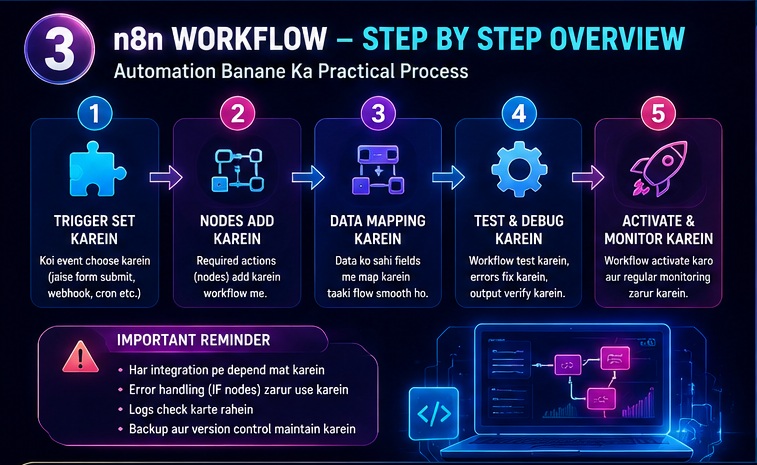
Step 1: Apni Technical Skill Assess Karein
Khud se puchhiye:
- Kya aap APIs samajhte hain?
- Kya aap basic troubleshooting kar sakte hain?
- Kya aap workflows manage kar sakte hain?
Agar answer “No” hai to learning time consider karein.
Step 2: Automation Requirement Check Karein
Agar aapko sirf:
- Simple email automation
- Social posting
- Basic integrations
chahiye to simpler tools bhi kaam kar sakte hain.
Step 3: Budget Calculate Karein
Sirf software nahi.
Consider karein:
- Hosting
- APIs
- Maintenance
- Backup
- Monitoring
Step 4: Growth Planning Karein
Future me:
- Kitni workflows hongi?
- Kitne users honge?
- Kitne executions expected hain?
Scalability planning important hai.
Step 5: Risk Management Karein
Har automation ke liye:
- Backup process
- Error handling
- Monitoring
define karein.
n8n vs Zapier vs Make Comparison
| Feature | n8n | Zapier | Make |
|---|---|---|---|
| Learning Curve | High | Low | Medium |
| Beginner Friendly | Moderate | High | Medium |
| Self Hosting | Yes | No | No |
| Flexibility | Very High | Medium | High |
| Technical Knowledge | Required | Minimal | Moderate |
| Maintenance | User Managed | Provider Managed | Provider Managed |
| Cost Control | Better | Can Become Expensive | Moderate |
| Customization | Excellent | Limited | Good |
Har automation tool ke apne pros aur cons hote hain. Agar aap confuse hain ki aapke workflow ke liye kaunsa platform better rahega to hamara detailed comparison n8n vs Zapier Complete Comparison aapko better decision lene me help karega.
Practical Examples
Example 1: Blogger Workflow
A blogger ne workflow banayi:
Article Publish → AI Summary → Social Media Post
Initially sab sahi chala.
Lekin baad me:
- API limit exceed ho gayi
- Social platform authentication expire ho gaya
- Workflow fail hone lagi
Yahan maintenance zaruri ho gayi.
Example 2: Small Business Automation
Lead Form → CRM → Email Sequence
Agar CRM API update ho jaye to poori chain break ho sakti hai.
Result:
- Leads miss
- Customer delay
- Revenue impact
Example 3: AI Content Generation
AI workflow:
Keyword → GPT → Blog Draft → Google Docs
Sunne me perfect lagta hai.
Lekin practical level par:
- Output quality inconsistent ho sakti hai
- Manual editing fir bhi required hoti hai
- Human review zaruri rehta hai
Common Mistakes Jo Beginners Karte Hain
1. YouTube Hype Dekhkar Start Kar Dena
Aajkal bahut log sirf viral videos dekhkar automation start kar dete hain.
Lekin actual implementation alag hota hai.
2. Security Ignore Karna
Strong passwords aur backups ko ignore karna risky ho sakta hai.
3. Error Monitoring Nahi Lagana
Workflow fail hone ke baad hi issue pata chalna common mistake hai.
4. Documentation Nahi Banana
Future me troubleshooting difficult ho jati hai.
5. Complex Workflow Se Start Karna
Beginners ko pehle simple automation se shuruaat karni chahiye.
6. Cost Calculation Ignore Karna
Sirf free software dekhkar decision lena galat ho sakta hai.
7. Backup Strategy Nahi Banana
Server issue aane par kaafi problems create ho sakti hain.
Kya Beginners Ko n8n Use Karna Chahiye?
Haan, Agar:
- Aap learning ke liye ready hain
- Technical concepts seekhna chahte hain
- Long-term automation build karna chahte hain
- Flexibility chahiye
Nahi, Agar:
- Aap instant results chahte hain
- Technical work avoid karna chahte hain
- Maintenance handle nahi karna chahte
- Simple automation hi required hai
Kin Logon Ke Liye n8n Best Nahi Hai?
Ye section important hai kyunki har tool har user ke liye nahi hota.
Students
Agar sirf experimentation karna hai to theek hai.
Lekin complex projects ke liye learning investment lagega.
Local Business Owners
Agar technical support available nahi hai to challenges aa sakte hain.
Non-Technical Freelancers
Shuruaat me confusion ho sakta hai.
Busy Entrepreneurs
Jinke paas maintenance ka time nahi hai unke liye managed solutions better ho sakte hain.
Kya n8n Future Mein Better Hoga?
Industry trend dekha jaye to automation demand continuously badh rahi hai.
n8n bhi rapidly evolve kar raha hai.
Future improvements:
- Better AI integrations
- Improved UI
- Easier onboarding
- Advanced templates
- Enterprise features
Lekin phir bhi kuch n8n AI Software Ke Nuksaan hamesha rahenge kyunki flexibility aur complexity aksar saath-saath aati hain.
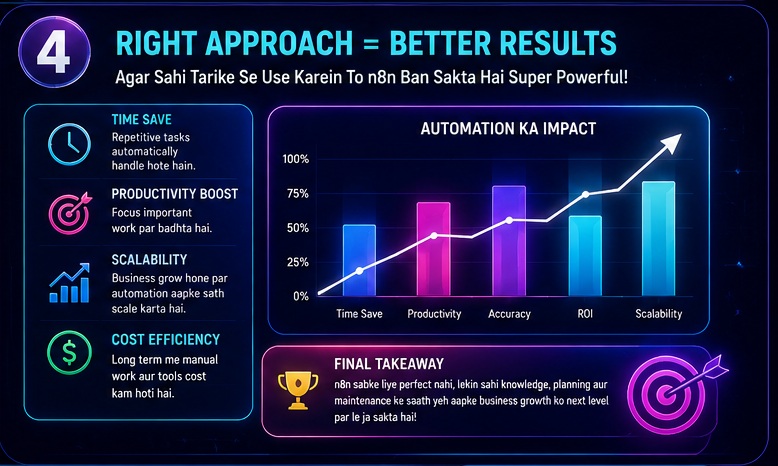
My Take
Mere hisab se n8n ek excellent automation platform hai.
Lekin problem tab hoti hai jab log ise “magic solution” samajh lete hain.
Reality ye hai:
n8n powerful hai.
Lekin powerful tools generally simple nahi hote.
Maine khud observe kiya hai ki beginners ko sabse zyada struggle:
- APIs
- Authentication
- Debugging
- Workflow logic
mein hoti hai.
Agar aap learning mindset ke saath aate hain to n8n long-term me kaafi valuable skill ban sakta hai.
Lekin agar aap sirf plug-and-play solution dhoond rahe hain to shayad ye aapke liye best choice na ho.
Practical level par dekha jaye to n8n un logon ke liye best hai jo automation ko seriously samajhna aur scale karna chahte hain.
Related Opportunities / Next Steps
Agar aap n8n seekh rahe hain to in topics ko bhi explore karein:
- n8n AI Software Kya Hai?
- n8n Installation Guide
- n8n AI Automation Ideas
- n8n vs Zapier Comparison
- n8n Se Paise Kaise Kamaye
- Best AI Automation Tools
- AI Agents Using n8n
- Freelancing With Automation Skills
Ye articles milkar aapki automation knowledge ko strong banayenge.
FAQs
1. Kya n8n beginners ke liye difficult hai?
Haan, beginners ke liye learning curve thoda steep ho sakta hai. APIs, webhooks aur workflow logic samajhne me time lag sakta hai.
2. Kya n8n completely free hai?
Self-hosted version use kiya ja sakta hai, lekin hosting, APIs aur maintenance costs aa sakti hain.
3. Sabse bada n8n AI Software Ke Nuksaan kya hai?
Most users ke liye sabse bada disadvantage learning curve aur technical complexity hai.
4. Kya n8n secure hai?
Proper configuration ke saath secure ho sakta hai. Lekin self-hosting me security responsibility largely user ki hoti hai.
5. Kya n8n Zapier se better hai?
Ye use case par depend karta hai.
Flexibility ke liye n8n strong hai.
Beginner friendliness ke liye Zapier easier ho sakta hai.
6. Kya n8n se paise kamaye ja sakte hain?
Haan.
Automation services, consulting, freelancing aur AI workflow development ke through earning opportunities available hain.
7. Kya coding zaruri hai?
Basic workflows bina coding ke ban sakti hain.
Advanced workflows me coding knowledge helpful ho sakti hai.
8. Kya n8n future-proof skill hai?
Automation aur AI demand badhne ke karan n8n related skills ki value future me bhi strong reh sakti hai.
Conclusion
Agar hum poori guide ko summarize karein to n8n AI Software Ke Nuksaan ko samajhna utna hi zaruri hai jitna iske advantages ko samajhna.
Sabse important drawbacks hain:
- Steep learning curve
- Technical setup complexity
- Maintenance responsibility
- Security management
- Hidden costs
- API dependency
- Workflow troubleshooting challenges
Lekin iska matlab ye nahi ki n8n bad tool hai.
Actually, ye ek powerful automation platform hai jo right users ke liye excellent results de sakta hai.
Decision lene se pehle apni:
- Technical skill
- Budget
- Time availability
- Business requirements
ko evaluate zarur karein.
Tabhi aap sahi choice kar payenge.
Final CTA
Agar aap automation aur AI tools ke baare me serious hain, to sirf ek article par mat rukiyega.
n8n ecosystem, AI automation workflows aur online earning opportunities ko detail me explore kariye.
Jitna jaldi aap automation skills seekhenge, utna hi future digital economy me advantage milega.
Aapka agla step ho sakta hai:
✅ n8n Installation Guide padhna
✅ n8n vs Zapier Comparison dekhna
✅ AI Automation Ideas explore karna
✅ n8n se paise kamane ke practical methods seekhna
Knowledge ko action me convert kariye aur automation ki power ko smart tareeke se use kariye.
- Real Estate AI Photo Prompts: Create Stunning Property Images That Sell Faster (2026 Guide)
- Car Dealer AI Photo Prompts: Create Professional Vehicle Photos That Sell Faster (2026 Guide)
- Jewelry Photography AI Prompts: Luxury Product Images Without Expensive Equipment 2026 guide
- E-Commerce Product Photo AI Prompts: Amazon & Flipkart Style Images in Minutes (2026 Guide)
- Facebook Profile AI Photo Prompts: Upgrade Your Social Presence Instantly