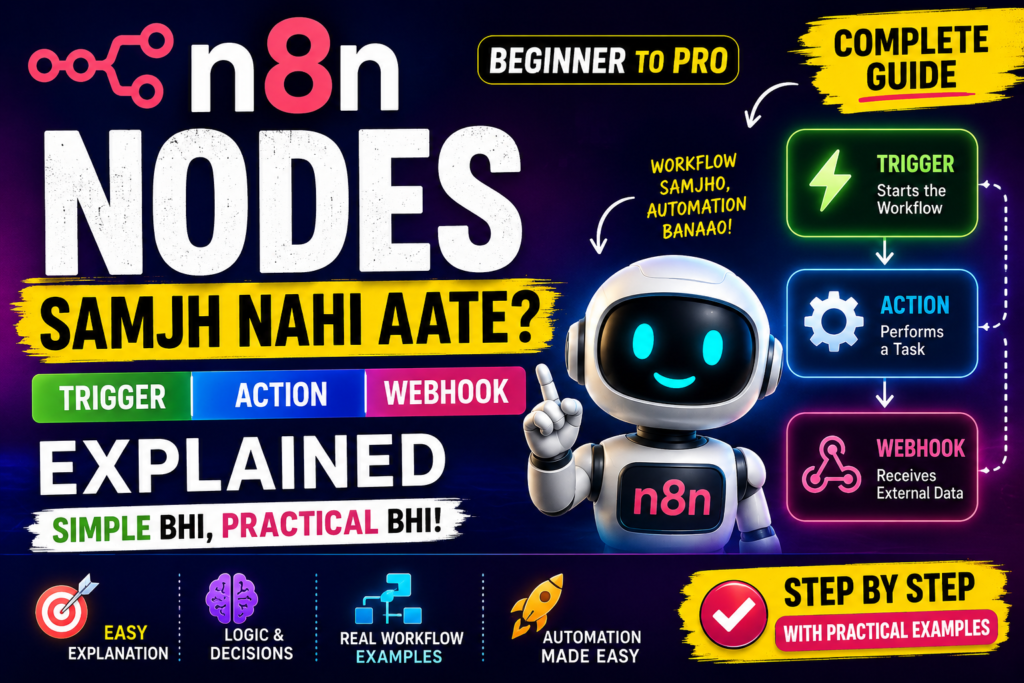
Kya aapne n8n install kar liya hai lekin Nodes dekhte hi confusion start ho jata hai? Trigger Node, Action Node, Webhook aur IF conditions jaise terms beginners ko kaafi technical lag sakte hain. Isi wajah se bahut log search karte hain n8n Nodes Samajh Nahi Aate aur phir bhi clear explanation nahi milti. Is guide me hum har important node type ko simple language me samjhenge, real workflow examples dekhenge aur beginner mistakes ko identify karenge. Article complete padhne ke baad nodes, triggers aur webhooks aapko kaafi easy lagne lagenge.
Maine khud observe kiya hai ki beginners workflow se zyada nodes se confuse hote hain.
Reality me nodes automation building blocks hote hain.
Ek baar nodes samajh aa gaye to n8n kaafi simple lagne lagta hai.
Agar aap n8n ecosystem me bilkul naye hain to nodes samajhne se pehle platform ki basic understanding hona zaruri hai. Bahut se beginners workflow aur nodes ke beech ka difference clear nahi kar pate. Isliye sabse pehle n8n AI Software Kya Hai? Complete Guide 2026 article zarur padhein.
Table of Contents
- Quick Answer
- Why Trust This Guide?
- n8n Node Kya Hota Hai?
- n8n Nodes Samajh Nahi Aate? Sabse Simple Explanation
- Trigger Node Kya Hota Hai?
- Action Node Kya Hota Hai?
- Webhook Node Kya Hota Hai?
- IF Node Aur Logic Nodes
- Data Flow Kaise Kaam Karta Hai?
- Common Node Types
- Real Workflow Examples
- Step-by-Step Node Learning Guide
- Common Mistakes
- My Take
- FAQs
- Conclusion
- Final CTA
Quick Answer
n8n Nodes Samajh Nahi Aate? Simple Answer
Node ek specific task perform karta hai.
Example:
Trigger Node
↓
Google Sheets Node
↓
AI Node
↓
Telegram Node
Har node ek action perform karta hai.
Aur multiple nodes milkar workflow banate hain.
Isi liye n8n Nodes Samajh Nahi Aate problem ka solution hai node ko ek “single action block” ki tarah dekhna.
Why Trust This Guide?
Ye guide based hai:
- Practical workflow testing
- Real n8n implementations
- Tool experimentation
- Industry automation trends
- Real-world business workflows
Mere experience me beginners ko nodes tab samajh aate hain jab unhe technical definition ke bajay practical examples diye jate hain.
Isi approach ko follow karte hue ye guide create ki gayi hai.
Nodes ko practical level par samajhne ka best tarika real workflows dekhna hota hai. Jab aap different automation examples dekhte hain tab trigger aur action nodes ka role aur clear ho jata hai. Isliye 10 Best n8n Workflow Examples (2026) guide bhi explore karein.
Agar aap nodes, workflows aur integrations ko official source se samajhna chahte hain to platform documentation sabse reliable resource hoti hai. Different node types aur workflow building concepts ke liye Official n8n Documentation explore kar sakte hain.
n8n Node Kya Hota Hai?
Sabse pehle basic definition samajhte hain.
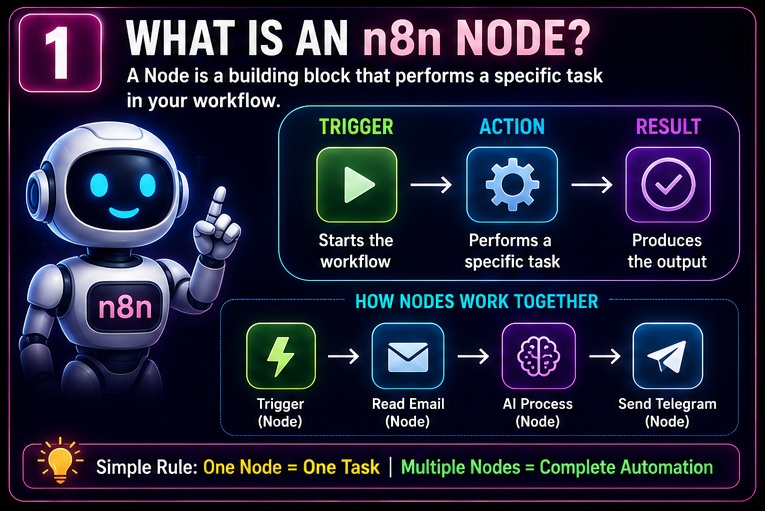
Node automation workflow ka ek individual step hota hai.
Har node ek kaam karta hai.
Real Life Example
Restaurant Process:
Order Receive
↓
Food Prepare
↓
Pack
↓
Deliver
Yahan har step ek node ki tarah hai.
Agar aap nodes ka role samajh gaye hain to next step workflow architecture ko samajhna hai. Nodes kaise milkar complete automation create karte hain, ye jaanne ke liye n8n Workflow Kaise Kaam Karta Hai? 90% Beginners Yahin Confuse Ho Jaate Hain (2026 Guide) article bhi padhein.
n8n Example
New Email
↓
Read Email
↓
AI Summary
↓
Telegram Message
Har step ek node represent karta hai.
n8n Nodes Samajh Nahi Aate? Sabse Simple Explanation
Agar aap beginner hain to node ko app ki tarah mat dekhiye.
Node ko action ki tarah dekhiye.
Wrong Thinking
Node = Complex Tool
Correct Thinking
Node = Single Action
Example
Telegram Node
Kaam:
Message Send Karna
Google Sheets Node
Kaam:
Spreadsheet Update Karna
OpenAI Node
Kaam:
AI Response Generate Karna
Trigger Node Kya Hota Hai?
Trigger workflow ka starting point hota hai.
Ye workflow ko activate karta hai.
Trigger Example #1
New Email Receive
↓
Workflow Start
Trigger Example #2
Form Submit
↓
Workflow Start
Trigger Example #3
Specific Time
↓
Workflow Start
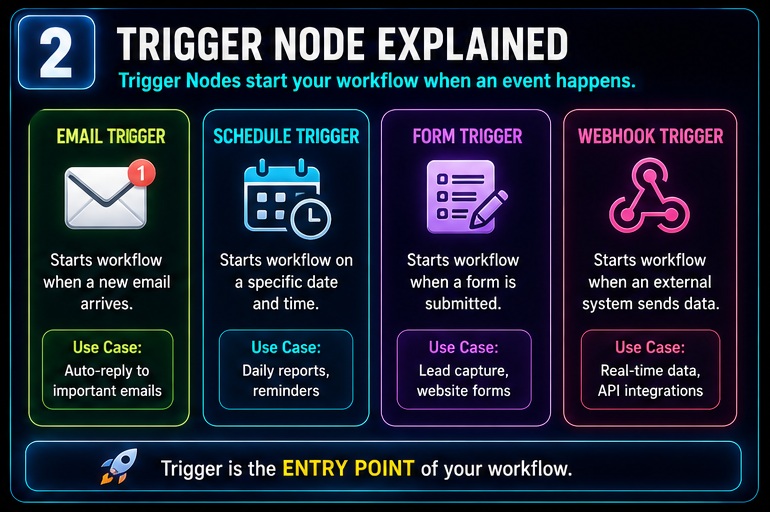
Trigger Example #4
Webhook Request
↓
Workflow Start
Easy Analogy
Trigger ko switch samjho.
Switch ON
↓
Workflow Start
Action Node Kya Hota Hai?
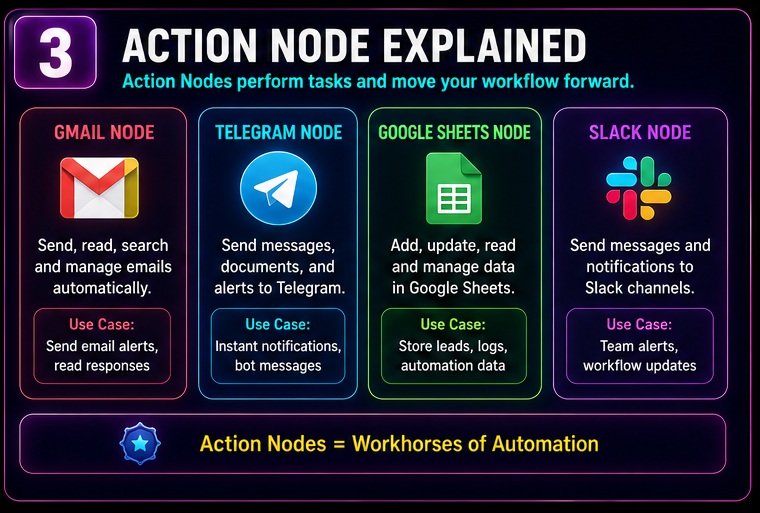
Action node workflow ke andar task perform karta hai.
Example
Send Email
Example
Create Google Sheet Row
Example
Generate AI Content
Example
Send Telegram Message
Important Rule
Workflow me usually:
1 Trigger
Multiple Actions
Hote hain.
Action nodes productivity aur automation ka core part hote hain. Real-world automation benefits aur workflow efficiency ko detail me samajhne ke liye n8n AI Software Ke Fayde article bhi kaafi useful rahega.
Webhook Node Kya Hota Hai?
Webhook beginners ko sabse zyada confusing lagta hai.
Reality thodi alag hai.
Webhook actually kaafi simple concept hai.
Webhook nodes ko samajhne ke baad messaging aur notification automations banana kaafi easy ho jata hai. Real-world messaging workflows ke liye n8n Se Telegram Automation Kaise Kare guide bhi zarur dekhein.
Simple Definition
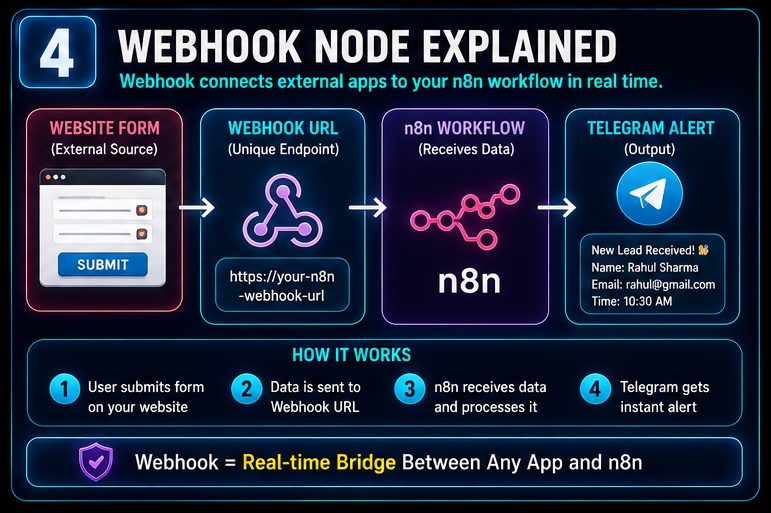
Webhook ek URL hota hai jo external system se data receive karta hai.
Example
Website Form
↓
Webhook
↓
n8n Workflow
↓
Telegram Alert
Real Life Analogy
Doorbell
↓
Button Press
↓
Signal Receive
↓
Door Open
Webhook bhi kuch isi tarah kaam karta hai.
Why Webhooks Important Hain?
Aajkal bahut log webhooks ka use karte hain.
Kyunki:
- Real-time automation
- Fast response
- Easy integrations
- Flexible workflows
Possible ho jate hain.
Most Common Trigger Nodes
Beginners ko ye nodes sabse pehle seekhne chahiye.
Schedule Trigger
Specific time par workflow start karta hai.
Webhook Trigger
External event se workflow start karta hai.
Email Trigger
New email receive hone par workflow run karta hai.
Form Trigger
Form submission detect karta hai.
RSS Trigger
New content detect karta hai.
Data Flow Kaise Kaam Karta Hai?
Ab hum us concept par aate hain jo beginners ko sabse zyada confuse karta hai.
Nodes samajh aane ke baad bhi log workflow execute nahi kar pate.
Reason?
Data Flow.
Mere experience me agar aap data flow samajh gaye to n8n ka 70% concept clear ho jata hai.
Isi liye n8n Nodes Samajh Nahi Aate problem ko solve karne ke liye data movement samajhna bahut zaruri hai.
Simple Definition
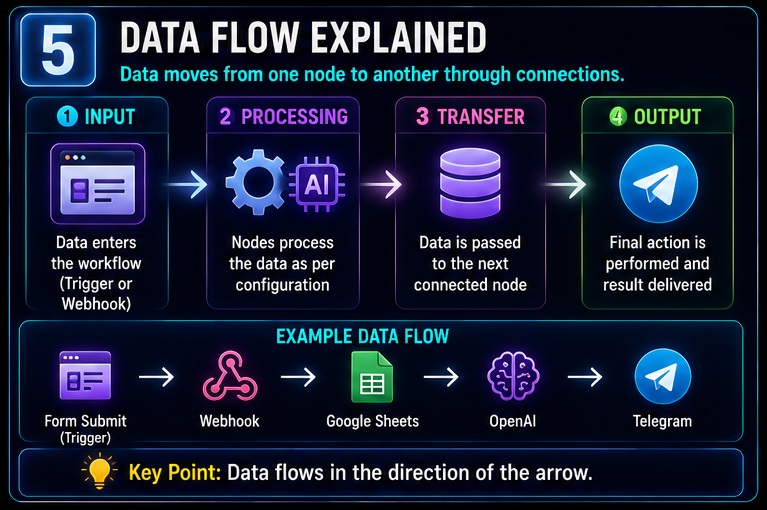
Data Flow = Information ka ek node se dusre node tak move hona.
Example
Form Submission
↓
Name
↓
↓
Phone Number
↓
Webhook Node
↓
Telegram Node
↓
Message
Kya Hua?
Data move hua.
Isi process ko data flow kehte hain.
Easy Analogy
Imagine courier delivery.
Sender
↓
Courier Hub
↓
Distribution Center
↓
Receiver
Data bhi isi tarah nodes ke beech travel karta hai.
IF Node Kya Hota Hai?
Ab baat karte hain sabse powerful beginner node ki.
IF Node.
Simple Definition
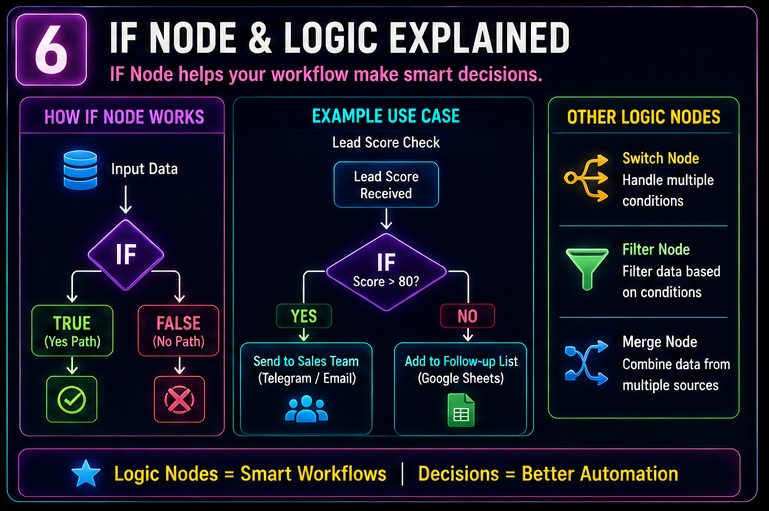
IF Node decision leta hai.
Example
Lead Score > 80
↓
Sales Team
Lead Score < 80
↓
Follow-up List
Result
Workflow intelligent decisions lena start kar deta hai.
Real Example
Customer Country Check
Agar India
↓
Hindi Message
Agar USA
↓
English Message
Ye IF Node ka practical use hai.
IF Node Kyu Important Hai?
Without IF Node:
Sab users ko same action milega.
With IF Node:
Different users ko different actions milenge.
Smart Automation Formula
Trigger
↓
IF Node
↓
Decision
↓
Correct Action
Yahi intelligent workflow ka base hai.
Logic Nodes Kya Hote Hain?
IF Node logic node ka ek example hai.
Lekin aur bhi logic nodes hote hain.
Switch Node
Multiple conditions handle karta hai.
Example
India
↓
Hindi
USA
↓
English
France
↓
French
Ye IF se zyada scalable hai.
Merge Node
Multiple data sources ko combine karta hai.
Example
Google Sheets Data
CRM Data
↓
Merge
↓
Single Report
Filter Logic
Unwanted data ko remove karta hai.
Example
Lead Score > 50
↓
Proceed
Lead Score < 50
↓
Ignore
Node Connections Kaise Kaam Karte Hain?
Bahut log sochte hain line sirf design ke liye hoti hai.
Reality?
Connection hi workflow ka route hota hai.
Example
Webhook
↓
OpenAI
↓
Telegram
↓
Google Sheets
Har connection data pass karta hai.
Important Rule
Connection toot gaya.
↓
Workflow fail.
Isliye node connections ko ignore nahi karna chahiye.
Most Important Node Categories
Ab professional level understanding build karte hain.
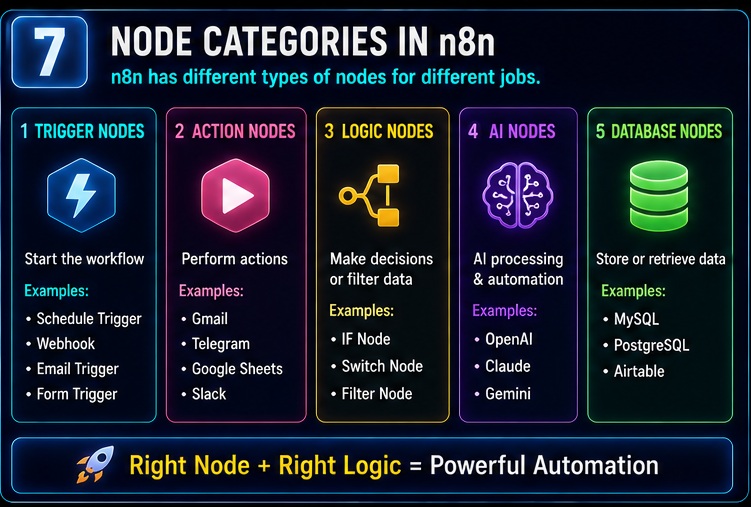
Category 1: Trigger Nodes
Workflow start karte hain.
Examples:
- Schedule
- Webhook
- RSS
Category 2: Action Nodes
Tasks perform karte hain.
Examples:
- Gmail
- Telegram
- Slack
- Google Sheets
Category 3: Logic Nodes
Decision making karte hain.
Examples:
- IF
- Switch
- Filter
Category 4: AI Nodes
Artificial Intelligence integrate karte hain.
Examples:
- OpenAI
- Claude
- Gemini
AI nodes automation ko next level par le ja sakte hain kyunki ye workflows ko intelligent decision-making capabilities dete hain. Advanced AI-powered workflows ke liye n8n AI Agents Complete Guide article padhna worthwhile rahega.
Category 5: Database Nodes
Data store karte hain.
Examples:
- MySQL
- PostgreSQL
- Airtable
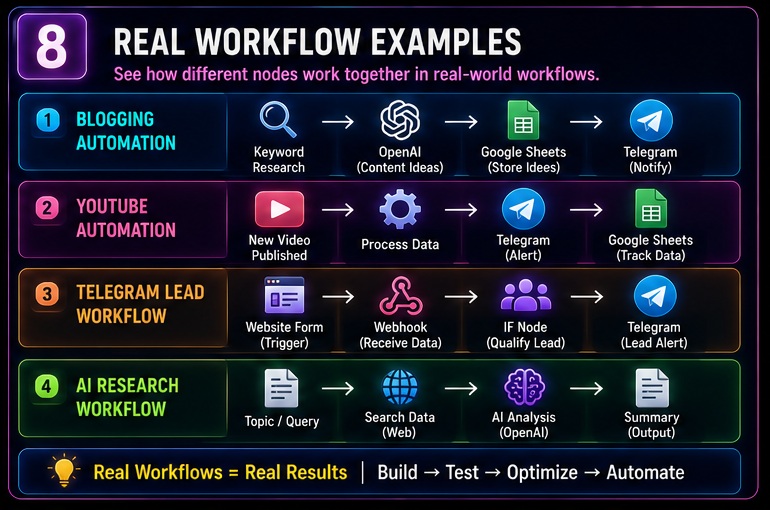
Real Workflow Example #1
Telegram Lead Notification
Website Form
↓
Webhook
↓
IF Node
↓
Telegram Message
Result
Qualified leads instantly receive ho jate hain.
Real Workflow Example #2
Blogging Automation
Keyword Research
↓
OpenAI
↓
Content Ideas
↓
Google Sheets
Result
Content planning automate ho jati hai.
Bloggers ke liye nodes aur workflows ka practical implementation content automation me sabse zyada dekha jata hai. Keyword research se publishing tak ke automation process ko samajhne ke liye n8n Se Blogging Automation Kaise Kare guide zarur padhein.
Real Workflow Example #3
YouTube Workflow
New Video Upload
↓
Processing
↓
Telegram Alert
↓
Performance Tracking
Result
Content distribution faster ho jata hai.
YouTube creators trigger nodes, action nodes aur notification workflows ka use karke kaafi repetitive tasks automate kar sakte hain. Iske practical examples dekhne ke liye n8n Se YouTube Automation Kaise Kare article explore karein.
Real Workflow Example #4
AI Research Workflow
Topic
↓
Search Data
↓
OpenAI Analysis
↓
Summary
↓
Delivery
Result
Research time dramatically reduce ho sakta hai.
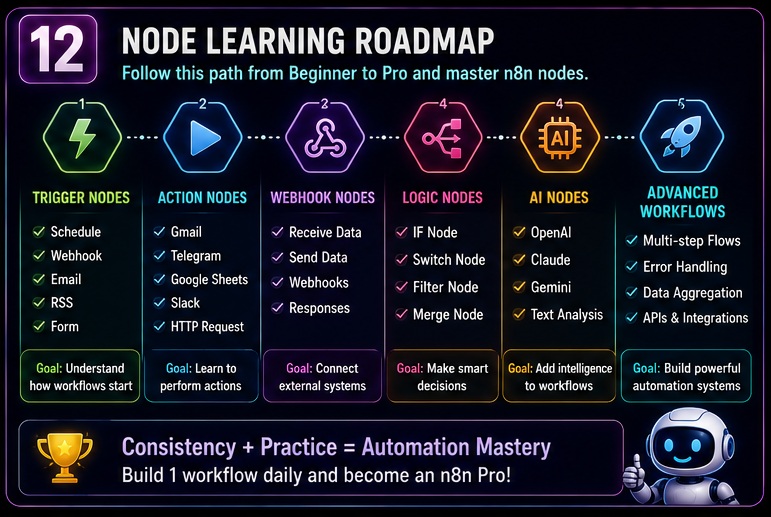
Step-by-Step Node Learning Roadmap
Mere hisab se beginners ko nodes is order me seekhne chahiye.
Stage 1
Trigger Nodes
Stage 2
Action Nodes
Stage 3
Webhook Nodes
Stage 4
IF Nodes
Stage 5
Merge Nodes
Stage 6
Database Nodes
Stage 7
AI Nodes
200 IQ Trick For Learning Nodes
Ye trick maine beginners ko recommend ki hai.
Rule
Node Ka Naam Mat Yaad Karo
Node Ka Purpose Yaad Karo
Example
Telegram Node
Purpose:
Message Send Karna
Google Sheets Node
Purpose:
Data Store Karna
Webhook Node
Purpose:
Data Receive Karna
IF Node
Purpose:
Decision Lena
Agar purpose yaad ho gaya to node kabhi confusing nahi lagega.
Beginners Ki Sabse Badi Galat Soch
Aajkal bahut log sochte hain:
“Jitne zyada nodes, utna powerful workflow”
Ye galat hai.
Better Rule
Simple Workflow
↓
Understandable Workflow
↓
Maintainable Workflow
↓
Successful Workflow
Node Mapping Method
Workflow banane se pehle paper par mapping karo.
Example
Lead Receive
↓
Check Quality
↓
Send Telegram Alert
↓
Save Data
Ab har step ke saamne node likho.
Lead Receive = Webhook
Check Quality = IF
Alert = Telegram
Save = Google Sheets
Workflow ready.
Mini Case Study
Ek freelancer ko website leads miss ho rahi thi.
Usne ye workflow banaya:
Webhook
↓
IF Node
↓
Telegram Alert
↓
Google Sheets
Result:
Response time 4 hours se 10 minutes tak aa gaya.
Ye practical example dikhata hai ki n8n Nodes Samajh Nahi Aate problem solve hone ke baad automation kitni powerful ho sakti hai.
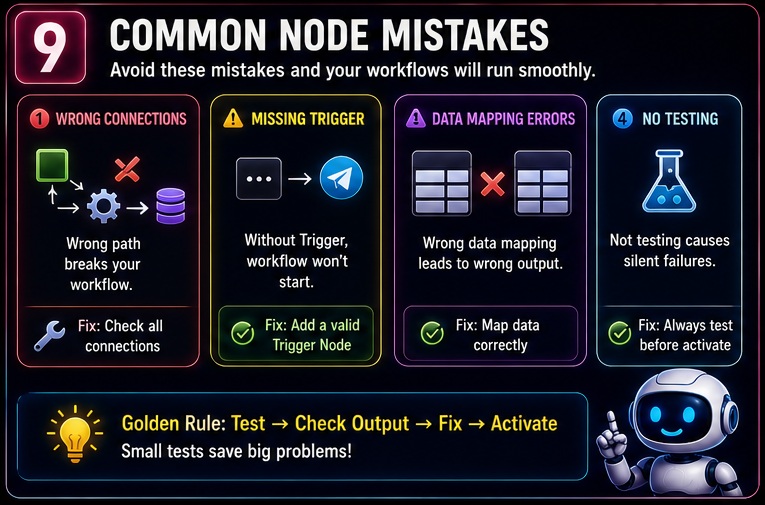
12 Common Node Mistakes Beginners Karte Hain
Ab hum us section par aate hain jahan most beginners struggle karte hain.
Maine khud observe kiya hai ki n8n difficult nahi hota.
Galat workflow thinking difficult hoti hai.
Isi wajah se n8n Nodes Samajh Nahi Aate problem baar-baar repeat hoti hai.
Mistake #1
Trigger Aur Action Node Ko Same Samajhna
Reality
Trigger workflow start karta hai.
Action workflow ke andar kaam karta hai.
Mistake #2
Webhook Ko Ignore Karna
Bahut log webhook se darte hain.
Lekin modern automation me webhook sabse useful nodes me se ek hai.
Mistake #3
Node Purpose Na Samajhna
Node ka naam yaad karna useful nahi.
Uska kaam samajhna useful hai.
Mistake #4
Data Flow Ignore Karna
Node connect kar diya.
Data check nahi kiya.
Result:
Workflow fail.
Mistake #5
Testing Skip Karna
Workflow activate kar diya.
Test nahi kiya.
Ye beginners ki common mistake hai.
Mistake #6
Over-Engineering
Simple workflow ko unnecessarily complex bana dena.
Mistake #7
Error Handling Ignore Karna
Agar workflow fail ho gaya to?
Most beginners ye question puchte hi nahi.
Mistake #8
Documentation Na Banana
2 mahine baad khud ka workflow samajh nahi aata.
Mistake #9
Node Connections Galat Banana
Connection galat.
Data route galat.
Output galat.
Mistake #10
Advanced AI Workflow Se Start Karna
Pehle basics clear karo.
Baad me AI workflows banao.
Mistake #11
Copy-Paste Learning
Template use karna thik hai.
Logic na samajhna galat hai.
Mistake #12
Instant Expert Banane Ki Koshish
Automation ek skill hai.
Time lagta hai.
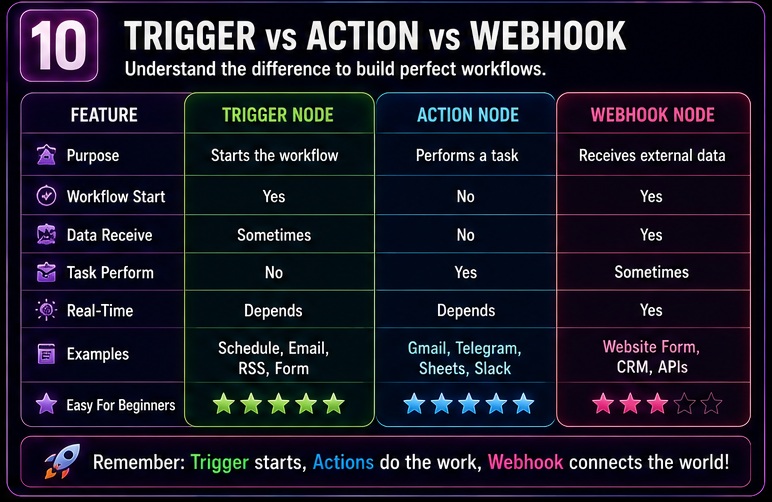
Trigger vs Action vs Webhook Comparison Table
| Feature | Trigger Node | Action Node | Webhook Node |
|---|---|---|---|
| Workflow Start | Yes | No | Yes |
| Data Receive | Sometimes | No | Yes |
| Task Perform | No | Yes | Sometimes |
| Real-Time | Depends | Depends | Yes |
| Beginner Friendly | High | High | Medium |
| Most Common Use | Start Workflow | Execute Action | External Data Receive |
Trigger vs Action vs Webhook Explained
Trigger Node
Workflow ka starting point.
Examples
- Schedule Trigger
- Email Trigger
- RSS Trigger
Action Node
Kaam perform karta hai.
Examples
- Gmail
- Telegram
- Google Sheets
- Slack
Webhook Node
External system se data receive karta hai.
Examples
- Website Forms
- CRM Systems
- External Apps
- APIs
Advanced Node Thinking
Ye section beginners ko intermediate level par le jata hai.
Old Thinking
Node = Tool
Better Thinking
Node = Function
Professional Thinking
Node = Workflow Responsibility
Example
Webhook
Responsibility:
Data Receive
IF Node
Responsibility:
Decision
Telegram
Responsibility:
Notification
Google Sheets
Responsibility:
Storage
Agar aap responsibility mindset develop kar lete hain to workflow design dramatically improve ho jata hai.
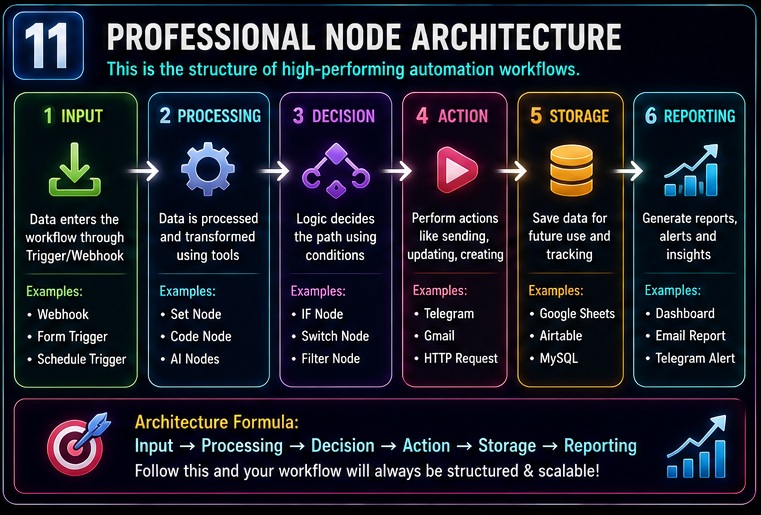
Node Architecture Framework
Professional automation builders usually is framework ko follow karte hain.
Stage 1
Input
Stage 2
Processing
Stage 3
Decision
Stage 4
Action
Stage 5
Storage
Stage 6
Reporting
Example
Webhook
↓
OpenAI
↓
IF
↓
Telegram
↓
Google Sheets
↓
Dashboard
Ye professional workflow architecture ka base hai.
Practical Example
Lead Qualification Workflow
Form Submit
↓
Webhook
↓
OpenAI Analysis
↓
IF Node
↓
Qualified
↓
Telegram Alert
↓
Google Sheets
Result
High quality leads automatically identify ho sakti hain.
Practical Example
Content Research Workflow
Keyword
↓
Search Data
↓
AI Analysis
↓
Summary
↓
Database
↓
Telegram
Result
Research process automate ho sakta hai.
My Take
Agar mujhe beginners ko sirf ek advice deni ho to main ye kahunga:
Node ka naam mat yaad karo.
Node ka purpose samjho.
Mere experience me yahi sabse bada difference create karta hai.
Jab aap nodes aur workflows dono samajh lete hain tab automation se earning opportunities bhi create ho sakti hain. Freelancing aur automation services ke through income generate karne ke ideas ke liye n8n Se Paise Kaise Kamaye article bhi padhein.
Beginners Ke Liye Best Strategy
Pehle seekho:
- Trigger
- Action
- Webhook
- IF
Bas.
In 4 node types se hi dozens of workflows ban sakte hain.
Reality Check
Aajkal bahut log advanced AI workflows dekhkar directly copy karne lagte hain.
Reality thodi alag hai.
Successful automation builders pehle fundamentals master karte hain.
Practical Advice
Har din 1 simple workflow banao.
30 din me aapki understanding dramatically improve ho sakti hai.
Related Opportunities / Next Steps
Agar aapne seekh liya hai ki n8n Nodes Samajh Nahi Aate problem ko kaise solve karna hai, to next topics ye hone chahiye:
- n8n Workflow Kaise Kaam Karta Hai
- n8n Workflow Examples
- n8n AI Agents Complete Guide
- Best n8n AI Automation Ideas
- n8n Se Blogging Automation Kaise Kare
- n8n Se Telegram Automation Kaise Kare
- n8n Se YouTube Automation Kaise Kare
- n8n Se Paise Kaise Kamaye
Ye saare topics milkar complete automation roadmap create karte hain.
Agar aap aur advanced workflow inspirations dekhna chahte hain to creators, freelancers aur businesses ke liye practical automations explore karna useful rahega. Iske liye Best n8n AI Automation Ideas guide ko next read bana sakte hain.
FAQs
1. n8n Node Kya Hota Hai?
Node workflow ka ek individual step hota hai jo specific task perform karta hai.
2. Trigger Node Aur Action Node Me Kya Difference Hai?
Trigger workflow start karta hai.
Action task execute karta hai.
3. Webhook Node Kya Hota Hai?
Webhook external systems se data receive karne wala node hota hai.
4. Beginners Ko Sabse Pehle Kaunse Nodes Seekhne Chahiye?
Trigger, Action, Webhook aur IF Nodes.
5. Kya n8n Seekhne Ke Liye Coding Zaruri Hai?
Basic workflows ke liye nahi.
Advanced workflows me coding helpful ho sakti hai.
6. Most Important Node Type Kaunsa Hai?
Trigger node.
Kyunki workflow wahi se start hota hai.
7. Kya Webhooks Difficult Hote Hain?
Nahi.
Ek baar concept samajh aa jaye to webhook kaafi easy lagte hain.
8. Best Way To Learn Nodes?
Daily practical workflows create karke.
Conclusion
Agar poore article ko summarize karein to n8n Nodes Samajh Nahi Aate problem ka solution technical definitions me nahi balki practical understanding me hai.
Humne dekha:
- Node kya hota hai
- Trigger ka role
- Action node ka role
- Webhook ka role
- IF node aur logic nodes
- Data flow
- Workflow architecture
- Common mistakes
Sabse important lesson ye hai:
Node ko software feature ki tarah mat dekho.
Node ko responsibility ki tarah dekho.
Jab ye mindset develop ho jata hai tab automation learning bahut easy ho jati hai.
Final CTA
Ab sirf n8n Nodes Samajh Nahi Aate article padhkar mat ruk jaiye.
Khud ek simple workflow banaiye.
Webhook add kariye.
Trigger connect kariye.
Telegram ya Google Sheets action add kariye.
Aur phir gradually advanced workflows ki taraf badhiye.
- Real Estate AI Photo Prompts: Create Stunning Property Images That Sell Faster (2026 Guide)
- Car Dealer AI Photo Prompts: Create Professional Vehicle Photos That Sell Faster (2026 Guide)
- Jewelry Photography AI Prompts: Luxury Product Images Without Expensive Equipment 2026 guide
- E-Commerce Product Photo AI Prompts: Amazon & Flipkart Style Images in Minutes (2026 Guide)
- Facebook Profile AI Photo Prompts: Upgrade Your Social Presence Instantly