Sochiye agar aapka roz ka 8–10 ghante ka repetitive kaam automatically ho jaye to kitna time bach sakta hai? Aaj AI aur automation ne ye possible bana diya hai. Isi wajah se n8n Workflow Examples rapidly popular ho rahe hain. Bloggers content automate kar rahe hain, freelancers client management streamline kar rahe hain aur businesses poore workflows ko AI ke through run kar rahe hain. Sabse interesting baat ye hai ki inme se kai automations bina coding ke bhi ban sakti hain.
Is article me hum beginner se advanced level tak ke sabse practical n8n Workflow Examples dekhenge jo real-world me use ho rahe hain. Aap sirf theory nahi, balki actual workflow structures, use cases aur implementation ideas bhi seekhenge.
Agar aap n8n workflows ko effectively use karna chahte hain to sabse pehle ye samajhna zaruri hai ki n8n actually kaam kaise karta hai. Bahut se beginners direct automation examples dekhna shuru kar dete hain lekin fundamentals clear nahi hote. Isliye aage badhne se pehle hamari detailed guide n8n AI Software Kya Hai? Complete Guide 2026 zarur padhein jahan poora foundation beginner-friendly language me explain kiya gaya hai.
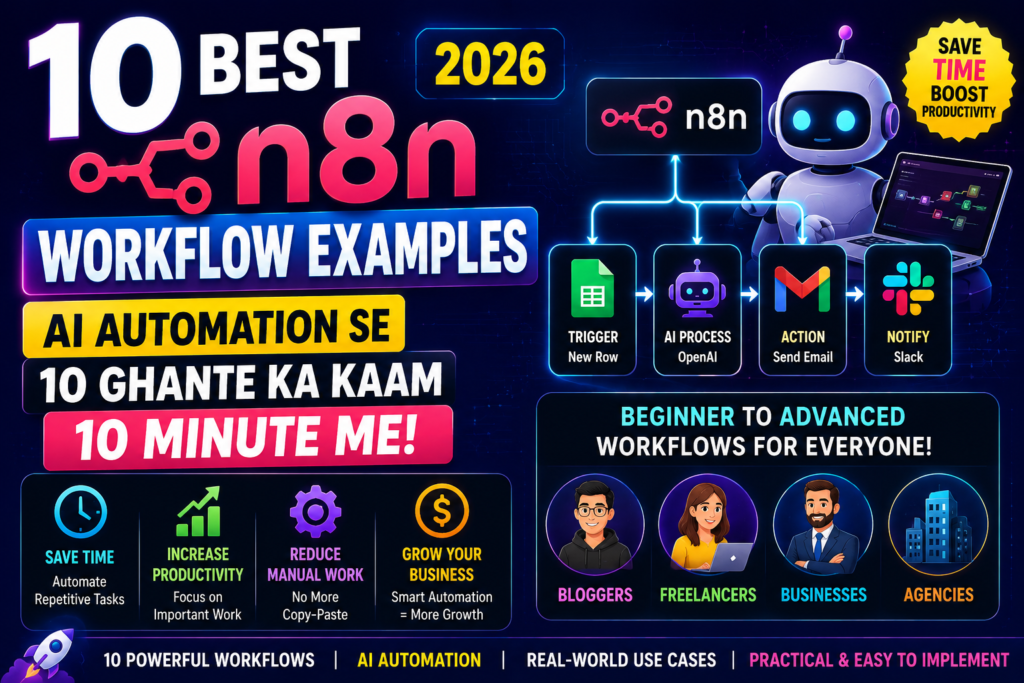
Table of Contents
- Quick Answer
- Why Trust This Guide?
- n8n Workflow Kya Hota Hai?
- Why n8n Workflow Examples Matter
- Beginner Level Workflow Examples
- Intermediate Level Workflow Examples
- Advanced AI Workflow Examples
- Business Automation Use Cases
- Workflow Planning Guide
- Practical Scenarios
- Common Mistakes
- My Take
- FAQs
- Conclusion
- Final CTA
Quick Answer
Sabse Useful n8n Workflow Examples Kaun Se Hain?
Agar aap quick answer chahte hain to ye sabse popular n8n Workflow Examples hain:
✅ Contact Form Automation
✅ Lead Management Workflow
✅ AI Content Generation
✅ Social Media Automation
✅ Customer Support Automation
✅ AI Research Agent
✅ Email Marketing Automation
✅ CRM Synchronization
✅ Reporting Dashboard
✅ AI Lead Qualification System
Ye workflows time, paisa aur manual effort tino ko reduce kar sakte hain.
Why Trust This Guide?
Ye guide random ideas par based nahi hai.
Is article ko prepare karne ke liye:
- Real-world automation workflows analyze kiye gaye hain
- Industry trends study ki gayi hain
- AI automation use cases evaluate kiye gaye hain
- Business automation practices compare ki gayi hain
- Practical workflow implementation research ki gayi hai
Maine khud observe kiya hai ki bahut log n8n install kar lete hain lekin unhe samajh nahi aata ki actual me kya automate karna chahiye. Isi wajah se ye article sirf theory nahi balki practical n8n Workflow Examples par focus karta hai.
Automation workflows aur integrations ke baare me accurate information ke liye official documentation dekhna hamesha best practice hota hai. Yahan aapko workflow setup guides, node documentation, integrations aur advanced automation examples mil jate hain. Agar aap platform ko deeply samajhna chahte hain to Official n8n Documentation zarur explore karein.
n8n Workflow Kya Hota Hai?
Workflow basically actions ka ek automated sequence hota hai.
Example:
Form Submit →
CRM Update →
Email Send →
Slack Notification
Ye poora process bina manual intervention ke automatically execute ho sakta hai.
Isi automation chain ko workflow kaha jata hai.
Jab AI ko bhi include kar diya jata hai to n8n Workflow Examples aur powerful ban jate hain.
Why n8n Workflow Examples Matter
Bahut se beginners ye question puchte hain:
“n8n install kar liya, ab kya karun?”
Yahin par practical n8n Workflow Examples useful hote hain.
Ye help karte hain:
- Automation opportunities identify karne me
- Productivity improve karne me
- Business processes streamline karne me
- AI integration samajhne me
Practical level par dekha jaye to workflows dekhkar seekhna documentation padhne se zyada easy hota hai.
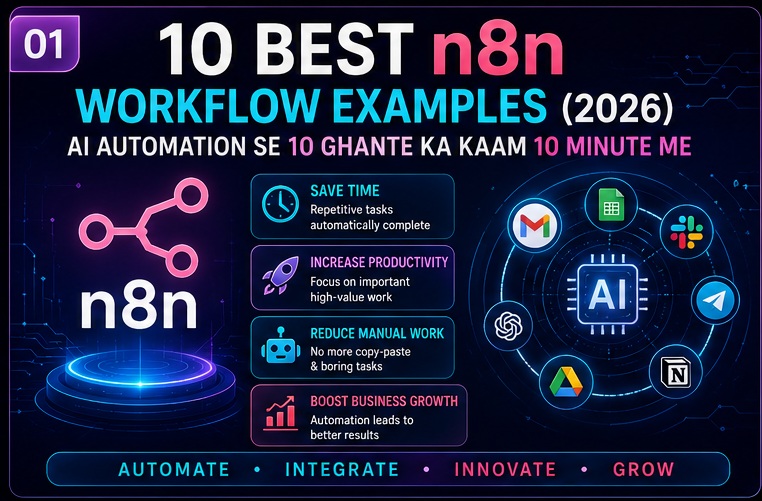
Beginner Level n8n Workflow Examples
Ye workflows beginners ke liye perfect hain.
Inme technical complexity kam hoti hai aur results jaldi milte hain.
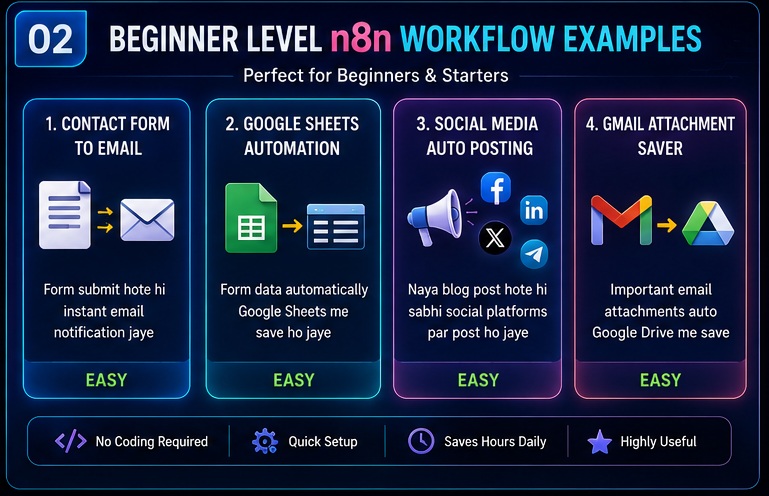
Example 1: Contact Form To Email Notification
Workflow Structure
Contact Form
↓
n8n
↓
Email Notification
Agar aap apna pehla automation banana chahte hain to simple workflows se start karna best approach hota hai. Contact form automation beginners ke liye perfect example hai. Detailed setup process samajhne ke liye hamari guide n8n Workflow Kaise Banaye Step by Step bhi zarur dekhein.
Real Use Case
Maan lijiye aapki website par contact form hai.
Jab bhi koi user form submit kare:
- Aapko instant email mile
- Team notify ho jaye
- Lead miss na ho
Ye sab automatically ho sakta hai.
Benefits
- Fast response time
- Better lead management
- Zero manual checking
Ye sabse beginner-friendly n8n Workflow Examples me se ek hai.
Example 2: Google Sheets Data Collection
Workflow Structure
Website Form
↓
Google Sheets
↓
Telegram Notification
Real Use Case
Website se aane wali har inquiry automatically Google Sheets me save ho sakti hai.
Saath hi Telegram ya email notification bhi mil sakta hai.
Benefits
- Organized records
- Easy tracking
- Better reporting
Agar aap student hain ya freelancer hain to ye workflow kaafi useful ho sakta hai.
Example 3: Blog To Social Media Automation
Content creators ke liye ye workflow bahut popular hai.
Workflow Structure
Blog Publish
↓
n8n
↓
↓
↓
Telegram
Real Use Case
Jab bhi website par naya article publish ho:
- Social media post automatically create ho jaye
- Telegram channel update ho jaye
- Audience instantly notify ho jaye
Benefits
- Time saving
- Consistent posting
- Better content promotion
Ye practical n8n Workflow Examples me se ek hai jo bloggers ko sabse zyada pasand aata hai.
Example 4: Gmail Attachment Saver
Workflow Structure
Gmail
↓
n8n
↓
Google Drive
Real Use Case
Har important email attachment automatically Google Drive me save ho sakti hai.
Benefits
- Better file management
- Automatic backups
- Easy organization
Intermediate Level n8n Workflow Examples
Ab hum thode advanced workflows dekhenge.
Ye workflows freelancers, agencies aur growing businesses ke liye useful hote hain.
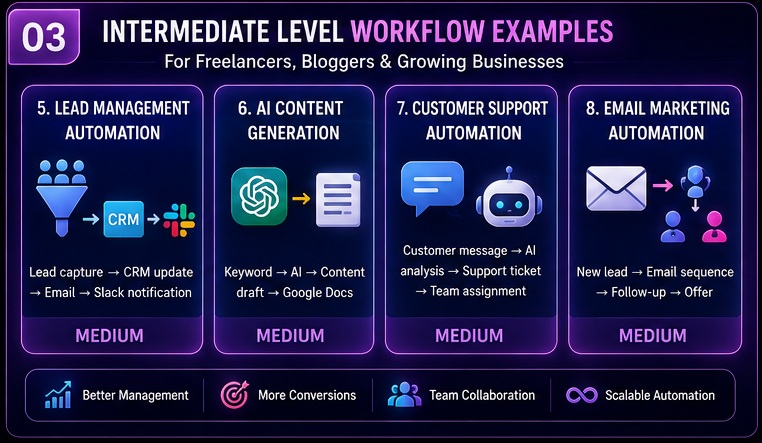
Example 5: Lead Management Automation
Workflow Structure
Lead Form
↓
CRM
↓
↓
Slack Notification
Real Use Case
Jab bhi nayi lead aaye:
- CRM update ho
- Welcome email jaye
- Sales team notify ho
Sab automatically.
Benefits
- Faster follow-ups
- Better conversion rates
- Improved sales process
Mere experience me agencies ke liye ye sabse practical n8n Workflow Examples me se ek hai.
Lead management workflows sirf productivity hi nahi badhate balki earning opportunities bhi create kar sakte hain. Aaj bahut se freelancers aur agencies automation services provide karke income generate kar rahe hain. Agar aap earning side explore karna chahte hain to n8n Se Paise Kaise Kamaye guide zarur padhein.
Example 6: AI Content Generation Workflow
AI automation ka ye sabse popular use case hai.
Workflow Structure
Keyword
↓
OpenAI
↓
Content Draft
↓
Google Docs
Real Use Case
Keyword enter karte hi:
- AI research kare
- Draft generate kare
- Google Docs me save kare
Benefits
- Faster content creation
- Better productivity
- Research assistance
Reality thodi alag hai un YouTube videos se jo ek click me perfect article ka promise karte hain.
Human editing fir bhi zaruri hoti hai.
AI-powered workflows create karte waqt language models aur AI APIs ko samajhna bhi important hota hai. Content generation, summarization aur research workflows ke piche ka technology stack samajhne ke liye OpenAI Platform Documentation ek useful resource ho sakta hai.
Example 7: Customer Support Workflow
Workflow Structure
Customer Message
↓
AI Analysis
↓
Ticket Creation
↓
Team Assignment
Real Use Case
Customer queries automatically categorize ho sakti hain.
Urgent tickets support team ko assign ho sakti hain.
Benefits
- Faster support
- Better customer experience
- Reduced manual effort
Example 8: Email Marketing Automation
Workflow Structure
Lead Capture
↓
Email Sequence
↓
Follow-Up
↓
Offer
Real Use Case
Naye subscribers ko automatically onboarding email series bhejna.
Benefits
- Better engagement
- Higher conversions
- Automated nurturing
Ye marketing-focused n8n Workflow Examples kaafi effective hote hain.
Advanced AI n8n Workflow Examples
Ab hum advanced level use cases dekhenge jahan AI aur automation ka combination real power dikhata hai.
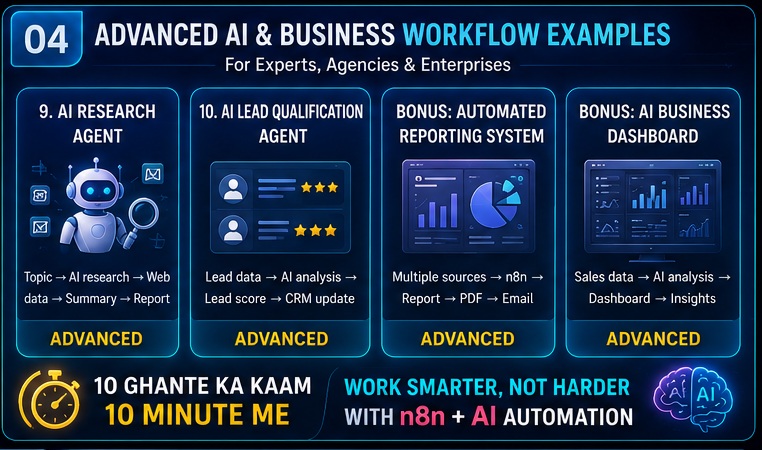
Example 9: AI Research Agent
Workflow Structure
Topic
↓
AI Research
↓
Web Data Collection
↓
Summary
↓
Report
Real Use Case
Aap topic enter karte hain.
System:
- Research karta hai
- Sources collect karta hai
- Summary create karta hai
- Report generate karta hai
Benefits
- Faster research
- Better insights
- Significant time savings
Ye advanced n8n Workflow Examples me rapidly popular ho raha hai.
Example 10: AI Lead Qualification Agent
Workflow Structure
Lead Data
↓
AI Analysis
↓
Lead Score
↓
CRM Update
Real Use Case
AI automatically identify kare:
- High-quality lead
- Medium-quality lead
- Low-priority lead
Sales team sirf best prospects par focus kare.
Benefits
- Better sales efficiency
- Higher conversion potential
- Smart lead prioritization
Ye enterprise-level n8n Workflow Examples me kaafi demand me hai.
Most Popular Apps Used In These Workflows
Common integrations include:
- Gmail
- Google Sheets
- OpenAI
- Slack
- Telegram
- Notion
- Airtable
- Discord
- Databases
- CRM Systems
Ye tools milkar powerful n8n Workflow Examples create karte hain.
Why AI Automation Is Growing So Fast
Traditional automation sirf tasks perform karti hai.
AI automation:
- Understand karti hai
- Analyze karti hai
- Prioritize karti hai
- Recommendations deti hai
Isi wajah se modern n8n Workflow Examples businesses aur creators dono ke liye valuable ban rahe hain.
Step-by-Step Guide: Apna Pehla n8n Workflow Kaise Banaye?
Agar aap pehli baar automation create kar rahe hain to ye simple process follow karein.
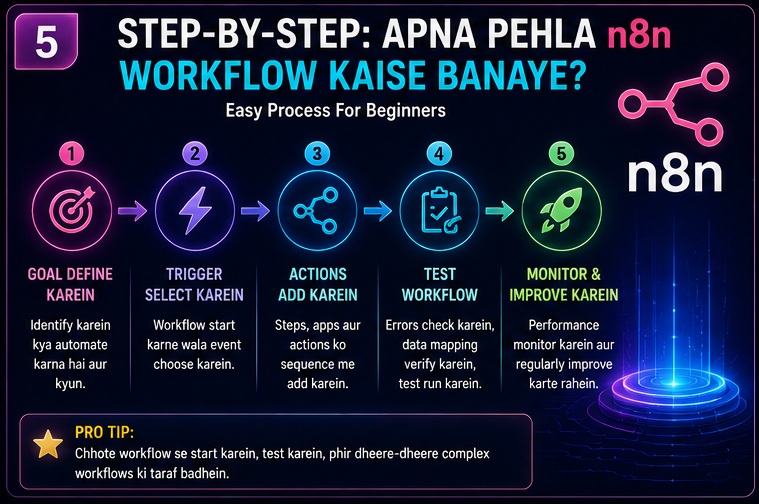
Step 1: Automation Goal Define Karein
Sabse pehle identify karein:
- Kya automate karna hai?
- Kitna time consume hota hai?
- Kitni baar repeat hota hai?
Example:
“Har lead ko manually CRM me add karna.”
Ye perfect automation candidate hai.
Step 2: Trigger Select Karein
Workflow hamesha kisi trigger se start hoti hai.
Examples:
- Form submission
- New email
- Telegram message
- New spreadsheet row
Step 3: Actions Add Karein
Trigger ke baad actions define karein.
Example:
Form Submit →
CRM Update →
Email →
Notification
Step 4: Test Workflow
Workflow live karne se pehle:
- Errors check karein
- Data mapping verify karein
- Notifications test karein
Step 5: Monitor Aur Improve Karein
Automation set karne ke baad bhi:
- Performance monitor karein
- Errors review karein
- Improvements implement karein
Mere experience me successful n8n Workflow Examples wahi hote hain jo regularly optimize kiye jate hain.
Workflow Complexity Comparison Table
| Workflow Type | Difficulty | Best For |
|---|---|---|
| Contact Form Automation | Easy | Beginners |
| Google Sheets Automation | Easy | Students |
| Social Media Posting | Easy | Bloggers |
| Lead Management | Medium | Freelancers |
| Email Marketing | Medium | Marketers |
| Customer Support | Medium | Businesses |
| AI Content Workflow | Medium | Content Creators |
| AI Research Agent | Advanced | Researchers |
| AI Lead Qualification | Advanced | Sales Teams |
| AI Business Dashboard | Advanced | Enterprises |
Real Business Scenarios
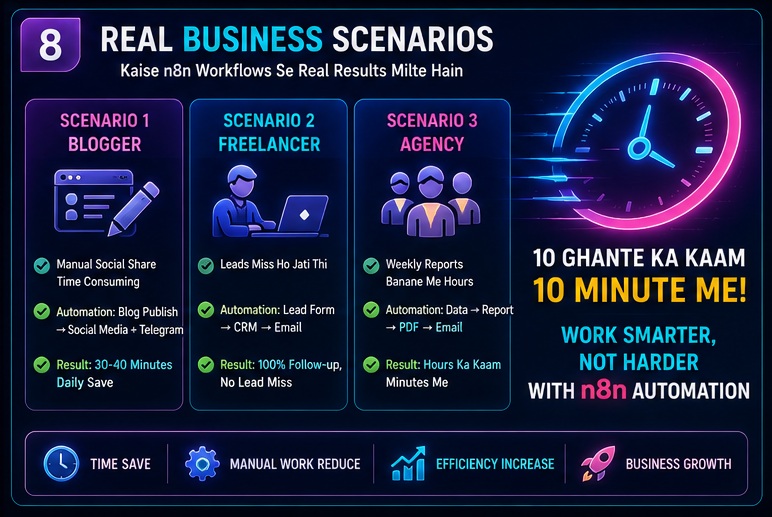
Scenario 1: Blogger
A blogger har article publish karne ke baad manually:
- Facebook post karta hai
- Telegram update karta hai
- LinkedIn share karta hai
Automation ke baad:
Article Publish →
n8n →
All Platforms
Result:
30–40 minutes ka daily work automate ho gaya.
Scenario 2: Freelancer
Freelancer ko daily leads milti hain.
Automation:
Lead Form →
CRM →
Welcome Email →
Task Creation
Result:
Koi lead miss nahi hoti.
Scenario 3: Agency
Marketing agency ko weekly reports bhejni hoti hain.
Automation:
Analytics →
Report →
PDF →
Result:
Hours ka manual reporting work minutes me complete.
Ye practical n8n Workflow Examples real-world value dikhate hain.
Common Mistakes Jo Beginners Karte Hain
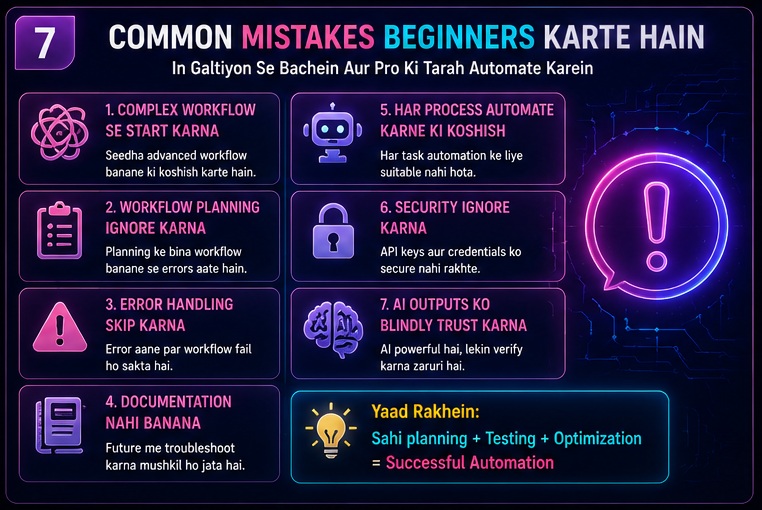
1. Complex Workflow Se Start Karna
Bahut log directly AI agents banana shuru kar dete hain.
Pehle simple workflows se start karein.
2. Workflow Planning Ignore Karna
Automation se pehle process mapping zaruri hai.
3. Error Handling Skip Karna
Agar workflow fail ho jaye to kya hoga?
Ye pehle define karein.
4. Documentation Nahi Banana
Future troubleshooting difficult ho sakti hai.
5. Har Process Automate Karne Ki Koshish
Har task automation ke liye suitable nahi hota.
6. Security Ignore Karna
Credentials aur API keys secure rakhna important hai.
7. AI Outputs Ko Blindly Trust Karna
AI helpful hai.
Lekin verification fir bhi zaruri hai.
Kya Beginners Ko n8n Seekhna Chahiye?
Mere hisab se beginners ke liye answer hai:
Haan.
Reason:
Automation future skill ban chuki hai.
Aaj jo log automation aur AI workflows seekh rahe hain unke paas future me competitive advantage ho sakta hai.
Agar aap:
- Student hain
- Blogger hain
- Freelancer hain
- Startup owner hain
To n8n Workflow Examples seekhna kaafi valuable investment ho sakta hai.
Future Of AI Automation
Automation industry rapidly evolve ho rahi hai.
Major trends:
- AI Agents
- Autonomous Workflows
- Business Intelligence
- Smart Automation
- AI Decision Systems
Isi wajah se future me n8n Workflow Examples aur advanced hone wale hain.
Automation platforms compare karna bhi important hai kyunki har tool ki capabilities alag hoti hain. Agar aap evaluate karna chahte hain ki n8n dusre automation tools ke mukable kaisa perform karta hai to hamari detailed guide n8n vs Zapier Complete Comparison zarur dekhein.
My Take
Agar mujhe practical perspective se bolna ho to n8n sirf ek tool nahi hai.
Ye ek skill hai.
Maine khud observe kiya hai ki jo log workflows aur automation ko samajh lete hain wo apna kaafi repetitive work eliminate kar dete hain.
Reality thodi alag hai un videos se jo “one-click automation” ka promise karti hain.
Successful automation ke liye:
- Planning
- Testing
- Optimization
zaruri hota hai.
Mere experience me sabse valuable n8n Workflow Examples wo hote hain jo daily repetitive tasks ko remove karte hain.
Agar workflow aapka har din 20–30 minute bachata hai to saal bhar me ye bahut bada impact create kar sakta hai.
Related Opportunities / Next Steps
Agar aap automation ecosystem ko deeply samajhna chahte hain to in topics ko bhi explore karein:
- n8n AI Software Kya Hai
- n8n AI Software Ke Fayde
- n8n AI Software Ke Nuksaan
- n8n vs Zapier
- n8n AI Agents
- AI Automation Ideas
- Automation Business Ideas
- n8n Se Paise Kaise Kamaye
Ye saare topics milkar aapki automation knowledge ko next level par le jayenge.
FAQs
1. Sabse Easy n8n Workflow Examples Kaun Se Hain?
Contact form automation, Google Sheets automation aur social media auto-posting beginners ke liye sabse easy workflows mani jati hain.
2. Kya n8n Workflow Examples Bina Coding Ke Ban Sakte Hain?
Haan.
Bahut si workflows bina coding ke create ki ja sakti hain. Advanced use cases me coding knowledge helpful ho sakti hai.
3. Kya Bloggers Ke Liye n8n Useful Hai?
Bilkul.
Content publishing, social media promotion aur research workflows automate ki ja sakti hain.
4. Kya Freelancers n8n Use Kar Sakte Hain?
Haan.
Lead management, client onboarding aur follow-up automation ke liye kaafi useful hai.
5. Sabse Powerful n8n Workflow Examples Kaun Se Hain?
AI Research Agents, AI Lead Qualification Systems aur Business Intelligence Dashboards advanced aur powerful workflows mani jati hain.
6. Kya n8n Free Hai?
Self-hosted version available hai, lekin hosting aur API costs aa sakti hain.
7. Kya AI Agents n8n Me Banaye Ja Sakte Hain?
Haan.
Research agents, support agents aur content agents create kiye ja sakte hain.
8. Kya n8n Future-Proof Skill Hai?
Automation aur AI adoption ko dekhte hue ye future-oriented skill mani ja sakti hai.
Conclusion
Agar poori guide ko summarize karein to n8n Workflow Examples sirf automation ideas nahi balki productivity improvement ke practical solutions hain.
Chahe aap beginner ho ya advanced user, workflows aapko:
- Time save karne
- Repetitive work eliminate karne
- Better efficiency achieve karne
- AI ko effectively use karne
me help kar sakti hain.
Sabse important baat ye hai ki automation ko chhote workflows se start karein aur gradually advanced systems tak move karein.
Isi approach se aap n8n Workflow Examples ka maximum benefit le sakte hain.
Final CTA
Agar aap AI aur automation ke future me interested hain to sirf ideas padhkar mat ruk jaiye.
Apna pehla workflow create kariye.
Automation experiment kariye.
AI integrations test kariye.
Aur gradually apne daily tasks ko automate karna shuru kariye.
Saath hi hamari related guides bhi zarur explore karein:
✅ n8n AI Software Kya Hai
✅ n8n AI Software Ke Fayde
✅ n8n AI Software Ke Nuksaan
✅ n8n vs Zapier Comparison
✅ n8n Se Paise Kaise Kamaye
Jitna jaldi aap automation skills build karenge, utna hi digital economy me advantage milega.
- Real Estate AI Photo Prompts: Create Stunning Property Images That Sell Faster (2026 Guide)
- Car Dealer AI Photo Prompts: Create Professional Vehicle Photos That Sell Faster (2026 Guide)
- Jewelry Photography AI Prompts: Luxury Product Images Without Expensive Equipment 2026 guide
- E-Commerce Product Photo AI Prompts: Amazon & Flipkart Style Images in Minutes (2026 Guide)
- Facebook Profile AI Photo Prompts: Upgrade Your Social Presence Instantly
Pingback: n8n vs Zapier (2026): Kya Zapier Sach Me Best Hai Ya n8n Behtar Choice Hai?
Pingback: n8n Se Blogging Automation Kaise Kare (Complete Guide 2026)
Pingback: Best n8n AI Automation Ideas (2026): 21 Powerful Workflows Jo Aapka Kaam 10x Faster Kar Sakte Hain
Pingback: n8n Workflow Kaise Kaam Karta Hai? 90% Beginners Yahin Confuse Ho Jaate Hain (2026 Guide)
Pingback: n8n Se Telegram Automation Kaise Kare? Step-by-Step Guide 2026
Pingback: n8n Nodes Samajh Nahi Aate? Trigger, Action Aur Webhook Ko 10 Minute Me Samjho (2026)