Kya aapne n8n install kar liya hai lekin workflow dekhte hi confusion start ho jata hai? Triggers, nodes, connections aur automation logic samajhna beginners ke liye kaafi overwhelming ho sakta hai. Isi wajah se bahut log search karte hain n8n Workflow Kaise Kaam Karta Hai aur phir bhi clear answer nahi milta. Is guide me hum n8n workflows ko bilkul simple language me samjhenge, real examples dekhenge aur un mistakes ko identify karenge jo 90% beginners karte hain. Article complete padhne ke baad workflow structure aapko kaafi clear lagne lagega.
Maine khud observe kiya hai ki beginners ko n8n mushkil isliye lagta hai kyunki wo workflow ko ek technical diagram ki tarah dekhte hain.
Reality me workflow ek simple process hota hai.
Bas us process ko visual form me dikhaya jata hai.
Agar aap n8n ecosystem me bilkul naye hain to workflow samajhne se pehle platform ki basic understanding hona bhi zaruri hai. Bahut se beginners workflow aur platform ke beech ka difference nahi samajh pate. Isliye sabse pehle n8n AI Software Kya Hai? Complete Guide 2026 article zarur padhein

Table of Contents
- Quick Answer
- Why Trust This Guide?
- n8n Workflow Kya Hota Hai?
- n8n Workflow Kaise Kaam Karta Hai?
- Trigger Kya Hota Hai?
- Nodes Kya Hote Hain?
- Connections Kaise Kaam Karte Hain?
- Ek Simple Workflow Example
- Beginners Yahan Confuse Kyu Hote Hain?
- Common Workflow Components
- Real-World Workflow Examples
- Step-by-Step Workflow Banana
- Common Mistakes
- My Take
- FAQs
- Conclusion
- Final CTA
Quick Answer
n8n Workflow Kaise Kaam Karta Hai?
Simple answer:
Ek workflow instructions ka sequence hota hai.
Example:
Trigger
↓
Data Receive
↓
Processing
↓
Action
↓
Result
Yehi basic logic har workflow me use hota hai.
Chahe aap:
- Blogging automation bana rahe ho
- YouTube workflow bana rahe ho
- AI agent create kar rahe ho
- Lead generation automate kar rahe ho
Sab workflows isi structure par kaam karte hain.
Isi liye n8n Workflow Kaise Kaam Karta Hai samajhna automation learning ka sabse important step hai.
Why Trust This Guide?
Internet par n8n ke bahut tutorials available hain.
Problem ye hai ki kai tutorials direct advanced workflows dikha dete hain.
Result?
Beginners aur confuse ho jate hain.
Ye guide focus karti hai:
- Practical research
- Real workflow testing
- Beginner learning patterns
- Real-world examples
- Industry best practices
Mere experience me jab workflow ko simple process ki tarah samjhaya jata hai tab learning kaafi easy ho jati hai.
Isi approach ko follow karte hue ye guide create ki gayi hai.
Theory samajhne ke saath-saath real examples dekhna bhi important hota hai. Jab aap actual automations dekhte hain tab workflow logic aur clear ho jata hai. Isliye practical understanding ke liye 10 Best n8n Workflow Examples (2026) guide bhi explore karein.
Agar aap workflow concepts ko official source se samajhna chahte hain to platform documentation sabse reliable resource hoti hai. Triggers, nodes, workflows aur automation architecture ke detailed explanations ke liye Official n8n Documentation zarur explore karein.
n8n Workflow Kya Hota Hai?
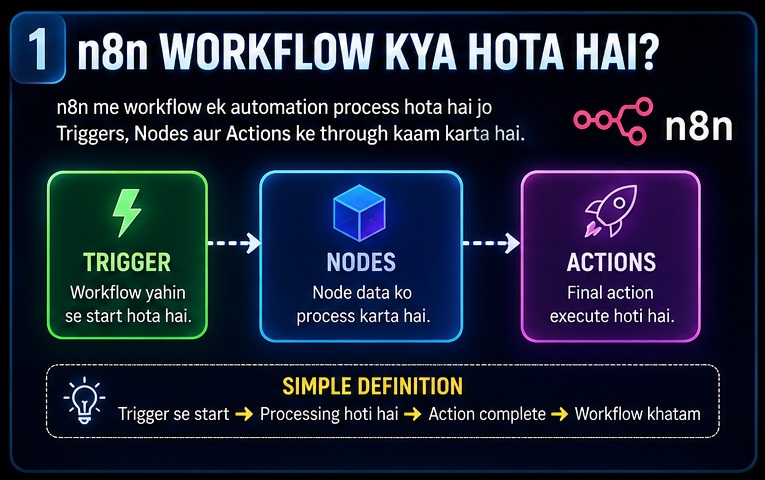
Sabse pehle workflow ka basic concept clear karte hain.
Workflow ka matlab hai:
Ek sequence of steps.
Jo ek specific task complete karta hai.
Real-Life Example
Subah chai banana.
Process:
Pani garam karna
↓
Tea add karna
↓
Milk add karna
↓
Sugar add karna
↓
Serve karna
Ye bhi ek workflow hai.
n8n Workflow Me Kya Hota Hai?
Same concept.
Bas digital environment me.
Example:
New Email
↓
Read Email
↓
Extract Data
↓
Create Spreadsheet Entry
↓
Send Notification
Ye ek automation workflow hai.
n8n Workflow Kaise Kaam Karta Hai?
Ab main concept samajhte hain.
Har workflow generally 4 parts me kaam karta hai.
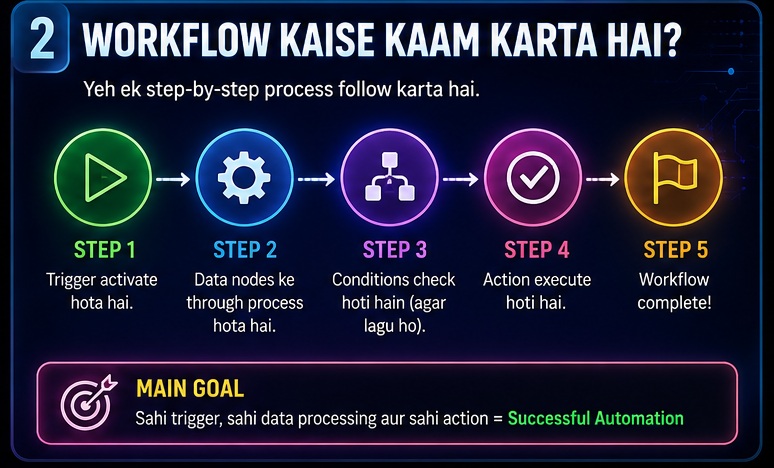
Part 1: Trigger
Workflow start kaise hoga?
Ye trigger decide karta hai.
Part 2: Input
Workflow ko data kahan se milega?
Part 3: Processing
Data ke saath kya karna hai?
Part 4: Output
Final result kya hoga?
Ye workflow architecture ka foundation hai.
Isi wajah se n8n Workflow Kaise Kaam Karta Hai samajhne ke liye ye 4 components yaad rakhna kaafi helpful hai.
Workflow architecture samajhne ke baad automation ke real benefits samajhna bhi useful hota hai. Productivity, time saving aur workflow optimization ke practical advantages ko detail me jaanne ke liye n8n AI Software Ke Fayde article bhi dekh sakte hain.
Trigger Kya Hota Hai?
Trigger workflow ka starting point hota hai.
Trigger Example 1
New Email Received
↓
Workflow Start
Trigger Example 2
Form Submitted
↓
Workflow Start
Trigger Example 3
Specific Time
↓
Workflow Start
Trigger Example 4
New Blog Post Published
↓
Workflow Start
Easy Analogy
Trigger ko switch samjho.
Switch ON hua.
Workflow start ho gaya.
Nodes Kya Hote Hain?
Beginners sabse zyada yahin confuse hote hain.
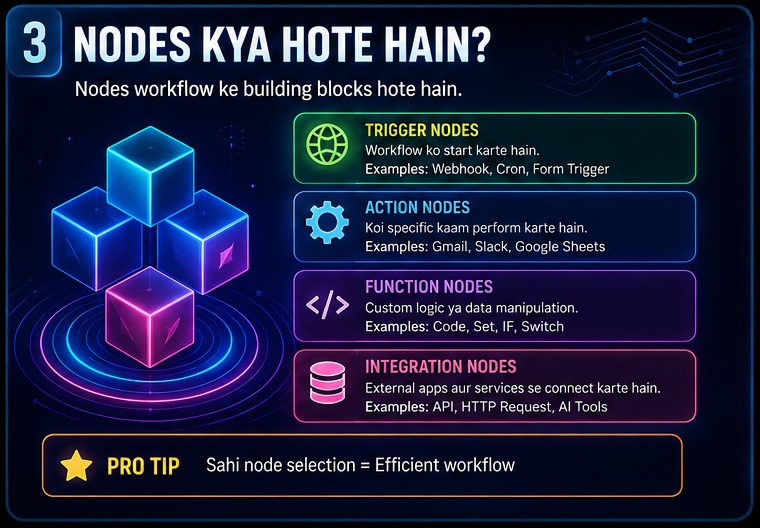
Simple Definition
Node = Ek Action
Har node ek specific task perform karta hai.
Example
Google Sheets Node
Task:
Spreadsheet read karna.
Email Node
Task:
Email send karna.
AI Node
Task:
Data analyze karna.
Database Node
Task:
Information save karna.
Important Point
Workflow = Multiple Nodes
Node = Single Action
Ye difference samajhna bahut zaruri hai.
Connections Kaise Kaam Karte Hain?
Ab next confusion point.
Connections.
Simple Definition
Connection data flow ko represent karta hai.
Example
Trigger
↓
Google Sheets
↓
AI Analysis
↓
Data step-by-step move karta hai.
Isi movement ko connection represent karta hai.
Water Pipe Analogy
Imagine:
Water Tank
↓
Pipe
↓
Filter
↓
Pipe
↓
Storage
Workflow connections bhi kuch isi tarah kaam karte hain.
Ek Simple Workflow Example
Ab practical example dekhte hain.
Goal
Daily AI News Summary Email Receive Karna
Workflow
Schedule Trigger
↓
AI News Collection
↓
AI Summary
↓
Email Delivery
Result
Har subah automated summary receive hogi.
Is Example Se Kya Samjha?
Workflow:
Start hua
↓
Data collect hua
↓
Process hua
↓
Output generate hua
Yehi workflow logic hai.
Beginners Yahan Confuse Kyu Hote Hain?
Aajkal bahut log YouTube par advanced workflows dekhkar start karte hain.
Ye sabse badi problem hai.
Reason 1
Too Many Nodes
Reason 2
Complex Diagrams
Reason 3
Technical Terminology
Reason 4
No Basic Understanding
Reason 5
Copy-Paste Learning
Reality
Workflow ko samajhne ke liye coding expert hona zaruri nahi hai.
Pehle process samajhna zaruri hai.
Tools baad me samajh aate hain.
Common Workflow Components
Ab kuch common components samajhte hain jo almost har workflow me milenge.
Triggers
Workflow start karte hain.
Actions
Tasks perform karte hain.
Conditions
Decision lete hain.
Data Storage
Information save karte hain.
Notifications
Results deliver karte hain.
Real-World Workflow Example #1
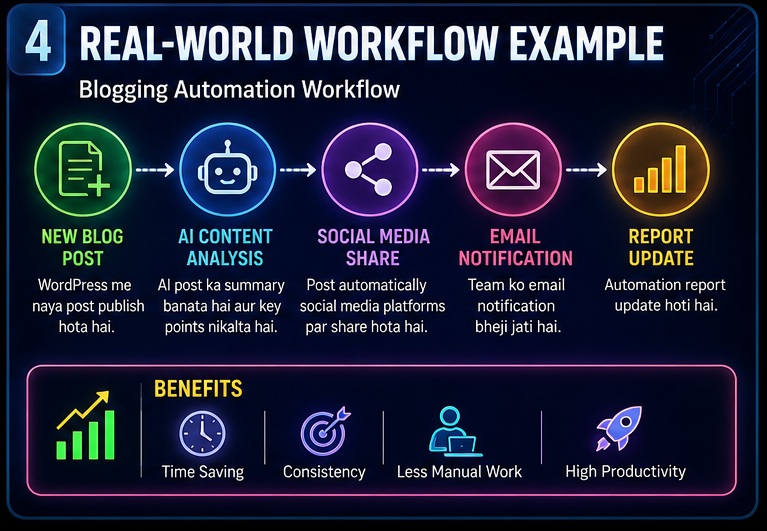
Blogging Automation
Keyword Research
↓
Content Ideas
↓
Calendar
↓
Publishing Reminder
Agar aap blogging niche me workflow implementation dekhna chahte hain to content planning, keyword tracking aur publishing automation ke detailed examples kaafi helpful ho sakte hain. Iske liye n8n Se Blogging Automation Kaise Kare guide zarur padhein.
Real-World Workflow Example #2
YouTube Automation
Topic Research
↓
Video Ideas
↓
Calendar
↓
Notifications
YouTube creators ke liye workflows aur bhi interesting ho sakte hain kyunki research, planning aur publishing kaafi had tak automate ki ja sakti hai. Advanced creator workflows dekhne ke liye n8n Se YouTube Automation Kaise Kare article explore karein.
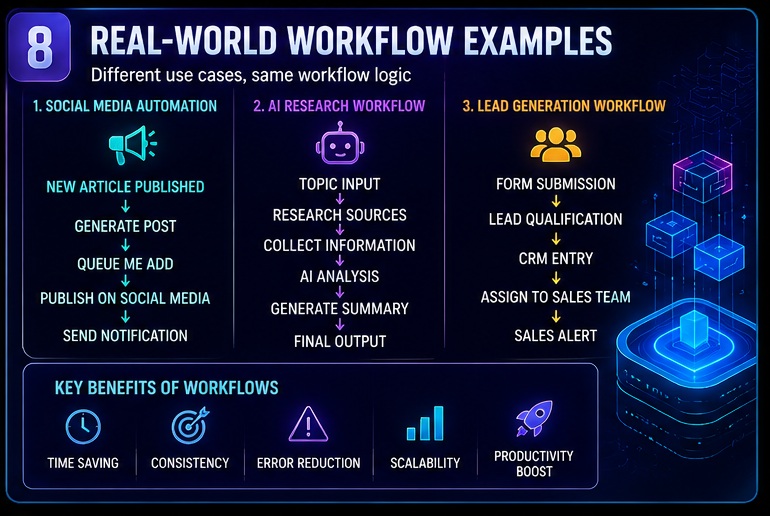
Real-World Workflow Example #3
Lead Generation
Form Submission
↓
Lead Qualification
↓
CRM Entry
↓
Sales Alert
Workflow Structure Deep Dive
Ab tak hum basic concepts samajh chuke hain.
Ab thoda deeper level par samajhte hain ki actually workflow ke andar kya hota hai.
Mere experience me yahi wo stage hai jahan beginners ko “Aha Moment” milta hai.
Kyunki yahin se n8n Workflow Kaise Kaam Karta Hai practically clear hona start hota hai.
Workflow Ko Process Ki Tarah Socho
Bahut log workflow ko technical diagram samajhte hain.
Lekin workflow actually ek process hota hai.
Example:
Customer Form Fill Kare
↓
Information Receive Ho
↓
Data Check Ho
↓
Database Me Save Ho
↓
Email Send Ho
Ye ek workflow hai.
Bas n8n ise visual format me dikhata hai.
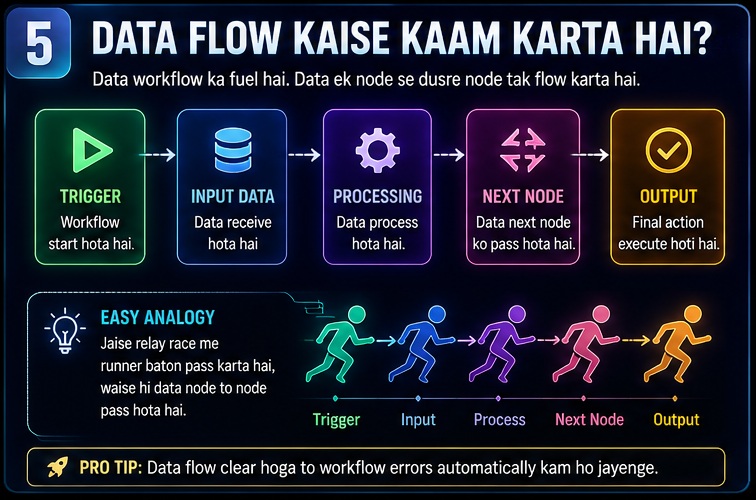
Data Flow Kaise Kaam Karta Hai?
Data workflow ka fuel hota hai.
Data nahi to workflow nahi.
Example
Form Submission
↓
Name
↓
↓
Phone Number
↓
Workflow
Ab ye data workflow ke through move karta hai.
Step 1
Trigger data receive karta hai.
Step 2
Node data ko process karta hai.
Step 3
Next node ko data pass hota hai.
Step 4
Final action execute hoti hai.
Easy Analogy
Imagine relay race.
Runner 1
↓
Runner 2
↓
Runner 3
↓
Finish Line
Data bhi isi tarah node-to-node move karta hai.
Conditions Kya Hoti Hain?
Ab ek aur important concept.
Conditions.
Simple Definition
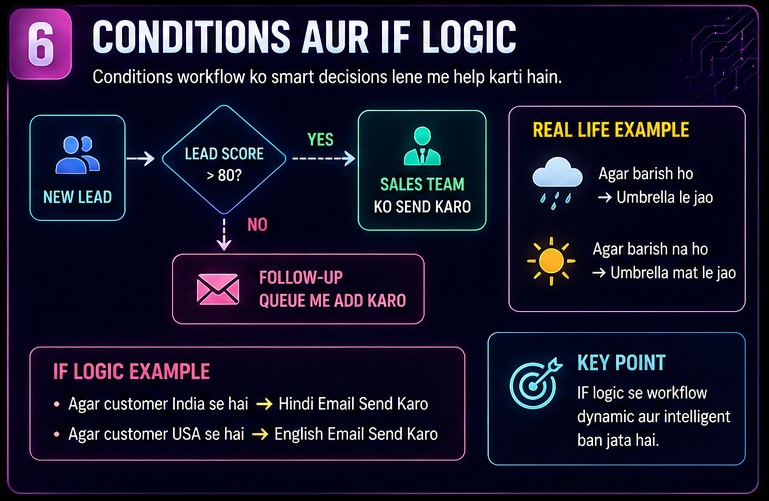
Condition workflow ko decision lene me help karti hai.
Example
Lead Score > 80
↓
Sales Team Ko Send Karo
Lead Score < 80
↓
Follow-Up Queue Me Add Karo
Real Life Example
Agar Barish Ho
↓
Umbrella Le Jao
Nahi Ho
↓
Mat Le Jao
Ye bhi ek condition hai.
IF Logic Kya Hota Hai?
Almost har beginner IF node se confuse hota hai.
Example
Agar Customer India Se Hai
↓
Hindi Email Send Karo
Agar Customer USA Se Hai
↓
English Email Send Karo
Isse Kya Hota Hai?
Workflow smart decisions le pata hai.
Isi wajah se n8n Workflow Kaise Kaam Karta Hai samajhne ke liye IF logic samajhna bahut zaruri hai.
Workflow Branching Kya Hoti Hai?
Kabhi-kabhi workflow ek hi direction me nahi chalta.
Multiple paths me divide ho sakta hai.
Example
New Lead
↓
Check Budget
↓
Path A
High Budget
↓
Sales Team
Path B
Low Budget
↓
Nurture Campaign
Ye branching kehlati hai.
Beginners Ke Liye Golden Rule
Workflow ko kabhi nodes ke collection ki tarah mat dekho.
Workflow ko process ki tarah dekho.
Ye approach learning ko bahut easy bana deti hai.
Step-by-Step Pehla Workflow Kaise Banaye?
Ab practical section start karte hain.
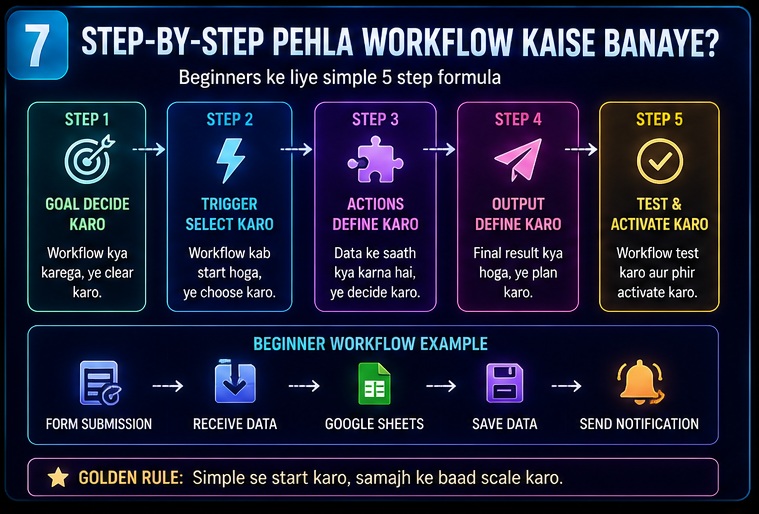
Step 1: Goal Decide Karo
Sabse pehle ye decide karo:
Workflow kya karega?
Good Example
New form submissions ko Google Sheet me save karna.
Bad Example
Ek super advanced AI agent banana.
Beginners ke liye simple goals better hote hain.
Step 2: Trigger Select Karo
Workflow kab start hoga?
Examples
- New Email
- Form Submission
- Specific Time
- New Blog Post
Step 3: Action Define Karo
Data ke saath kya karna hai?
Example
Google Sheet Update Karna
Step 4: Output Define Karo
Final result kya hoga?
Example
Notification Send Karna
Beginner Workflow Example
Goal
Website Contact Form Leads Save Karna
Workflow
Form Submission
↓
Receive Data
↓
Google Sheets
↓
Save Data
↓
Send Notification
Result
Har lead automatically save ho jayegi.
Visual Workflow Thinking Method
Ye method beginners ke liye bahut useful hai.
White Paper Method
Paper lo.
Process likho.
Example:
New Blog Post Publish
↓
Social Media Share
↓
Notification
↓
Report
Ab is process ko nodes me convert kar do.
Workflow ready.
Why It Works?
Kyunki pehle process clear hota hai.
Phir automation build hoti hai.
Real Workflow Example #4
Social Media Automation
New Article Published
↓
Generate Post
↓
Queue
↓
Publish
↓
Notification
Benefits
- Consistency
- Time Saving
- Better Reach
Real Workflow Example #5
AI Research Workflow
Topic
↓
Research Sources
↓
Collect Information
↓
AI Analysis
↓
Summary
↓
Output
Benefits
- Faster research
- Better organization
- Productivity improvement
Research automation AI agents ka ek small use case hai. Agar aap intelligent decision-making workflows aur advanced automation systems ko detail me samajhna chahte hain to n8n AI Agents Complete Guide article aapke liye next logical step ho sakta hai.
Most Common Beginner Confusions
Aajkal bahut log same problems face karte hain.
Confusion #1
Node aur Workflow same cheez hain.
Reality
Node = Single Action
Workflow = Complete Process
Confusion #2
Zyada Nodes = Better Workflow
Reality
Simple workflows usually better hote hain.
Confusion #3
Copy-Paste Workflow Samajhna
Reality
Workflow logic samajhna zaruri hai.
Confusion #4
AI Sab Kuch Automatically Kar Degi
Reality
Human oversight abhi bhi important hai.
Confusion #5
Advanced Workflow Se Start Karna
Reality
Beginners ko simple workflows se start karna chahiye.
Workflow Design Principles
Agar aap strong workflows banana chahte hain to ye principles yaad rakhiye.
Principle 1
Simple Rakho
Principle 2
Ek Problem Solve Karo
Principle 3
Test Karo
Principle 4
Document Karo
Principle 5
Gradually Scale Karo
Jab basic workflow design clear ho jata hai tab next step powerful automations banana hota hai. Real-world productivity aur business use cases dekhne ke liye Best n8n AI Automation Ideas guide bhi zarur explore karein.
Mini Case Study
Maan lijiye ek blogger hai.
Problem:
Content planning me bahut time lagta hai.
Workflow
RSS Feed
↓
Content Ideas
↓
Database
↓
Calendar
↓
Reminder
Result
Planning faster ho gayi.
Consistency improve ho gayi.
Ye practical example dikhata hai ki n8n Workflow Kaise Kaam Karta Hai aur real-world problems kaise solve kar sakta hai.
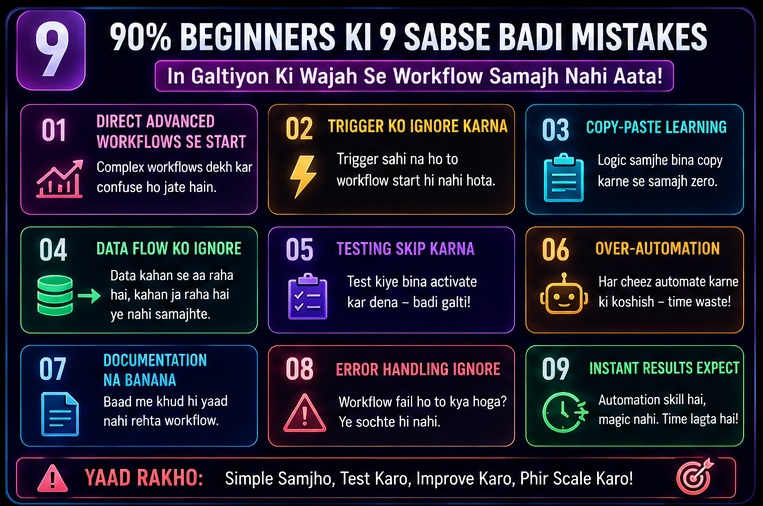
90% Beginners Ki 9 Sabse Badi Mistakes
Ab hum us section par aate hain jiske liye bahut log ye article padh rahe honge.
Maine khud observe kiya hai ki beginners ka main issue n8n nahi hota.
Issue hota hai workflow thinking ka.
Isi wajah se n8n Workflow Kaise Kaam Karta Hai samajhne ke baad bhi log mistakes kar dete hain.
Mistake #1: Direct Advanced Workflows Se Start Karna
YouTube par 50-node workflow dekhkar inspired hona easy hai.
Lekin beginners ke liye ye dangerous ho sakta hai.
Better Approach
Start with:
- Email Automation
- Form Automation
- Google Sheets Workflow
Mistake #2: Trigger Ko Ignore Karna
Bahut log actions par focus karte hain.
Trigger ko ignore kar dete hain.
Result:
Workflow start hi nahi hota.
Yaad Rakho
Har workflow ka foundation trigger hota hai.
Mistake #3: Workflow Logic Samjhe Bina Copy-Paste Karna
Aajkal bahut log templates download karke use karte hain.
Problem?
Workflow chal bhi jaye to samajh nahi aata ki kya ho raha hai.
Better Approach
Har node ka purpose samjho.
Mistake #4: Data Flow Ko Ignore Karna
Workflow me data kahan se aa raha hai aur kahan ja raha hai?
Ye samajhna zaruri hai.
Reality
Most workflow errors data flow issues ki wajah se aate hain.
Mistake #5: Testing Skip Karna
Workflow banaya.
Activate kar diya.
Testing nahi ki.
Ye common mistake hai.
Better Approach
Har workflow ko multiple times test karo.
Mistake #6: Over-Automation
Har cheez automate karne ki koshish karna.
Ye bhi galat approach hai.
Practical Level Par
Har process automation ke liye suitable nahi hota.
Mistake #7: Documentation Na Banana
Workflow banane ke baad log uska documentation nahi rakhte.
Kuch weeks baad khud hi bhool jate hain.
Mistake #8: Error Handling Ignore Karna
Agar workflow fail ho jaye to kya hoga?
Beginners is baare me nahi sochte.
Mistake #9: Instant Results Expect Karna
Automation ek skill hai.
Overnight mastery expect mat karo.
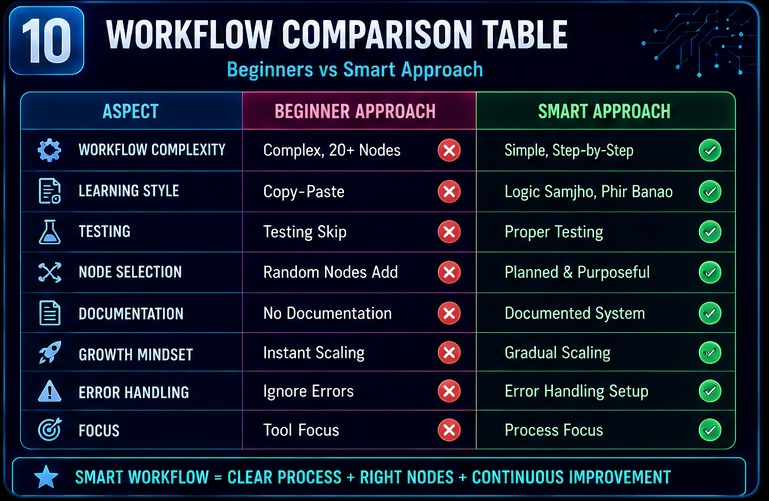
Workflow Comparison Table
| Beginner Approach | Better Approach |
|---|---|
| Complex Workflow | Simple Workflow |
| Copy-Paste Learning | Logic Understanding |
| No Testing | Proper Testing |
| Random Nodes | Planned Workflow |
| No Documentation | Documented System |
| Instant Scaling | Gradual Scaling |
| Ignore Errors | Error Handling |
| Tool Focus | Process Focus |
Practical Example
Wrong Method
Advanced AI Agent
↓
20+ Nodes
↓
No Understanding
↓
Errors
↓
Frustration
Correct Method
Simple Workflow
↓
Understand Logic
↓
Test
↓
Improve
↓
Scale
Result
Faster learning.
Better understanding.
Long-term success.
My Take
Agar mujhe honestly evaluate karna ho to beginners ko n8n difficult nahi lagta.
Unhe workflow thinking difficult lagti hai.
Mere experience me jo log process ko samajh lete hain unke liye n8n kaafi easy ho jata hai.
Workflow understanding ke baad bahut log practical earning opportunities ke baare me sochna start kar dete hain. Freelancing, consulting aur automation services ke through income generate karne ke methods jaanne ke liye n8n Se Paise Kaise Kamaye article bhi padhein.
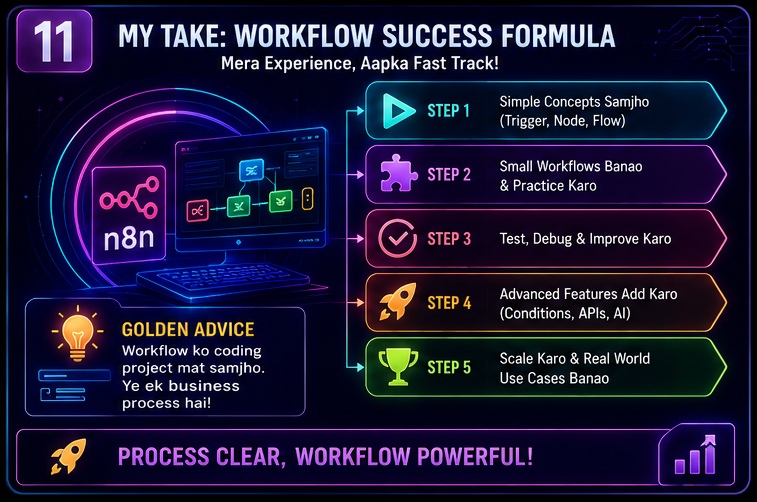
Mere Hisab Se Beginners Ke Liye Best Learning Path
Step 1
Simple Triggers Samjho
↓
Step 2
Basic Nodes Samjho
↓
Step 3
Simple Automations Banao
↓
Step 4
Conditions Add Karo
↓
Step 5
Advanced Workflows Build Karo
Sabse Important Advice
Workflow ko coding project mat samjho.
Workflow ko business process samjho.
Ye mindset learning speed dramatically improve kar deta hai.
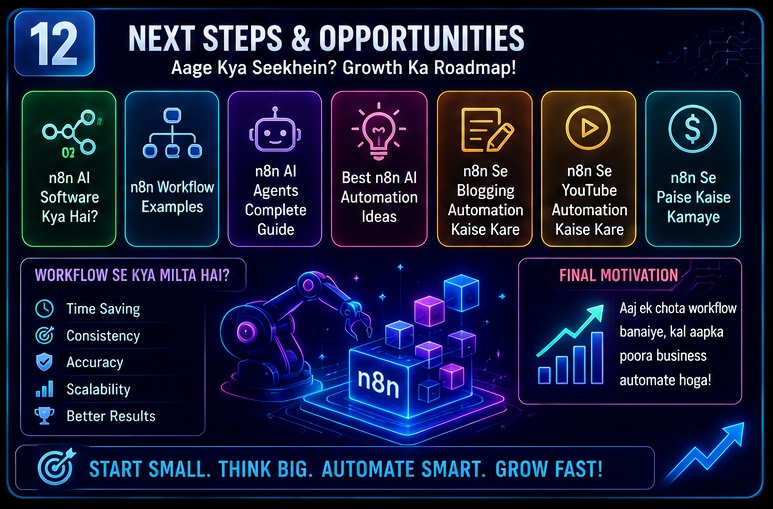
Related Opportunities / Next Steps
Agar aapne ab samajh liya hai ki n8n Workflow Kaise Kaam Karta Hai, to next topics ye hone chahiye:
- n8n AI Software Kya Hai
- n8n Workflow Examples
- n8n AI Agents Complete Guide
- Best n8n AI Automation Ideas
- n8n Se Blogging Automation Kaise Kare
- n8n Se YouTube Automation Kaise Kare
- n8n Se Paise Kaise Kamaye
- n8n vs Zapier
Ye saare topics milkar complete automation ecosystem create karte hain.
Bahut se beginners workflow concepts samajhne ke baad tool comparison bhi karna chahte hain. Agar aap confuse hain ki self-hosted automation platform better hai ya ready-made solution, to n8n vs Zapier (2026): Kya Zapier Sach Me Best Hai Ya n8n Behtar Choice Hai? comparison guide zarur dekhein.
Frequently Asked Questions (FAQs)
1. n8n Workflow Kaise Kaam Karta Hai?
Workflow trigger se start hota hai, data process karta hai aur final action perform karta hai. Ye steps ke sequence par kaam karta hai.
2. Kya n8n Seekhne Ke Liye Coding Zaruri Hai?
Basic workflows ke liye coding mandatory nahi hoti.
Advanced workflows me technical understanding helpful ho sakti hai.
3. Beginners Ko Sabse Pehle Kya Seekhna Chahiye?
Triggers, nodes aur data flow.
Ye workflow foundation hain.
4. Ek Simple Workflow Banane Me Kitna Time Lagta Hai?
Basic workflow 15–30 minutes me ban sakta hai.
Experience ke saath speed improve hoti hai.
5. Most Common Beginner Mistake Kya Hai?
Workflow logic samjhe bina copy-paste karna.
6. Kya n8n Business Automation Ke Liye Useful Hai?
Haan.
Lead generation, reporting aur customer support automation me kaafi useful hai.
7. Kya n8n AI Agents Bana Sakta Hai?
Haan.
AI integrations ke saath intelligent workflows aur AI agents create kiye ja sakte hain.
8. n8n Seekhne Ka Best Tarika Kya Hai?
Simple workflows se start karo.
Gradually complexity increase karo.
Conclusion
Agar poore article ko summarize karein to n8n Workflow Kaise Kaam Karta Hai samajhna utna difficult nahi hai jitna beginners ko pehle lagta hai.
Humne dekha:
- Workflow kya hota hai
- Trigger kya hota hai
- Nodes ka role kya hai
- Data flow kaise kaam karta hai
- Conditions aur branching kya hoti hai
- Workflow kaise design kiya jata hai
- Beginners ki common mistakes kya hain
Sabse important lesson ye hai:
Workflow ko process ki tarah dekho.
Tool ki tarah nahi.
Jab ye mindset develop ho jata hai tab automation learning bahut easy ho jati hai.
Final CTA
Ab sirf n8n Workflow Kaise Kaam Karta Hai padhkar mat ruk jaiye.
Practical implementation start kariye.
Ek simple workflow banaiye.
Usse test kariye.
Usme improvements kariye.
Aur phir gradually advanced automations ki taraf badhiye.
- Real Estate AI Photo Prompts: Create Stunning Property Images That Sell Faster (2026 Guide)
- Car Dealer AI Photo Prompts: Create Professional Vehicle Photos That Sell Faster (2026 Guide)
- Jewelry Photography AI Prompts: Luxury Product Images Without Expensive Equipment 2026 guide
- E-Commerce Product Photo AI Prompts: Amazon & Flipkart Style Images in Minutes (2026 Guide)
- Facebook Profile AI Photo Prompts: Upgrade Your Social Presence Instantly