Kabhi aapne koi perfect photo click ki ho lekin background ne poori image kharab kar di ho? Shayad piche unwanted log the, room messy tha ya location professional nahi lag rahi thi. Isi problem ka modern solution hai AI Photo Background Change Prompts. Aaj AI tools ki help se aap kisi bhi photo ka background seconds me remove, replace ya completely transform kar sakte hain. Sabse interesting baat ye hai ki professional editing skills ke bina bhi studio, luxury, travel ya cinematic backgrounds create kiye ja sakte hain. Is guide me hum AI Photo Background Change Prompts ko detail me samjhenge.
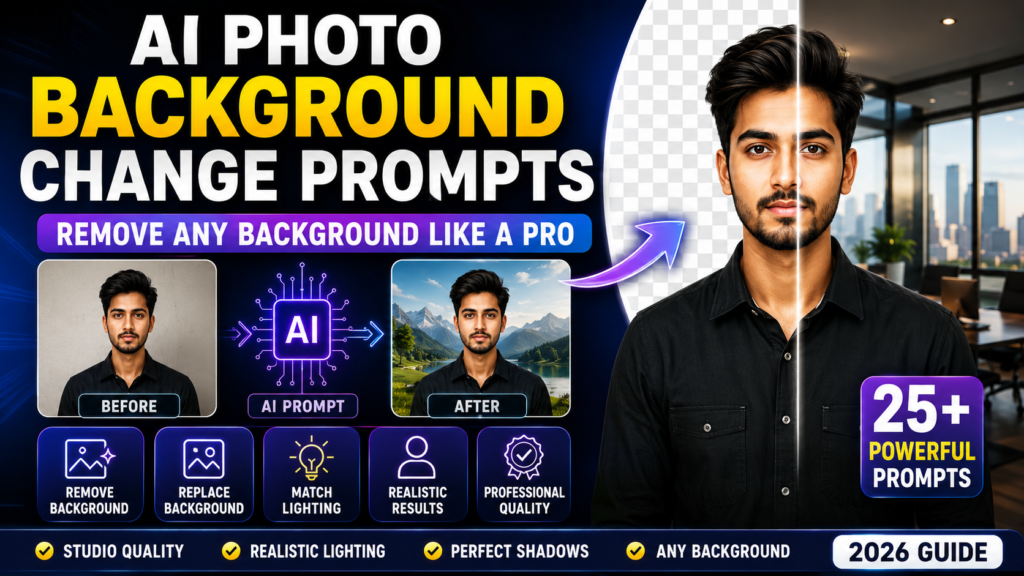
Table of Contents
- Quick Answer
- Why Trust This Guide?
- What Are AI Photo Background Change Prompts?
- Why Background Matters in Photos
- Benefits of AI Background Editing
- Best AI Tools for Background Changes
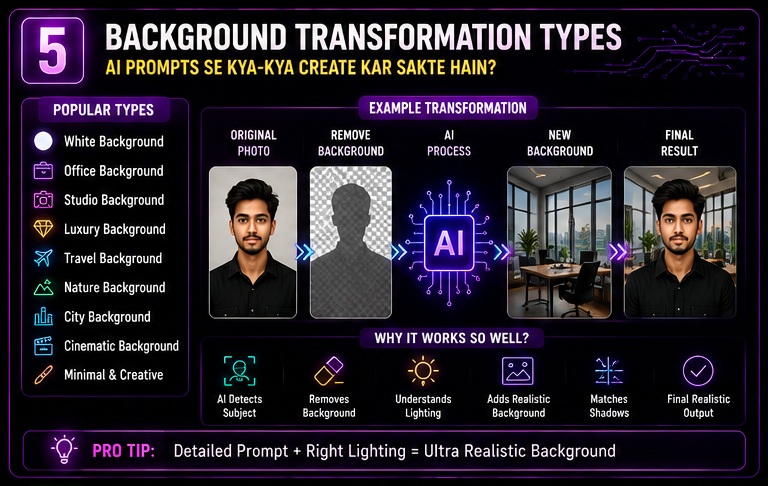
- Types of Background Transformations
- 25 Powerful AI Photo Background Change Prompts
- Practical Use Cases
- Part 1 Summary
Quick Answer
AI Photo Background Change Prompts detailed instructions hote hain jo AI tools ko guide karte hain taaki image ka existing background remove karke new professional background add kiya ja sake.
Example:
Basic Prompt:
“Change the background.”
Professional Prompt:
“Remove the existing background and replace it with a luxury modern office environment, realistic lighting, natural shadows, depth of field and professional portrait quality.”
Professional prompt usually significantly better results produce karta hai.
Why Trust This Guide?
Ye guide based hai:
- Practical AI tool testing
- Real-world editing workflows
- Background replacement experiments
- Industry trends
- Professional photography concepts
Maine khud observe kiya hai ki AI background editing aaj photo enhancement ka sabse popular use case ban chuka hai.
What Are AI Photo Background Change Prompts?
Simple language me:
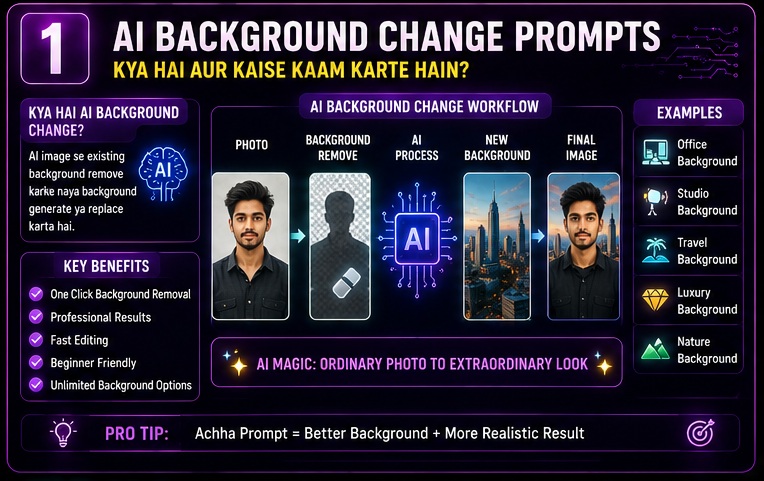
AI Photo Background Change Prompts instructions hote hain jo AI tools ko batate hain ki photo ka background kaise replace karna hai.
Ye prompts help karte hain:
- Background remove karne me
- New scene create karne me
- Lighting match karne me
- Realistic shadows generate karne me
- Professional appearance create karne me
Result:
Ordinary Photo → Professional Photo
Isi transformation ko optimize karne ke liye AI Photo Background Change Prompts use kiye jate hain.
Agar aap AI editing ki complete foundation samajhna chahte hain, to AI Photo Editing Prompts guide zarur explore karein. Ye hamari pillar guide hai jisme prompt writing frameworks, image enhancement techniques aur professional AI photo editing workflows detail me explain kiye gaye hain. AI Photo Background Change Prompts ko effectively use karne ke liye ye strongest starting point hai.
Why Background Matters in Photos
Bahut log sirf subject par focus karte hain.
Reality thodi alag hai.
Background bhi image quality ka major factor hota hai.
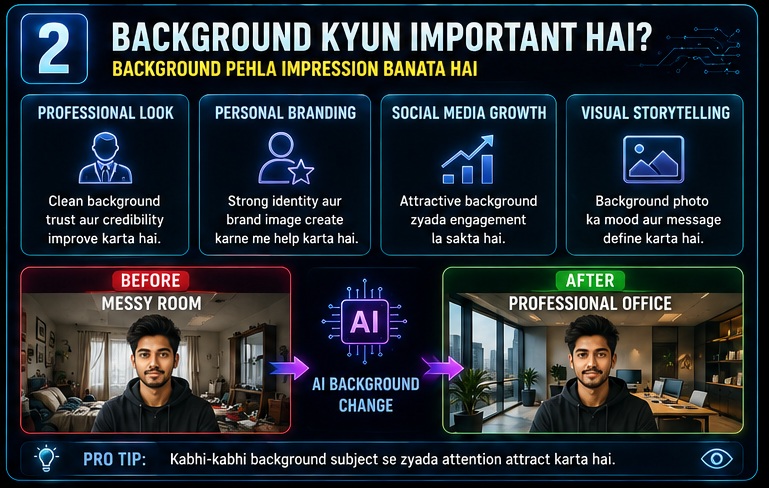
First Impression
Background immediately attention capture karta hai.
Professional Appearance
Clean background trust improve kar sakta hai.
Visual Storytelling
Background image ka mood define karta hai.
Branding
Creators aur businesses ke liye background identity build karta hai.
Social Media Performance
Attractive backgrounds engagement improve kar sakte hain.
Benefits of AI Background Editing
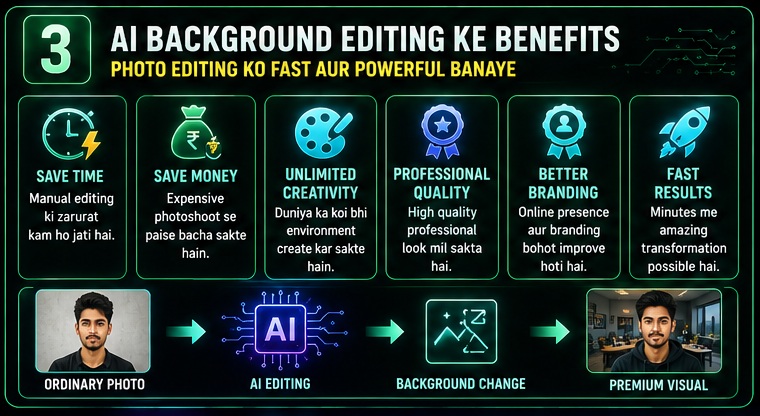
AI Photo Background Change Prompts multiple benefits provide karte hain.
Professional background replacement me lighting ka role bahut important hota hai. Isi liye Studio Lighting AI Photo Prompts article bhi helpful resource ho sakta hai. Is guide me lighting setups aur portrait enhancement techniques explain ki gayi hain jo background replacement ko aur realistic bana sakti hain.
Time Saving
Manual editing ki requirement reduce ho sakti hai.
Cost Effective
Expensive photoshoots avoid kiye ja sakte hain.
Unlimited Creativity
Almost any environment create kiya ja sakta hai.
Better Visual Quality
Professional appearance achieve ki ja sakti hai.
Fast Results
Minutes me transformations possible hain.
Best AI Tools for Background Changes
Agar aap AI Photo Background Change Prompts use karna chahte hain to ye tools useful ho sakte hain.
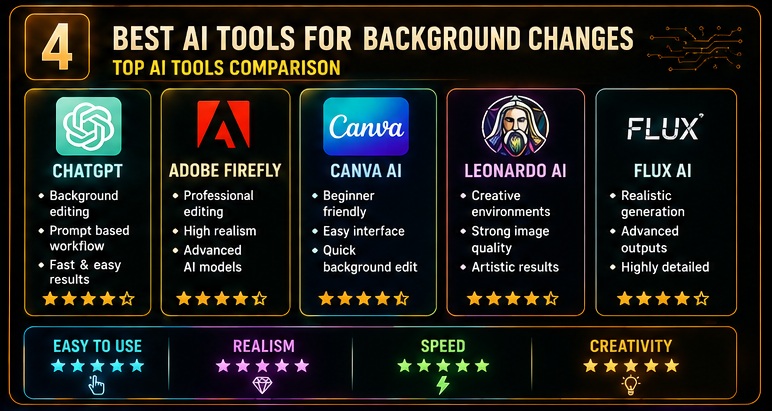
ChatGPT Image Editing
Quick background replacement ke liye useful.
Adobe Firefly
Professional editing workflows.
AI image editing aur creative background generation ke latest trends ko samajhne ke liye Adobe Firefly ke official learning resources explore kar sakte hain. Yahan AI-assisted image editing aur generative design workflows ke practical examples milte hain.
Canva AI
Beginner-friendly platform.
Leonardo AI
Creative background generation.
Flux AI
Highly realistic scene generation.
Pixlr AI
Fast editing tasks ke liye useful.
Types of Background Transformations
AI Photo Background Change Prompts multiple styles support karte hain.
White Background
Professional use cases.
Office Background
Business portraits.
Studio Background
Professional photography look.
Luxury Background
Premium social media content.
Travel Background
Vacation aesthetics.
Nature Background
Outdoor appearance.
City Background
Urban creator style.
Cinematic Background
Movie-like visuals.
Fantasy Background
Creative transformations.
Minimalist Background
Clean modern look.
Luxury visual branding aur premium social media aesthetics ko samajhne ke liye Luxury Lifestyle AI Photo Prompts guide bhi useful hai. Is article me luxury interiors, premium environments aur aspirational visual styles cover kiye gaye hain jo background replacement projects me directly use ho sakte hain.
25 Powerful AI Photo Background Change Prompts
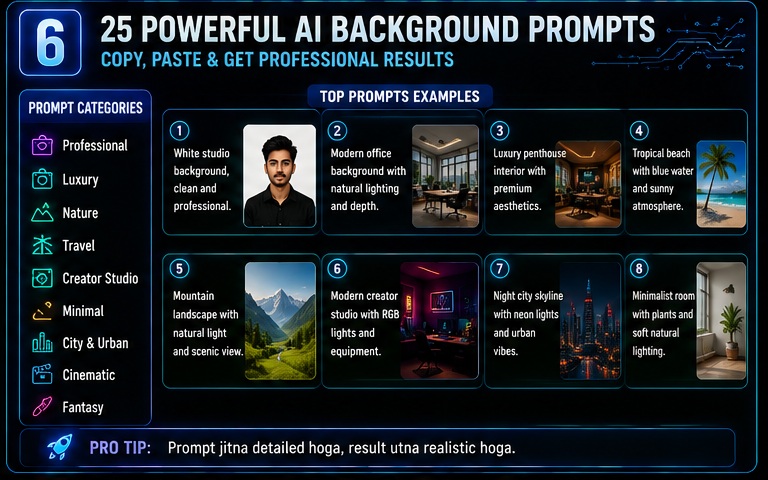
1. White Background
Remove the existing background and replace it with a clean white studio background with realistic lighting.
2. Luxury Office
Transform the background into a modern luxury office with realistic shadows and professional atmosphere.
3. Professional Studio
Create a professional photography studio background with premium lighting.
4. Modern Workspace
Replace the background with a clean modern workspace.
5. Luxury Mansion
Generate an elegant luxury mansion interior background.
6. Beach Vacation
Transform the background into a tropical beach destination.
7. Mountain Adventure
Create a scenic mountain landscape background.
8. Sunset Background
Replace the background with a cinematic sunset environment.
9. Luxury Hotel
Generate a premium hotel interior background.
10. Business Conference
Create a corporate conference environment.
11. Modern City Skyline
Generate an urban skyline background.
12. Coffee Shop
Replace background with a cozy modern café.
13. Creative Studio
Create a modern creator studio setup.
14. Neon Cyberpunk
Generate a futuristic cyberpunk environment.
15. Fashion Editorial
Create a magazine-style editorial background.
16. Nature Forest
Replace background with lush green forest scenery.
17. Luxury Car Showroom
Generate a premium automobile showroom.
18. University Campus
Create a professional academic background.
19. Wedding Venue
Transform the background into a luxury wedding venue.
20. Golden Hour Landscape
Generate warm sunset outdoor scenery.
21. Library Interior
Create an elegant library background.
22. Airport Lounge
Generate a luxury airport lounge environment.
23. Home Office
Create a modern work-from-home setup.
24. Film Set
Transform background into a cinematic movie scene.
25. Premium Minimalist Space
Generate a luxury minimalist interior.
Agar aap cinematic style backgrounds create karna chahte hain, to Bollywood Cinematic AI Photo Prompts article bhi explore karein. Is guide me movie-style environments, dramatic visuals aur cinematic editing concepts explain kiye gaye hain jo AI background replacement ke saath kaafi effective lagte hain.
Practical Use Cases
AI Photo Background Change Prompts multiple scenarios me useful ho sakte hain.
LinkedIn Headshots
Professional backgrounds create karne ke liye.
Instagram Content
Luxury visuals generate karne ke liye.
YouTube Branding
Creator photos improve karne ke liye.
Business Profiles
Corporate appearance create karne ke liye.
Product Photography
Clean backgrounds generate karne ke liye.
Wedding Editing
Luxury venue effects create karne ke liye.
Advanced AI Photo Background Change Prompt Formula
Agar aap truly professional results chahte hain to sirf “change background” likhna enough nahi hota.
Professional editors aur advanced AI users ek structured prompt framework use karte hain.
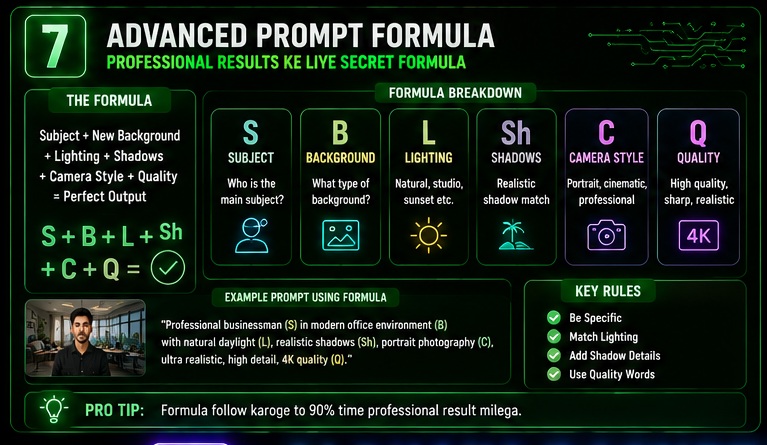
Professional Formula
Subject + New Background + Lighting + Shadow Matching + Camera Style + Quality Layer
Ye framework almost har high-quality AI Photo Background Change Prompts workflow me kaam karta hai.
Step 1: Subject Definition
Sabse pehle AI ko clear batana hota hai ki image ka main subject kya hai.
Examples:
- Business Professional
- Student
- Influencer
- Content Creator
- Entrepreneur
- Fashion Model
- Traveler
Example:
“Professional businessman standing confidently.”
Jitna clear subject hoga utna realistic output milne ke chances badhte hain.
Step 2: Background Selection
Background hi image ka mood define karta hai.
Maine khud observe kiya hai ki beginners sabse zyada background selection me galti karte hain.
Corporate Office Background
Perfect for:
- Resume
- Business profiles
Prompt:
“Luxury corporate office background with modern interior.”
Luxury Lifestyle Background
Perfect for:
- Personal branding
Prompt:
“Luxury penthouse interior with premium aesthetics.”
Creator Studio Background
Perfect for:
- YouTubers
- Content creators
Prompt:
“Modern content creator studio with RGB lights.”
Travel Background
Perfect for:
- Influencers
- Bloggers
Prompt:
“Tropical island travel destination with realistic atmosphere.”
Travel-themed background replacement ideas ko aur expand karne ke liye Travel Influencer AI Photo Prompts guide bhi zarur padhein. Is article me luxury travel locations, tropical destinations aur influencer-style visual presentation techniques share ki gayi hain.
Nature Background
Perfect for:
- Outdoor lifestyle content
Prompt:
“Beautiful mountain landscape with natural lighting.”
Step 3: Lighting Matching
Ye sabse important part hai.
Agar background aur subject ki lighting match nahi karegi to image fake lagegi.
Soft Studio Lighting
Prompt:
“Professional studio lighting matching the environment.”
Golden Hour Lighting
Prompt:
“Warm golden hour lighting with realistic shadows.”
Natural Daylight
Prompt:
“Natural daylight illumination matching outdoor conditions.”
Cinematic Lighting
Prompt:
“Dramatic cinematic lighting with realistic depth.”
Step 4: Shadow Matching
Bahut se beginners shadows ko ignore kar dete hain.
Result:
Photo artificial lagti hai.
Prompt Add Karein:
“Realistic shadows consistent with the background lighting.”
Step 5: Depth & Perspective
Professional AI Photo Background Change Prompts me depth add karna zaruri hai.
Prompt:
“Realistic depth of field and natural perspective.”
Benefits:
- More realistic look
- Better visual quality
- Professional appearance
Step 6: Quality Layer
Har prompt ke end me quality layer add karein.
Example:
“Ultra realistic, high resolution, professional photography, realistic skin tones, sharp details.”
Most Popular Background Categories
AI Photo Background Change Prompts me kuch categories consistently high-performing rehti hain.
1. Professional Backgrounds
Use Cases:
- Corporate Profiles
- Resume Photos
Examples:
- Modern office
- Boardroom
- Workspace
- Business conference
2. Luxury Backgrounds
Use Cases:
- Personal branding
Examples:
- Luxury penthouse
- Five-star hotel
- Designer interior
- Premium lounge
3. Travel Backgrounds
Use Cases:
- Influencers
- Travel creators
Examples:
- Maldives beach
- Santorini
- Swiss mountains
- Dubai skyline
4. Nature Backgrounds
Use Cases:
- Lifestyle content
Examples:
- Forest
- Waterfall
- Mountains
- Lake views
5. Creator Backgrounds
Use Cases:
- YouTube
- Digital branding
Examples:
- Podcast studio
- Gaming setup
- Creator room
- Editing workspace
Content creators ke liye profile optimization aur visual branding equally important hai. Isi liye Instagram Profile Picture AI Prompts article bhi helpful ho sakta hai jahan profile-focused branding strategies explain ki gayi hain.
Professional Background Prompt Templates
Template 1
LinkedIn Background
Replace the background with a modern corporate office environment featuring professional lighting, realistic reflections, natural depth and executive atmosphere.
Template 2
Luxury Lifestyle
Transform the background into a luxury penthouse interior with elegant decor, realistic shadows and premium aesthetics.
Template 3
Travel Influencer
Replace the background with a tropical beach destination featuring crystal clear water, realistic sunlight and luxury travel vibes.
Template 4
Creator Studio
Generate a professional content creator studio background with RGB lighting, camera setup and modern design.
Template 5
Modern Workspace
Create a clean minimalist workspace with realistic lighting and productivity-focused atmosphere.
Lighting & Background Matching Framework
Professional editors ek rule follow karte hain.
Indoor Subject → Indoor Background
Best results.
Outdoor Subject → Outdoor Background
Most realistic output.
Warm Lighting → Warm Background
Natural appearance.
Cool Lighting → Cool Background
Better consistency.
Daylight Subject → Daylight Environment
Professional quality.
AI Background Editing Workflow
Ye workflow beginners ke liye highly recommended hai.
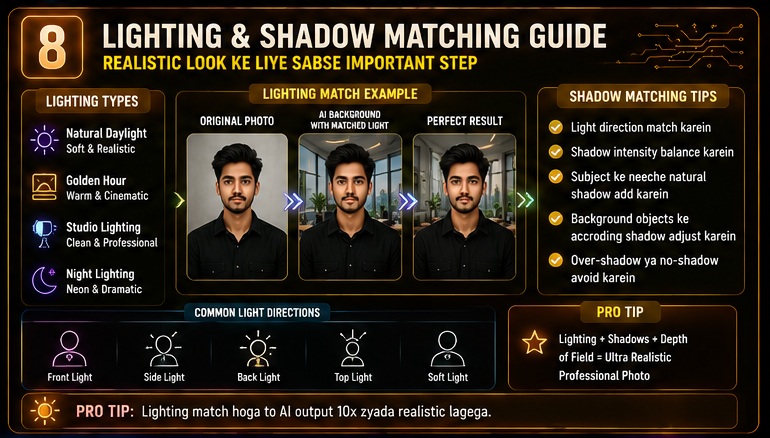
Step 1
Choose the best original image.
Step 2
Analyze current lighting.
Step 3
Select suitable background category.
Step 4
Create detailed prompt.
Step 5
Generate multiple versions.
Step 6
Choose best result.
Step 7
Perform minor refinements.
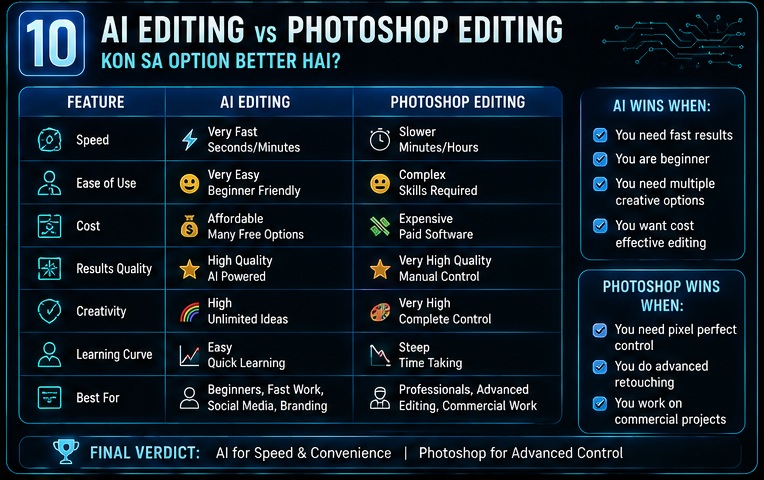
AI vs Manual Photoshop Editing
| Feature | AI Editing | Photoshop |
|---|---|---|
| Speed | Very Fast | Slower |
| Learning Curve | Easy | High |
| Cost | Lower | Higher |
| Creativity | High | High |
| Beginner Friendly | Yes | No |
| Professional Control | Moderate | Very High |
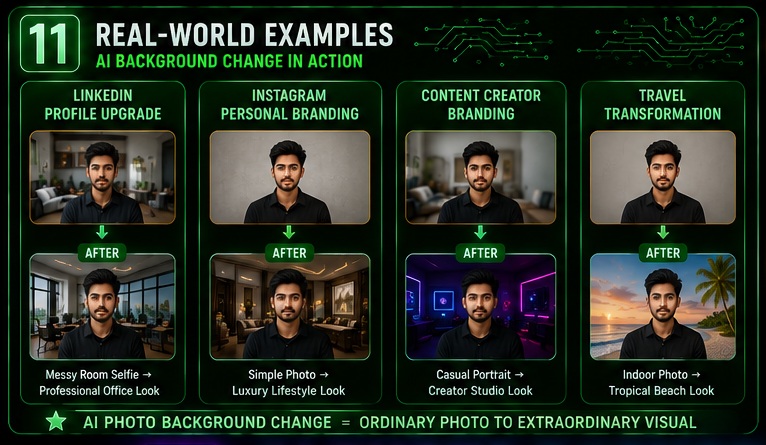
Real-World Example #1
LinkedIn Profile Upgrade
Original:
Bedroom selfie
Prompt:
Replace background with a modern executive office environment, realistic lighting and professional atmosphere.
Result:
Professional business portrait.
Real-World Example #2
Instagram Personal Branding
Original:
Simple home photo
Prompt:
Luxury penthouse background with premium interior design, realistic lighting and lifestyle aesthetics.
Result:
High-end social media appearance.
Social media profile enhancement ke liye WhatsApp DP AI Photo Prompts guide bhi useful resource hai. Is article me premium profile picture editing aur personal branding improvements cover kiye gaye hain jo background replacement ke saath aur bhi effective results de sakte hain.
Real-World Example #3
Creator Branding
Original:
Casual portrait
Prompt:
Modern creator studio background with RGB lights, podcast setup and professional content creation environment.
Result:
Strong creator identity.
Real-World Example #4
Travel Transformation
Original:
Indoor room photo
Prompt:
Luxury Maldives resort background with tropical scenery, realistic shadows and cinematic travel atmosphere.
Result:
Premium travel-style visual.
Common Background Problems Solved by AI
Aajkal bahut log AI Photo Background Change Prompts use karte hain specific issues solve karne ke liye.
Messy Rooms
AI clean background generate kar sakta hai.
Distracting Objects
Unwanted elements remove kiye ja sakte hain.
Poor Locations
Better environment create kiya ja sakta hai.
Weak Branding
Professional appearance build ki ja sakti hai.
Social Media Quality Issues
Visual appeal improve ki ja sakti hai.
Background Change Quality Checklist
Final image generate hone ke baad check karein:
Lighting Match
✅ Yes
Shadows Realistic
✅ Yes
Perspective Correct
✅ Yes
Subject Natural
✅ Yes
Background High Quality
✅ Yes
No Visible Artifacts
✅ Yes
Professional Appearance
✅ Yes
Why Detailed Prompts Matter
Bad Prompt:
“Change background.”
Good Prompt:
“Replace the existing background with a luxury corporate office environment featuring realistic lighting, natural shadows, depth of field, executive atmosphere and professional portrait quality.”
Difference noticeable hota hai.
Specific prompts almost always stronger results produce karte hain.
Common Mistakes When Using AI Photo Background Change Prompts
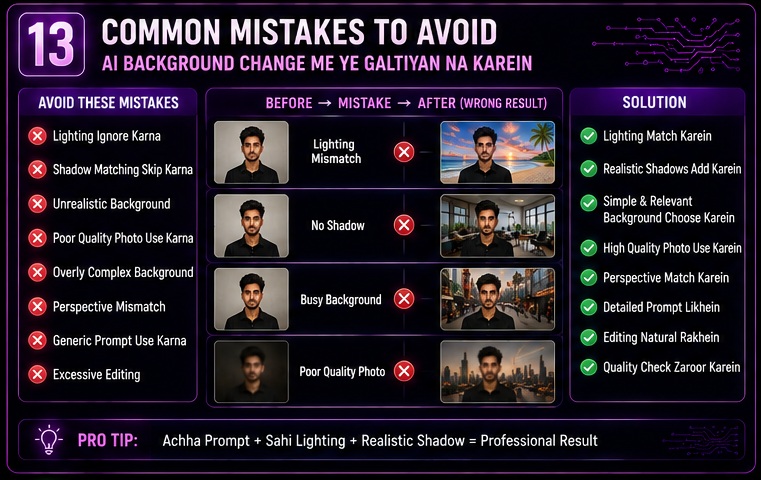
AI Photo Background Change Prompts powerful results de sakte hain, lekin beginners aksar kuch mistakes kar dete hain jinki wajah se image artificial ya low-quality lagne lagti hai.
Agar aap professional results chahte hain to in mistakes ko avoid karna bahut zaruri hai.
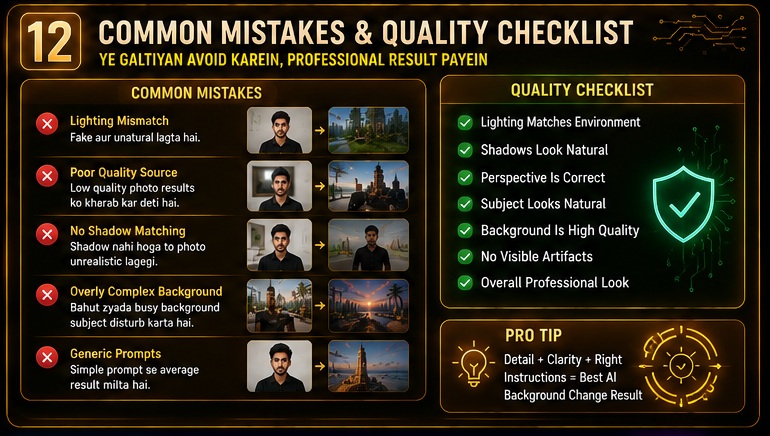
Mistake #1: Unrealistic Background Selection
Sabse common mistake hai completely mismatched background choose karna.
Example:
- Indoor selfie + Snow mountain background
- Low-light room photo + Bright beach background
Result:
Image fake lagne lagti hai.
Solution:
Background subject aur lighting ke according select karein.
Mistake #2: Lighting Ignore Karna
Maine khud observe kiya hai ki most AI-edited photos lighting mismatch ki wajah se unrealistic lagti hain.
Example:
Subject dark room me hai.
Background sunny beach hai.
AI confuse ho sakta hai.
Always prompt me lighting instructions add karein.
Mistake #3: Shadow Matching Skip Karna
Shadow realism ka important factor hai.
Prompt me include karein:
“Realistic shadows matching the environment.”
Mistake #4: Overly Complex Backgrounds
Bahut log unnecessary crowded backgrounds use karte hain.
Examples:
- Hundreds of objects
- Busy city scene
- Overloaded luxury environments
Simple backgrounds often better perform karte hain.
Mistake #5: Poor Quality Source Image
Reality thodi alag hai.
AI editing magic nahi hai.
Agar source image:
- Blurry hai
- Dark hai
- Pixelated hai
To final result bhi limited rahega.
Mistake #6: Ignoring Perspective
Perspective mismatch instantly image ko fake bana sakta hai.
Example:
Subject camera ke close hai.
Background extreme aerial angle me hai.
Result awkward lagta hai.
Mistake #7: Using Generic Prompts
Bad Prompt:
“Change background.”
Good Prompt:
“Replace the background with a luxury office featuring realistic lighting, professional atmosphere and natural depth.”
Specific prompts better results dete hain.
Mistake #8: Excessive Editing
Aajkal bahut log over-edit kar dete hain.
Examples:
- Unrealistic skin
- Artificial face
- Extreme HDR effects
Natural appearance usually best hoti hai.
Step-by-Step Professional Workflow
Agar aap AI Photo Background Change Prompts se consistent results chahte hain to ye workflow follow karein.
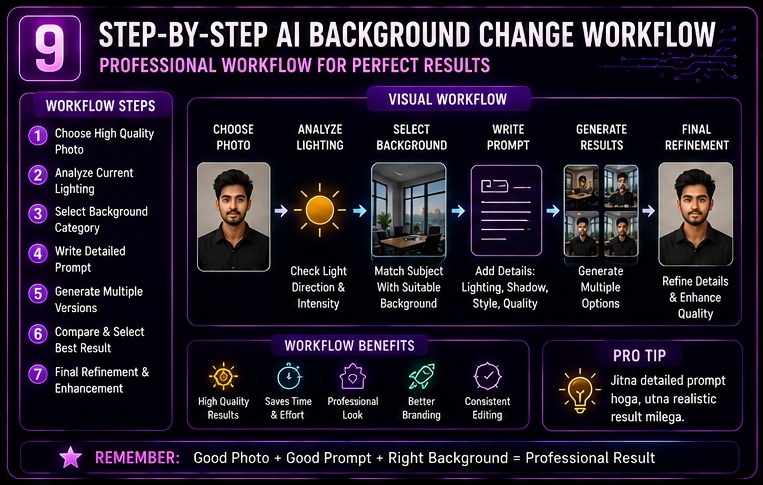
Step 1: Choose a High-Quality Photo
Requirements:
✔ Clear face
✔ Good lighting
✔ High resolution
✔ Minimal blur
Step 2: Analyze Existing Lighting
Check:
- Warm light?
- Cool light?
- Daylight?
- Indoor lighting?
Step 3: Select Matching Background
Background lighting subject se match honi chahiye.
Step 4: Build Detailed Prompt
Include:
- Background type
- Lighting
- Shadows
- Quality layer
Step 5: Generate Multiple Versions
Ek hi prompt se multiple outputs test karein.
Step 6: Compare Results
Best image choose karein.
Step 7: Final Refinement
Small corrections apply karein.
How to Make Money Using AI Photo Background Change Prompts
AI Photo Background Change Prompts sirf personal use ke liye nahi hain.
Ye income opportunities bhi create kar sakte hain.
Opportunity #1: Freelance Background Editing
Platforms:
- Fiverr
- Upwork
- Freelancer
Services:
- Background replacement
- Portrait enhancement
- LinkedIn photo upgrades
Opportunity #2: Instagram Editing Service
Creators regularly need:
- Luxury backgrounds
- Travel backgrounds
- Professional branding images
Ye recurring demand category hai.
Opportunity #3: LinkedIn Profile Optimization
Professional users better profile photos ke liye pay karte hain.
Service Package:
- Background replacement
- Professional lighting
- Executive appearance
Opportunity #4: Local Photo Editing Business
Students aur job seekers ko frequently photo editing services ki need hoti hai.
Examples:
- Resume photos
- Passport photos
- ID card photos
Opportunity #5: AI Personal Branding Agency
Advanced users:
- Personal branding
- Social media image optimization
- Creator identity development
services offer kar sakte hain.
AI Photo Background Change Prompts for Different Niches
Business Professionals
Recommended Backgrounds:
- Office
- Boardroom
- Workspace
Students
Recommended Backgrounds:
- University campus
- Library
- Study environment
Influencers
Recommended Backgrounds:
- Luxury interiors
- Travel locations
- Fashion environments
Content Creators
Recommended Backgrounds:
- Podcast studios
- Creator setups
- Gaming rooms
Freelancers
Recommended Backgrounds:
- Home office
- Modern workspace
Entrepreneurs
Recommended Backgrounds:
- Executive offices
- Startup workspaces
Future of AI Background Editing
AI background replacement rapidly evolve ho rahi hai.
Upcoming trends kaafi exciting hain.
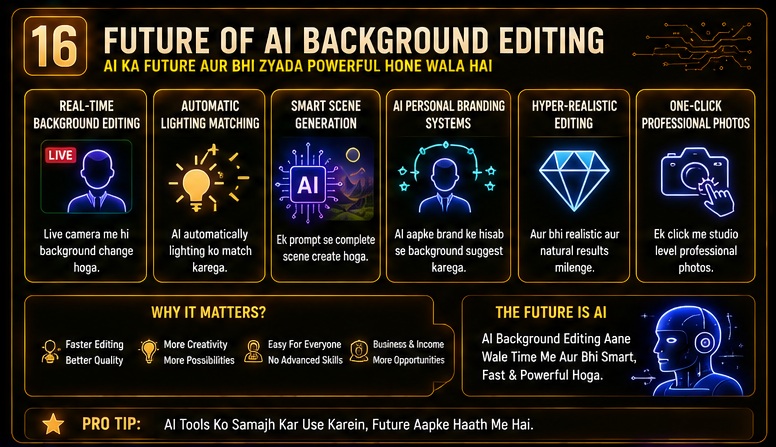
Real-Time Background Editing
Live background replacement increasingly common hoga.
Automatic Lighting Matching
AI automatically subject aur background lighting synchronize karega.
Smart Scene Generation
Single prompt se complete environment generate ho sakta hai.
AI Personal Branding Systems
Future me AI automatically branding-specific backgrounds suggest kar sakta hai.
Hyper-Realistic Editing
AI-generated backgrounds aur realistic hote jayenge.
One-Click Professional Photos
Complex editing process significantly simplify ho sakta hai.
Artificial intelligence aur image generation technology ke future developments ko samajhne ke liye OpenAI ke official resources bhi useful ho sakte hain. Yahan AI-powered visual creation aur image editing innovations ke updates milte rehte hain.
My Take
Mere experience me AI Photo Background Change Prompts AI photo editing ka sabse practical use case hain.
Reason simple hai.
Har kisi ke paas:
- Professional studio nahi hota
- Luxury location nahi hoti
- Travel destinations available nahi hote
Lekin AI tools ordinary photos ko dramatically improve kar sakte hain.
Maine khud observe kiya hai ki proper prompts use karne par background replacement ka result surprisingly realistic aa sakta hai.
Lekin ek important point yaad rakhiye.
AI background editing ka goal fake identity create karna nahi hona chahiye.
Best use case hai:
- Better presentation
- Stronger branding
- Cleaner visuals
- Professional appearance
Mere hisab se beginners ke liye AI Photo Background Change Prompts sabse useful AI photo editing skills me se ek hain.
Frequently Asked Questions (FAQs)
1. AI Photo Background Change Prompts kya hote hain?
Ye detailed instructions hote hain jo AI tools ko guide karte hain taaki image ka background remove ya replace kiya ja sake.
2. Best AI tool kaunsa hai?
Popular options:
- ChatGPT Image Editing
- Adobe Firefly
- Canva AI
- Leonardo AI
- Flux AI
3. Kya mobile photos par bhi kaam karta hai?
Haan.
High-quality smartphone photos usually good results produce kar sakti hain.
4. Kya AI background editing free hai?
Kuch tools free plans offer karte hain, jabki advanced features paid ho sakte hain.
5. Kya AI realistic shadows create kar sakta hai?
Advanced AI tools realistic shadow generation support karte hain.
6. Kya LinkedIn profile ke liye useful hai?
Bilkul.
Professional office backgrounds LinkedIn appearance improve kar sakte hain.
7. Kya product photography me use ho sakta hai?
Haan.
White backgrounds aur studio environments product photos ke liye popular use cases hain.
8. Kya beginners bhi use kar sakte hain?
Haan.
Detailed prompts ke saath beginners bhi professional-looking results achieve kar sakte hain.
Related Opportunities & Next Steps
AI Photo Background Change Prompts seekhne ke baad aap:
✅ Freelance editing services start kar sakte hain
✅ LinkedIn optimization service offer kar sakte hain
✅ Instagram branding photos create kar sakte hain
✅ Product photography improve kar sakte hain
✅ AI editing business build kar sakte hain
✅ Personal branding niche me expertise develop kar sakte hain
Conclusion
Aaj ke digital world me background photo quality ka major factor ban chuka hai.
Isi wajah se AI Photo Background Change Prompts rapidly popular ho rahe hain.
Is guide me humne cover kiya:
✅ Background replacement fundamentals
✅ 25 powerful prompts
✅ Advanced prompt formula
✅ Professional workflows
✅ Lighting & shadow matching
✅ Common mistakes
✅ Income opportunities
✅ Future trends
Sabse important lesson simple hai:
Professional-looking photos create karne ke liye expensive locations hamesha zaruri nahi hoti. Smart AI Photo Background Change Prompts ordinary images ko premium visuals me transform kar sakte hain.
Final CTA
Ab aapke paas AI Photo Background Change Prompts ka complete framework hai.
Next step:
✅ Apni best photo choose karein
✅ Different background categories test karein
✅ Detailed prompts apply karein
✅ Multiple versions compare karein
✅ Professional branding visuals create karein
Saath hi related guides bhi explore karein:
- AI Photo Editing Prompts
- Studio Lighting AI Photo Prompts
- Instagram Profile Picture AI Prompts
- WhatsApp DP AI Photo Prompts
- Professional LinkedIn Headshot AI Prompts
In guides ko follow karke aap AI-powered photo editing aur personal branding skills ko next level tak le ja sakte hain.
- Real Estate AI Photo Prompts: Create Stunning Property Images That Sell Faster (2026 Guide)
- Car Dealer AI Photo Prompts: Create Professional Vehicle Photos That Sell Faster (2026 Guide)
- Jewelry Photography AI Prompts: Luxury Product Images Without Expensive Equipment 2026 guide
- E-Commerce Product Photo AI Prompts: Amazon & Flipkart Style Images in Minutes (2026 Guide)
- Facebook Profile AI Photo Prompts: Upgrade Your Social Presence Instantly